


Dropbox Get Sharing Members
This Snap retrieves the list of members who have access to a shared file in Dropbox.
Note: This Snap must be placed downstream of the List Snap in the pipeline, as it requires the file path or file ID from the List Snap's output.
Supported Accounts
- This is a Transform-type Snap.
 Works in Ultra Tasks
Prerequisites
- A configured Dropbox account with appropriate sharing permissions.
- A List Snap must be placed upstream of this Snap in the pipeline. The Get Sharing Members Snap uses the file path or file ID from the List Snap's output view.
Limitations
- This Snap supports files only. If a folder path or folder ID is provided as input, the Snap routes the document to the error view with an
access_error/is_foldermessage. - To retrieve sharing members for a folder, use the
/2/sharing/list_folder_membersDropbox API endpoint instead.
Snap views
| Type | Description | Examples of upstream and downstream Snaps |
|---|---|---|
| Input | This Snap accepts the file or folder ID to query for sharing members. |
|
| Output | This Snap outputs the list of members with access to the specified file or folder. |
|
| Learn more about Error handling. | ||
Snap settings
Note: Learn about
the common controls in the Snap settings dialog.
| Field/Field set | Description |
|---|---|
|
Label*
|
Default value: Dropbox Get Sharing Members |
| File ID*
|
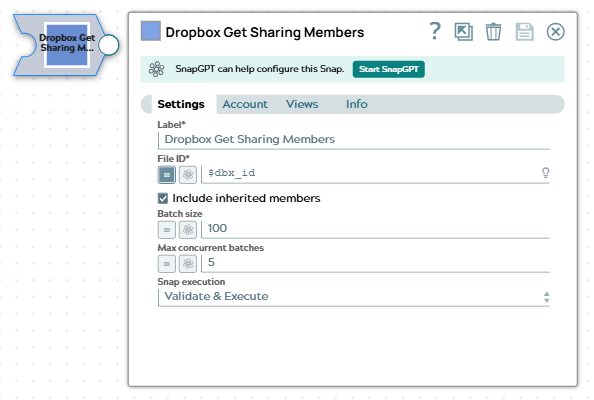
The unique identifier of the shared file or folder for which to retrieve sharing members.
Example: Default value: None |
| Include inherited members
|
Select this checkbox to include members who have access through parent folder sharing. When selected, the results will include both direct members and those who inherited access from parent folders.
Default value: Selected |
| Batch size
|
Specify the number of sharing member records to retrieve in each batch. This setting controls how many members are fetched in a single API request.
Note: Set the Batch size to 1 if your pipelines run in Ultra mode.
Example: Default value: 100 |
| Max concurrent batches
|
Specify the maximum number of batches to process concurrently. This setting controls the parallelism level when retrieving sharing members.
Note: Set the Max concurrent batches to 1 if your pipelines run in Ultra mode.
Maximum value 10 Example: Default value: 5 |
| Snap execution
|
Choose one of the three modes in
which the Snap executes. Available options are:
Default value: Validate & Execute |