


PostgreSQL Bulk Load
Overview
Use this Snap to bulk load data into PostgreSQL tables. If the target table does not exist in PostgreSQL, you also have the provision to create the table. This Snap supports both binary and document inputs. You can configure the input view in the Views tab.
- This is a Write-type Snap.
 Does not support Ultra Tasks
Prerequisites
None.
Support and Limitations
- If the target table does not exist and the input is binary, the Snap does not fetch the table's schema from the input. The table's schema must be passed to the Snap through the second input view.
- Known Issue: If database metadata from an upstream Snap contains
geography column data such as modifiers, those modifiers may not be written to
the target table.
Workaround: To write geographic data to the target table, create the table using the PostgreSQL Execute Snap.
Snap views
| Type | Description | Examples of upstream and downstream Snaps |
|---|---|---|
| Input | The data to be loaded into the PostgreSQL table. This Snap
supports a maximum of two input streams which is useful in sending
table schema to the Snap if the target table does not exist. You can
mix and match binary and document input views based on the input
type.
Note: If the schema is from a different database, there is no
guarantee that all the data types will be properly
handled. |
|
| Output | The Snap outputs one document specifying the status with the records count that are being inserted into the table. | |
| Learn more about Error handling. | ||
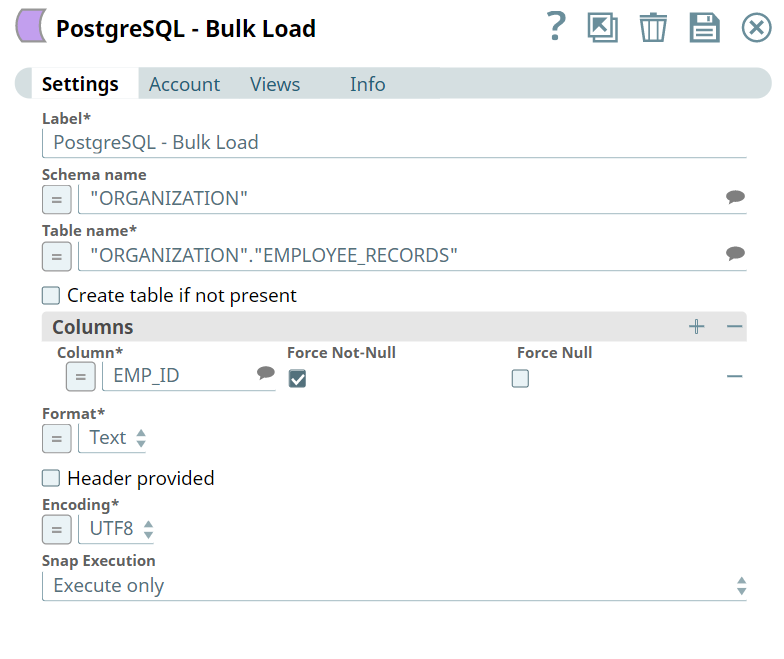
Snap settings
| Field/Field set | Type | Description |
|---|---|---|
| Label
|
Required. Specify a unique name for the Snap. Modify this to be more appropriate, especially if more than one of the same Snaps is in the pipeline. Default value: PostgreSQL Bulk Load Example: Load Employee Data |
|
| Schema name
|
Optional. Specify the database
schema name in PostgreSQL. In case it is not defined, then the
suggestion for the Table name retrieves all table names of all
schemas. The property is suggestible and will retrieve available
database schemas during suggest values. Default value: N/A Example: Employee |
|
| Table name
|
Required.
Specify the PostgreSQL table on which to execute the bulk load
operation. Default value: N/A Example: Employee.PersonnelInformation |
|
| Create table if not present
|
Select this checkbox to
automatically create the target table if it does not exist.
Default status: Deselected |
|
| Columns | Optional. Specify the
columns to be loaded/copied. If you do not configure this field set,
then all columns in the input data stream are loaded into the target
table. You can also set how the null values should be handled for
each column. Note:
|
|
| Column
|
Specify the name of the
column/field. This is a suggestible field and lists all field names
in the input. Default value: N/A Example: emp_name |
|
| Force Non-Null
|
Select this checkbox to not match
the selected column's value against the null string. The Snap reads
empty null strings as zero-length strings rather than nulls, even
when they are not quoted. Default status: Deselected |
|
| Force Null
|
Select this checkbox to match the
selected column value against the null string, even if it has been
quoted. If a match is found, the field value is set to NULL. By default, where the null string is empty, the Snap converts a quoted empty string into NULL. Default status: Deselected |
|
| Format
|
Choose the data format to be
written. This field is applicable only when using the binary input
view. Available options:
Default value: Text Example: CSV |
|
| Header Provided
|
Select this checkbox to include the
input data has a header. Applicable only when using binary input
view and CSV option in the Format field. Default status: Deselected |
|
| Encoding
|
Choose the encoding to be used. This
is limited to the encodings supported by the PostgreSQL server. The
available options are:
Default value: UTF8 Example: Unicode |
|
| Snap Execution
|
Choose one of the three modes in which the Snap executes. Available options are:
Default value: Execute only Example: Validate & Execute |
|
Temporary files
During execution, data processing on Snaplex nodes occurs principally in-memory as streaming and is unencrypted. When processing larger datasets that exceed the available compute memory, the Snap writes unencrypted pipeline data to local storage to optimize the performance. These temporary files are deleted when the pipeline execution completes. You can configure the temporary data's location in the Global properties table of the Snaplex node properties, which can also help avoid pipeline errors because of the unavailability of space. Learn more about Temporary Folder in Configuration Options.