


BigQuery - Dataset Create
Use this Snap to create BigQuery Datasets.
Overview
You can use this Snap to create BigQuery Datasets. Datasets are top-level containers that you can use to organize and control access to your tables and views.
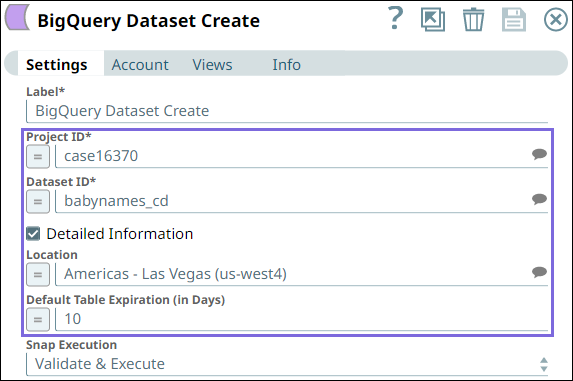
- Snap Type: Write
 Works in Ultra Tasks
Prerequisites
- A valid Google BigQuery Account with the required permissions.
- Access/Valid permissions to the project to create a dataset
Limitations and Known Issues
- You can set the geographic location only at the time of creating a dataset. After you create the dataset, the location becomes immutable.
- Dataset names must be unique for each project.
Supported Accounts
This Snap works with the following account types. For more information, see Configuring Google BigQuery Accounts.
Snap Views
| Type | Format | Number of Views | Examples of Upstream and Downstream Snaps | Description |
|---|---|---|---|---|
| Input | Document |
|
|
The Snap can have at the most one input document that provides the value for the project ID or Dataset ID |
| Output | Document |
|
|
The Snap has a minimum of one output that provides information on whether the dataset is created or not. You can add an input and error views to view the result. |
| Learn more about Error handling. | ||||
Snap Settings
| Field/Field set | Description | ||
|---|---|---|---|
| Label String |
Specify a unique name for the Dataset that is to be created. Important:
Dataset names must be unique for each project. Default value: BigQuery Dataset Create Example: BigQuery_Dataset_Create |
||
| Project ID String/Expression |
Specify the Project ID in which the dataset is to be created. Default value: N/A Example: case16370 |
||
| Dataset ID String/Expression |
Specify the Dataset ID for the dataset that is to be created. Default value: N/A Example: dscreate5 |
||
| Detailed Information Checkbox |
Select this checkbox to allow the Snap to display additional fields which can be included while creating the dataset. Default value: Deselected Example: Selected |
||
| Location String/Expression |
Specify the geographic location where you want to create the dataset. Important:
You can set the geographic location only at the time of creating a dataset. After you create the dataset, the location becomes immutable. Default value: None. Example: Europe - Finland (europe-north1) Displays when Detailed Information is selected. |
||
| Default Table Expiration (in Days) String/Expression |
Specify the number of days after which any new table created in this dataset should be automatically deleted. You can use this field only if you want to create a dataset to store temporary data that is not to be preserved for longer. If you want to preserve the tables for longer, then leave this field blank. Default value: None. Example: 10 Displays when Detailed Information is selected. |
||
Snap execution
Dropdown list |
Choose one of the three modes in
which the Snap executes. Available options are:
Default value: Validate & Execute Example: Execute only |
||
Implicit retries in BigQuery Snaps
The BigQuery Snaps handle all retriable BigQuery errors (BigQuery exception, IO exception, and Runtime exception) internally.
- 429 (Too Many Requests):
- Retry attempts: Maximum of 5 retries.
- Delay Between Retries: Backoff strategy with jitter (random variation) is applied to prevent synchronized retries and reduce load.
- 401 (Unauthorized):
- Retry attempts: Maximum of 3 retries.
- Delay Between Retries: Backoff strategy is applied.
- Additional Actions: Reloads the BigQuery account on the retry event.
- IOException and 500, 502, 503, 504 (Server Errors):
- Retry attempts: Maximum of 3 retries.
- Delay Between Retries: Backoff strategy is applied.