


SAP Concur OAuth2 Account
Overview
You can use this account type to connect SAP Concur Snaps with data sources that use the SAP Concur OAuth2 account.
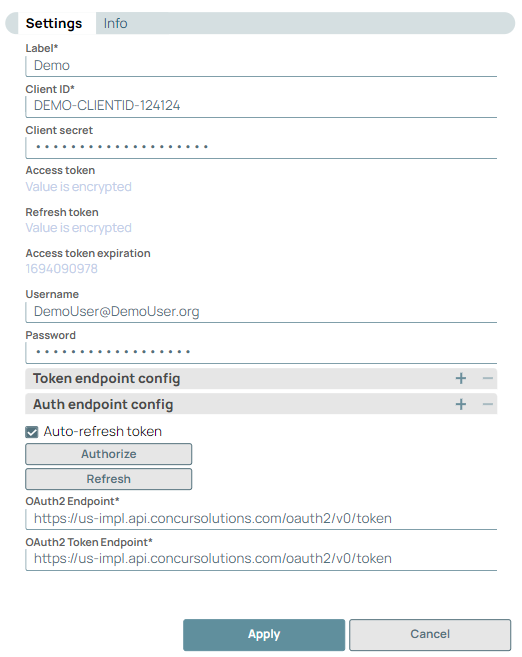
Prerequisites
- Application Registration with SAP Concur
- Client ID
- Client Secret
- Base URI
Known issues
You must authorize this account before using it in a pipeline.
Account settings
- Expression icon (
 ): Allows using
JavaScript syntax to access SnapLogic Expressions to set field values dynamically (if
enabled). If disabled, you can provide a static value. Learn more.
): Allows using
JavaScript syntax to access SnapLogic Expressions to set field values dynamically (if
enabled). If disabled, you can provide a static value. Learn more. - SnapGPT (
 ): Generates SnapLogic Expressions
based on natural language using SnapGPT. Learn
more.
): Generates SnapLogic Expressions
based on natural language using SnapGPT. Learn
more. - Suggestion icon (
 ): Populates a
list of values dynamically based on your Snap configuration. You can select only one
attribute at a time using the icon. Type into the field if it supports a comma-separated
list of values.
): Populates a
list of values dynamically based on your Snap configuration. You can select only one
attribute at a time using the icon. Type into the field if it supports a comma-separated
list of values. - Upload
 : Uploads files. Learn more.
| Field/Field set | Description |
|---|---|
Label*
String |
Required. Specify a unique name for the account. Default value: N/A Example: |
Client ID
String |
Required. Specify the client ID generated while registering the application. Learn more about generating a client ID: SAP Concur Authentication. Default value: N/A Example: |
Client secret
String |
Required. Specify the client secret generated while registering the application. Learn more about generating a client secret: SAP Concur Authentication. Default value: N/A Example: |
Access token
String |
Required. Auto-generated after authorization. Specify the access token for the application. The access token is retrieved while setting up the account for the endpoint. Default value: N/A Example: |
Refresh token
String |
Required. Auto-generated after authorization. The token used to refresh the access token. The retrieval of the refresh token is done while setting up the account for the endpoint. Default value: N/A Example: |
Access token expiration
String |
Auto-generated after authorization. Specify the time until which the access token should be active. Default value: N/A Example: |
Username
String |
Specify the username associated with the account. Username is created by following the steps during application registration. For more information with an example refer to SAP Concur Authentication. Default value: N/A Example: |
Password
String |
Specify the password associated with the account. Password can be created by following the steps during application registration. For more information with an example refer to SAP Concur Authentication. Default value: N/A Example: |
| Token endpoint config |
Use this fieldset to provide custom properties for the OAuth2 token endpoint. This field set contains the following fields: |
Token endpoint parameter
String |
Define an optional token endpoint parameter. Default value: N/A |
Token endpoint parameter value
String |
Specify the value associated with the optional endpoint parameter defined above. Default value: N/A |
| Auth endpoint config |
Use this fieldset to provide custom properties for the OAuth2 auth endpoint. This field set contains the following fields: |
Authentication parameter
String |
Define an optional authorization endpoint parameter. Default value: N/A |
Authentication parameter value
String |
Specify the value associated with the optional authorization endpoint parameter defined above. Default value: N/A |
Auto-refresh token
Checkbox |
Select to refresh the token automatically using the refresh token if the property is enabled. Otherwise, the token might expire and will not be automatically refreshed. Default value: Deselected |
OAuth2 Endpoint
String |
Specify the base URI for obtaining an authorization token of the application provider. For more information with an example refer to SAP Concur Authentication. Default value: N/A Example: |
OAuth2 Token Endpoint
String |
Required. Specify the base URI for refreshing authorization token. For more information with an example refer to SAP Concur Authentication. Default value: N/A Example: |
Troubleshooting
| Error | Cause | Resolution |
|---|---|---|
| Account is not authorized | {"http_status_code": 500, "response_map": {"error_list": [{"message":
"Request to token endpoint https://xx-impl.api.concursolutions.com/oauth2/v0/token
failed for account \"{Account}\" of type \"SAP Concur OAuth2 Account\""}]}} |
Check the account credentials are valid. Ensure that the credentials parameters have a value of either password or authtoken. If it is authtoken, specify a value in the Authentication parameter field. |