


Advanced Use Case: Twitter Data to Redshift with Salesforce Lookup
Overview
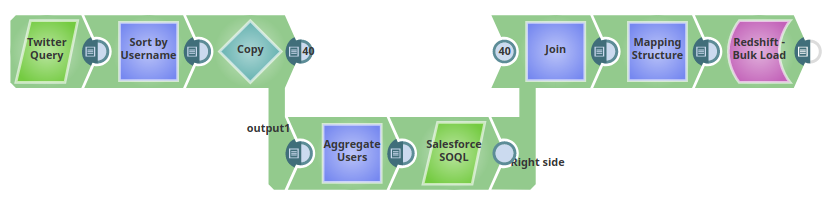
This advanced example demonstrates a complete ETL pipeline that extracts tweets from Twitter, enriches them with Salesforce customer data, and loads the results into Amazon Redshift. The pipeline extracts tweets with the hashtag "#ThursdayThoughts", sorts them by username, performs a lookup in Salesforce for matching records, and bulk loads the combined data into a Redshift table.
Prerequisites
- Twitter account with API access credentials
- Salesforce account with appropriate permissions
- Amazon Redshift cluster with
twittersnaplogictable (or allow Snap to create it) - S3 bucket configured in Redshift account
- Valid Twitter, Salesforce, and Redshift accounts configured in SnapLogic
Pipeline flow
The pipeline performs the following ETL operations:
- Extract: Twitter Query Snap selects 25 tweets pertaining to the Twitter query (hashtag "#ThursdayThoughts")
- Transform: Sort Snap (labeled "Sort by Username") sorts the records based on the value of the
user.namefield - Extract: Salesforce SOQL Snap extracts records matching the
user.namefield value, including LastName, FirstName, Salutation, Name, and Email fields - Load: Redshift Bulk Load Snap loads the enriched results into the
twittersnaplogictable in the public schema
Pipeline
Snap Configuration
Twitter Query Snap:
Configure the Snap to retrieve tweets with the specified hashtag:
- Query:
#ThursdayThoughts - Maximum tweets: 25
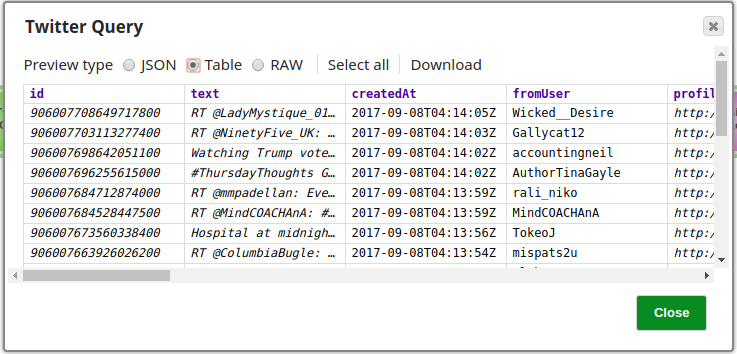
Twitter Query Snap Output Preview:
The Snap retrieves 25 records from the Twitter account. Each record contains tweet metadata including user information, tweet text, timestamp, and engagement metrics.
Sort Snap (Sort by Username):
- Sort paths:
$user.name - Sort order: Ascending
- Prepares data for efficient Salesforce lookup
Salesforce SOQL Snap:
- Performs lookup to match Twitter usernames with Salesforce contacts
- Fields extracted: LastName, FirstName, Salutation, Name, Email
- Enriches Twitter data with CRM information
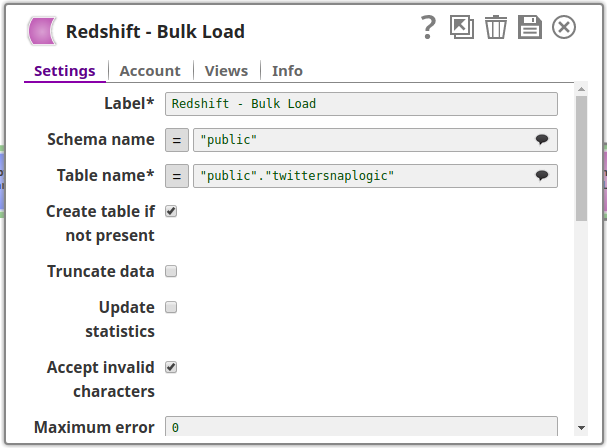
Redshift Bulk Load Snap:
- Schema name: public
- Table name: twittersnaplogic
- Create table if not present: Selected
- Maximum error count: Configured to handle data quality issues
Output
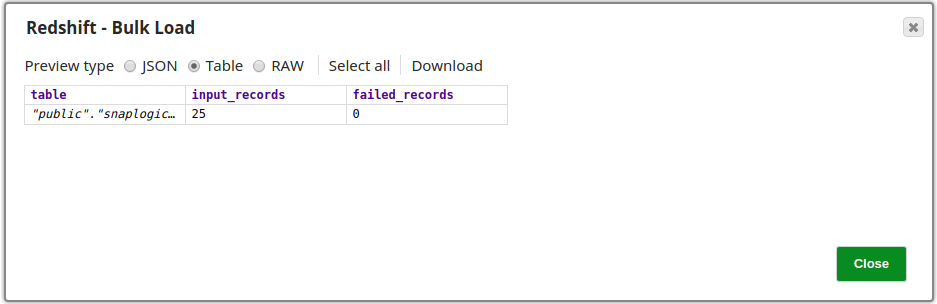
Successful execution of the Snap is indicated by a count of the records loaded into the specified table. The output also shows the number of failed records, provided it does not exceed the limit specified in the Maximum error count property (otherwise the pipeline would stop).
In this example, all 25 records retrieved from the Twitter Query Snap have been successfully loaded into the table:
- Records loaded: 25
- Failed records: 0
The combined data now includes both Twitter engagement metrics and Salesforce customer information, ready for analysis in Redshift.
Use Cases
This pipeline pattern is useful for:
- Social media sentiment analysis combined with customer data
- Marketing campaign tracking with CRM integration
- Customer engagement analytics across multiple platforms
- Real-time social listening with historical customer context