


MySQL Select to Redshift Bulk Load
Overview
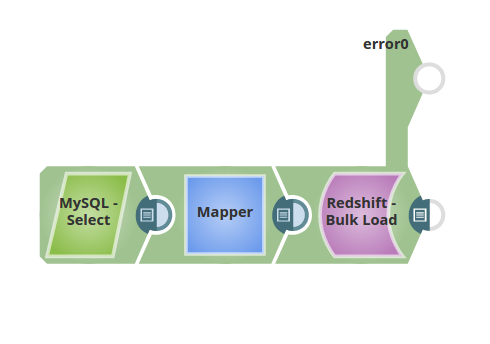
This example demonstrates how to extract data from a MySQL database and load it into Amazon Redshift using the Redshift Bulk Load Snap. The pipeline selects data from the AV_Persons table in the enron schema, maps it to match the target schema, and loads it into the bulkload_demo table in the prasanna schema.
Prerequisites
- MySQL database with the source
AV_Personstable - Amazon Redshift cluster with appropriate access
- S3 bucket configured in Redshift account for staging files
- Valid MySQL and Redshift accounts configured in SnapLogic
Pipeline Flow
- MySQL Select: Selects data from the MySQL database
AV_Personstable. - Mapper: Maps the data to the input schema associated with the Redshift Bulk Load database table.
- Redshift Bulk Load: Loads the input documents from the Mapper to an S3 file, then invokes the COPY command to insert the data into the destination table.
Pipeline
Snap Configuration
MySQL Select Snap:
- Schema name: enron
- Table name: AV_Persons
- Retrieves all records from the source table
Mapper Snap:
- Maps source MySQL columns to target Redshift table schema
- Ensures data type compatibility between MySQL and Redshift
Redshift Bulk Load Snap:
- Schema name: prasanna
- Table name: bulkload_demo
- Create table if not present: Selected (if needed)
- Uses S3 as staging area for efficient bulk loading
Output
The Snap outputs a document with:
- Status of the bulk load operation
- Count of records inserted into the table
- Count of any failed records