


Kerberos Account
Overview
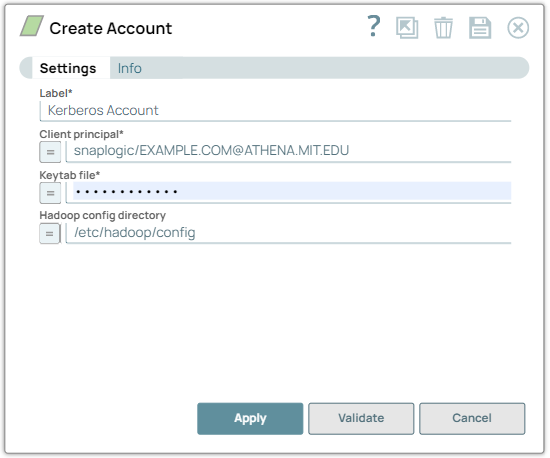
Use this account type to connect Hadoop Snaps with data sources that use Kerberos accounts.
Limitations
- The security model configured for the Groundplex (SIMPLE or KERBEROS authentication) must match the security model of the remote server. Due to limitations of the Hadoop library, we are only able to create the necessary internal credentials for the configuration of the Groundplex.
Account settings
| Field/Field set | Description | ||
|---|---|---|---|
| Label
|
Specify a unique label for the account. Default value: N/A Example: Kerberos Account |
||
| Client Principal
|
Specify the client principal associated with the account. Default value: N/A Example: snaplogic/[email protected] |
||
| Keytab File
|
Specify the path to the Keytab file. Default value: N/A Example: /keytabs/snaplogic.keytab |
||
| Hadoop config directory
|
Specify the path of the Hadoop configuration files to read the Hadoop configuration for a specific instance of a Hadoop cluster. The account uses the config files from this path to initialize the Hadoop object and establishes a connection with the Hadoop cluster. Note:
Default value: N/A Example: /etc/hadoop/config |
||
Troubleshooting
| Error Message | Reason | Resolution |
|---|---|---|
| Failed to validate account: Kerberos keytab file does not exist or cannot be read. |
Specify the location of the keytab file. This typically means that the Keytab File or Client Principal details provided are incorrect. |
Verify if the provided credentials are correct. |
| Cannot locate default realm | This error appears when the value in the Client Principal field is not in the format expected. | Verify if the provided credentials are correct. |
Failure in URL connection or file access denial, detail: SIMPLE authentication is not enabled. Available:[TOKEN, KERBEROS] |
Either the value in the Hadoop config directory field or the Node properties is empty or the configuration directory is invalid. | Specify a valid path for the Hadoop configuration files. |