


Box Write
write binary data to a file on Box.
Overview
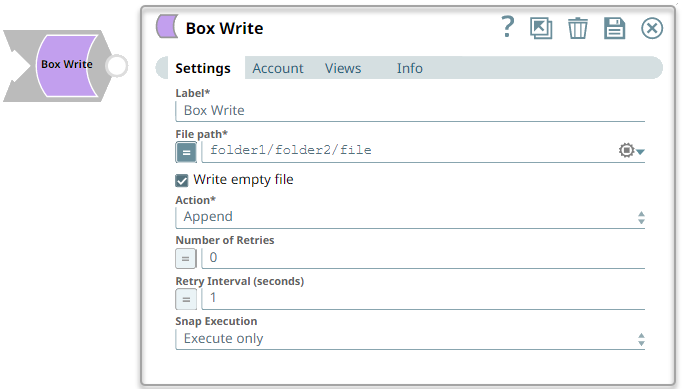
You can use this Snap to write binary data to a file on Box.
Support and limitations
Works in Ultra Tasks.
Snap Views
| Input/Output | Type of View | Number of Views | Examples of Upstream and Downstream Snaps | Description |
|---|---|---|---|---|
| Input | Document |
|
File path. | |
| Output | Binary |
|
Writes the file to the specified file path. |
Snap settings
Note: Learn about
the common controls in the Snap settings dialog.
| Field/Field set | Description |
|---|---|
|
LabelRequired. String
|
Specify the name of the Snap. You can modify this to be more specific,
especially if you have more than one of the same Snap in your Pipeline. Default value: Box Write Example: Box Write |
|
File pathRequired. String/Expression
|
Specify the destination path of the file to be written. Default value: None. Example: folder1/folder2/file |
|
Write empty file Checkbox
|
Select this checkbox to write an empty file when the incoming binary document
has empty data, in which case a zero byte file is written to the output. Note: If there is no incoming document at the input view of the Snap, no
file is written regardless of the value of the property.
Default status: Selected Example: Deselected |
|
Action Dropdown list
|
Select the action to perform if the file already exists. The available options
are:
Default value: Append Example: Overwrite |
|
Number of retries Integer
|
Specify the number of attempts the Snap must make in case of connection failure
or timeout. Note: If the retry value is more than zero, the Snap first
stores the input data in a temporary local file before writing to the target Box
file. Ensure that the local drive has sufficient free disk space as large as the
expected target file size.
Minimum value: 0 Default value: 0 Example: 3 |
|
Retry interval (seconds) Integer
|
Specify the minimum number of seconds the Snap must wait before each retry
attempt. Minimum value: 1 Default value: 1 Example: 3 Note: For existing Pipelines which have the Enable Staging
(deprecated field) checkbox selected, this Snap retries the connection once even
if the Number of retries is zero.
|
|
Snap execution Dropdown list
|
Choose one of the three modes in
which the Snap executes. Available options are:
Default value: Execute only Example: Validate & Execute |