


Tc Classification Details
This Snap retrieve the entire classification data of the object.
Supported Accounts
- This is a Read-type Snap.
 Works in Ultra Tasks
Prerequisites
- A valid Teamcenter account with the required permissions.
Snap views
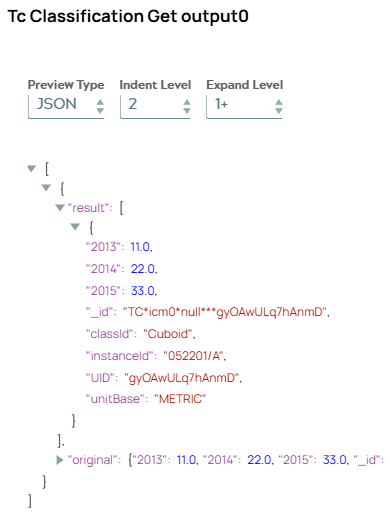
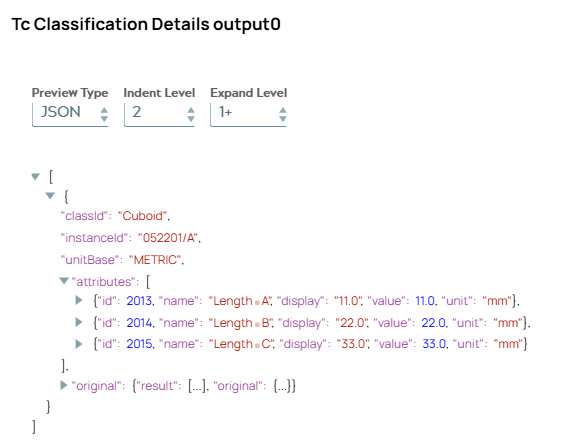
In comparison to Tc Classification Get Snap output difference is visible.
| Type | Description | Examples of upstream and downstream Snaps |
|---|---|---|
| Input |
Optional.This Snap has at the most one document input view. The required input of the snap is the Object ID that classification data needs to be fetched from Teamcenter. |
|
| Learn more about Error handling. | ||
Examples
Create a part, classify it and get classification detailsSnap settings
| Field/Field set | Description |
|---|---|
Label
String |
Specify a unique name for the Snap. Modify this to
be more appropriate, especially if there are more than one of the same Snap in the
pipeline.
Default value: Tc Classification Details |
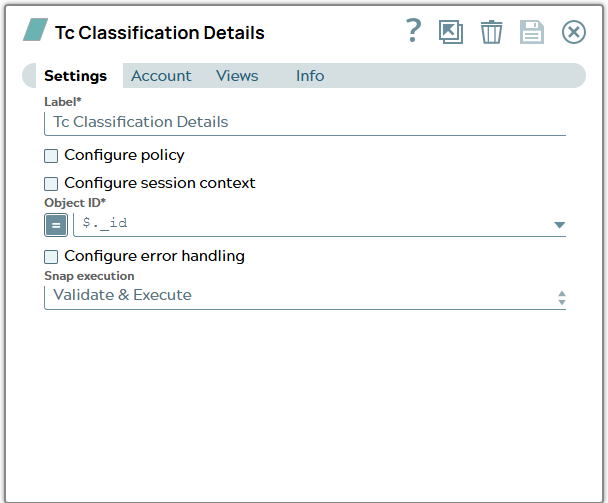
Configure policy
Checkbox |
Select this checkbox to run the Snap with a specific named Teamcenter policy. A policy determines the set of object properties that Teamcenter returns. Learn more: Configure policy. Default status: Deselected |
Configure session context
Checkbox |
Select this checkbox to run the Snap with a group, role, or project other than the one configured in the account. Learn more: Configure session context. Default status: Deselected |
Object ID*
String/Expression |
Select the UID (unique identifier) or the Teamcenter adapter ID of the classification object. Default value: $._id Example: $.uid |
Snap execution
Dropdown list |
Choose one of the three modes in
which the Snap executes. Available options are:
|
Comparison to Tc Classification Get
| Snap | Tc Classification Get | Tc Classification Details |
|---|---|---|
| object to be used on |
Called for classified object. |
Called for classification object itself. |
| result |
Contains zero to multiple objects in a list. Objects contains classification attributes with values. |
Contains one object which includes details of classification. |
| output example |
 |
 |