


Insert Records into Salesforce Object
Scenario
I want to insert records into the Salesforce object through SnapLogic.
Requirements
Snaps Used
For this scenario, the following Snaps are used:
File ReadJSON ParserMapperSalesforce Create(Optional) JSON Formatter(Optional) File WriterOther Requirements
A Salesforce account configured in SnapLogic Manager. See Accounts for more information on configuring an account.Configuration
This simplified pipeline reads a file from the SnapLogic Database, creates a base-64 encoded ASCII string of the file and attaches it using the Salesforce Create Snap.
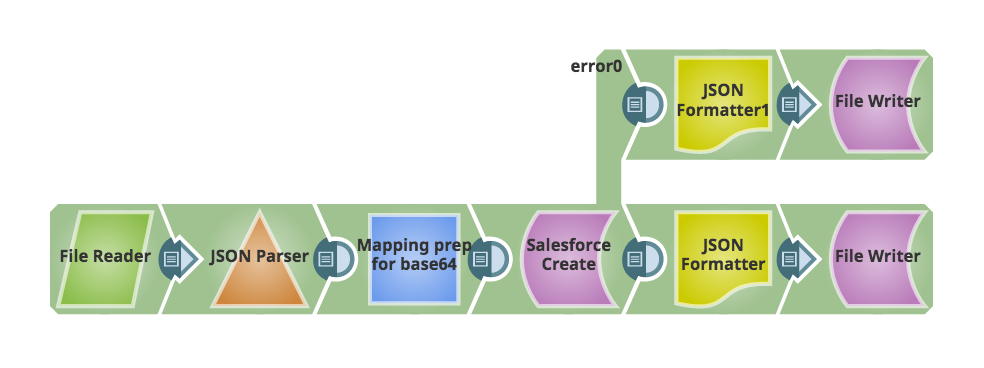
Add a File Reader Snap to read the file you want to attach. In this case, the file we are using is a JSON file with the following format:
[ { "nodes": {}, "org": "org_name", "SnapPacks": [...], "Subscriptions": null, "SF_ID": "" }, ... ]where SF_ID corresponds to the Salesforce ID associated with a customer.
A JSON Parser is added to parse the JSON for use within SnapLogic.Add a Mapper Snap to base-64 encode the file and supply required fields to Salesforce. Configure the following Expression/Target path pairs:- Expression: (with expression toggle on) Base64.encode(JSON.stringify($)) Target path: $Body This encodes the file.
- Expression: (with expression toggle on) $SF_ID Target path: $ParentID This identifies the Salesforce ID where to attach the file.
- Expression: (with expression toggle on) $org + "_Integrations" Target path: $Name The provides the name to the file. An expression was used to generate the name based on the $org value supplied.
- Expression: (with expression toggle off) application/json Target path: $ContentType
- Verify that the correct Service version is configured.
- Set the Object type to Attachment.
- Set Salesforce API to REST API.
- Set the error view to route error data to error view.
The pipeline could end here. In this example, we added a JSON Formatter and File Writer to both the output and error views to capture what is written out and save it to a file for troubleshooting purposes.