


ORC Writer
The ORC Writer Snap converts documents into the ORC format and writes the data to HDFS, S3, or the local file system.
Overview
Supported Accounts
- This is a Write-type Snap.
 Works in Ultra Tasks
Prerequisites
[None]
Support and limitations
- Works in Ultra Tasks.
Snap views
| Type | Format | Number of Views | Examples of Upstream and Downstream Snaps | Description |
|---|---|---|---|---|
| Input | Document | Min: 1 Max: 1 |
|
Documents containing data to be written to ORC files. |
| Output | Document | Min: 0 Max: 1 |
|
Document with metadata about the written ORC file. |
| Error | Error handling is a generic way to handle errors without losing data or failing the Snap execution. You can handle the errors that the Snap might encounter while running the Pipeline by choosing one of the following options from the When errors occur list under the Views tab:
Learn more about Error handling in Pipelines. |
|||
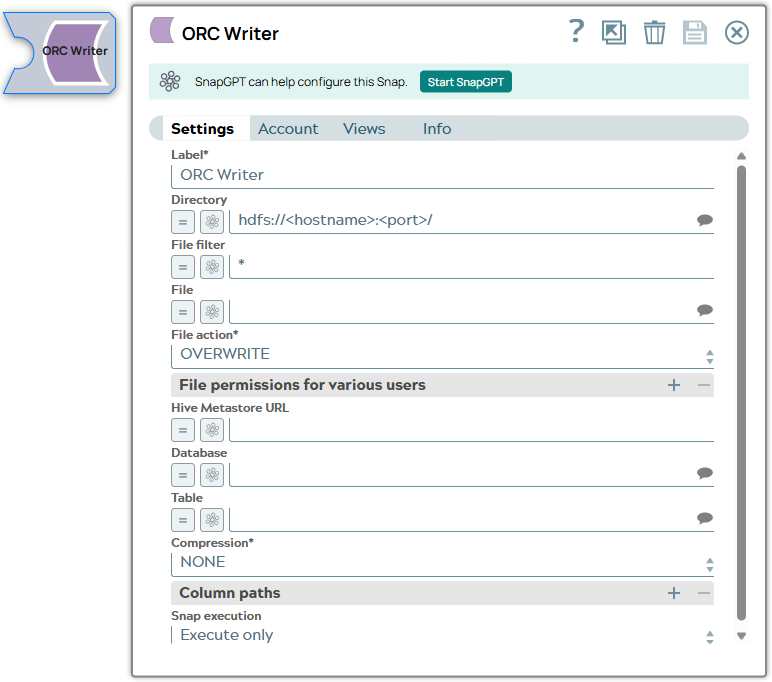
Snap settings
| Field | Description |
|---|---|
| Label
|
Specify a unique name for the Snap. Modify this to be more appropriate, especially if more than one of the same Snaps is in the pipeline. Default value: ORC Writer Example: ORC Writer |
| Directory
|
Required. The path to a directory where the Snap writes ORC formatted files. Basic directory URI structure
The Directory property is not used in the pipeline execution or preview, and used only in the Suggest operation. When you press the Suggest icon, the Snap displays a list of subdirectories under the given directory. It generates the list by applying the value of the Filter property. Example:
Default value: hdfs://<hostname>:<port>/ |
| Filter
|
The GLOB pattern to be applied to select the files. Example:
Default value: * |
| File
|
Required for standard mode. Filename or a relative path to a file under the directory given in the Directory property. It should not start with a URL separator "/". The File property can be a JavaScript expression which will be evaluated with values from the input view document. When you press the Suggest icon, it will display a list of regular files under the directory in the Directory property. It generates the list by applying the value of the Filter property. Use Hive tables if your input documents contains complex data types, such as maps and arrays. Example:
Default value: [None] |
| File action
|
Required. Select an action to take when the specified file already exists in the directory. Please note the Append file action is supported for SFTP, FTP, and FTPS protocols only. Default value: [None] |
| File permissions for various users |
Set the user and desired permissions. Default value: [None] |
| Hive Metastore URL
|
This setting is used to assist in setting the schema along with the database and table setting. If the data being written has a Hive schema, then the Snap can be configured to read the schema instead of manually entering it. Set the value to a Hive Metastore URL where the schema is defined. Default value: [None] |
| Database
|
The Hive Metastore database where the schema is defined. See the Hive Metastore URL setting for more information. |
| Table
|
The table from which the schema in the Hive Metastore's database must be read. See the Hive Metastore URL setting for more information. |
| Compression
|
Required. The compression type to be used when writing the file. |
| Column paths
|
Paths where the column values appear in the document. This property is required if the Hive Metastore URL property is empty. Examples:
Default value: [None] |
| Snap Execution
|
Choose one of the three modes in
which the Snap executes. Available options are:
Default value: Execute only Example: Validate & Execute |
Troubleshooting
Writing to S3 files with HDFS version CDH 5.8 or later
When running HDFS version later than CDH 5.8, the Hadoop Snap Pack may fail to write to S3 files. To overcome this, make the following changes in the Cloudera manager:
- Go to HDFS configuration.
- In Cluster-wide Advanced Configuration Snippet (Safety Valve) for core-site.xml, add an entry with the following details:
- Name: fs.s3a.threads.max
- Value: 15
- Click Save.
- Restart all the nodes.
- Under Restart Stale Services, select Re-deploy client configuration.
- Click Restart Now.
Temporary Files
During execution, when larger datasets are processed that exceed the available compute memory, the Snap writes pipeline data to local storage as temporary files to optimize performance. These temporary files are deleted when the Snap/Pipeline execution completes.
See Also
Read more about ORC at the Apache project's website, https://orc.apache.org/