


Teradata Export to HDFS
Overview
- This Snap does not support kerberized Hadoop environments.
- You can drop your database with it, so be careful.
Valid JSON paths that are defined in the where clause for queries/statements will be substituted with values from an incoming document. Documents will be written to the error view if the document is missing a value to be substituted into the query/statement.
If a select query is executed, the query's results are merged into the incoming document
and any existing keys will have their values overwritten. On the other hand, the original
document is written if there are no results from the query.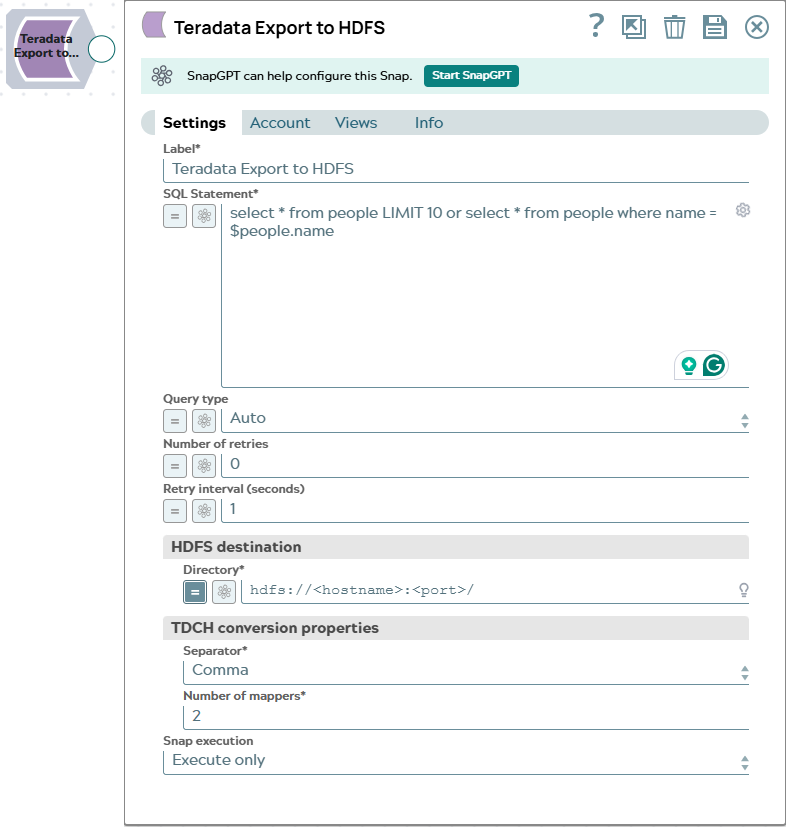
- This is a Write-type Snap.
 Works in Ultra Tasks
Prerequisites
- Teradata Connector for Hadoop (v1.5.1). See Account for information on the necessary jar file.
Snap views
| Type | Description | Examples of upstream and downstream Snaps |
|---|---|---|
| Input |
This Snap allows zero or one input views. If the input view is defined, then the where clause can substitute incoming values for a given expression. Expected input: None. |
|
| Output |
This Snap has exactly one output view and produces documents in the view. Expected output: A single document containing the console output and return status from the external Teradata application for each input document. The output fields of a single view are:
|
|
| Learn more about Error handling. | ||
Snap settings
- Expression icon (
 ): Allows using
pipeline parameters to set field values dynamically (if enabled). SnapLogic Expressions
are not supported. If disabled, you can provide a static value.
): Allows using
pipeline parameters to set field values dynamically (if enabled). SnapLogic Expressions
are not supported. If disabled, you can provide a static value. - SnapGPT (
 ): Generates SnapLogic Expressions
based on natural language using SnapGPT. Learn
more.
): Generates SnapLogic Expressions
based on natural language using SnapGPT. Learn
more. - Suggestion icon (
 ): Populates a
list of values dynamically based on your Snap configuration. You can select only one
attribute at a time using the icon. Type into the field if it supports a comma-separated
list of values.
): Populates a
list of values dynamically based on your Snap configuration. You can select only one
attribute at a time using the icon. Type into the field if it supports a comma-separated
list of values. - Upload
 : Uploads files. Learn more.
| Field/Field set | Description |
|---|---|
Label
String |
Specify a unique name for the Snap. Modify this to be more appropriate, especially if more than one of the same Snaps is in the pipeline. Default value: Teradata Export to HDFS |
SQL Statement
String/Expression |
Required. SQL statement to execute on the Teradata
server. Document value substitution will be performed on literals starting with $
(such as $people.name will be substituted with its value in the incoming document).
The Snap does not allow to inject SQL, such as Default value: N/A Example:
|
Query type
Dropdown list |
Select the type of query for your SQL statement (Read or Write). The default option, Auto, attempts to infer the type based on your SQL statement. Read is used with SELECT statements, Write is used with INSERT, UPDATE, or DELETE. Default value: Auto |
Number of retries
Integer |
The number of retry attempts the Snap makes in case of a connection failure. Default value: 3 |
Retry interval (seconds)
Integer |
The interval in seconds between retry attempts. Default value: 1 |
| HDFS destination | Settings for the HDFS destination. |
Directory
String/Expression |
Required. The HDFS directory where the output files will
be written. This directory must not already exist. Default value: hdfs://<hostname>:<port>/ Example: people |
| TDCH conversion properties | Settings for Teradata Connector for Hadoop conversion. |
Separator
Dropdown list |
Required. Field separator in text file output. The
available options are Comma, Tab, Pipe (I). Default value: Comma |
Number of mappers
Integer/Expression |
The number of mappers to use to export table data from Teradata. The degree of
parallelism for these TDCH jobs is defined by the number of mappers (a Snap
configuration) used by the MapReduce job. The number of mappers also defines the
number of files created in HDFS location. More mappers leads to faster execution, however, the number of mappers is limited by the number of nodes in the cluster and the available bandwidth. Default value: 2 |
Snap execution
Dropdown list |
Choose one of the three modes in
which the Snap executes. Available options are:
|