


Google Directory Read
Overview
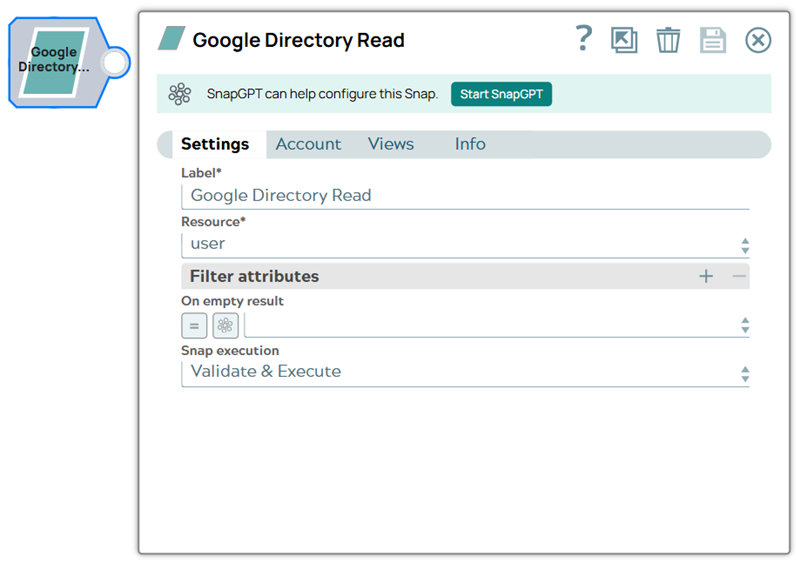
The Google Directory Read Snap reads the data of Users, User photos, Groups, and Org units from Google Directory.
Verify that you have the correct Application scope defined for your account. See Google Directory Application Scope for more information.
Access tokens for Google Directory accounts expire in one hour.
- This is a Write-type Snap.
 Works in Ultra Tasks
Prerequisites
- A valid account with the required permissions.
Snap views
| Type | Description | Examples of upstream and downstream Snaps |
|---|---|---|
| Input |
This Snap has at most one document input view. Expected input: Resource type and Filter attributes (Filter keys, Filter values). |
|
| Output |
This Snap has exactly one document output view. Expected output: The data for the resource type provided. |
|
| Learn more about Error handling. | ||
Snap settings
| Field/Field set | Description |
|---|---|
Label*
String |
Specify a unique name for the Snap. Modify this to be more appropriate, especially if more than one of the same Snaps is in the pipeline. Default value: Google Directory Read Example: Google Directory Read |
Resource*Dropdown list |
The type of resource to be created. The options available include:
Default value: user Example: group |
| Filter Attributes | Use this field set to list the attributes to return the search results. |
Filter Keys
String/Expression/ Suggestion |
The suggested filter attributes based on the provided Resource Type selected.
Default value: user Example: domain |
Filter Values
String/Expression/ Suggestion |
The corresponding values of the suggested filter key to read the resource.
Default value: user Example: group |
On empty result
Dropdown list |
Specify or select the Snap behavior when no matching filter value is found. The available options are:
Note:
Default value: None Example: Ignore |
Snap execution
Dropdown list |
Choose one of the three modes in
which the Snap executes. Available options are:
|
Supported Filter Attributes by Resource
user
- userKey - Required for Users Get API. Set the expression toggle (=) off and enter the userKey.
- domain - Optional. Set the expression toggle (=) off and enter the domain.
- showDeleted - Optional. Set the expression toggle (=) off and enter true | false.
- fields - Optional. Set the expression toggle (=) off and list the fields to return, separated by a comma. See the API documentation for the complete list of fields.
- query - Optional. Set the expression toggle (=) off and enter the query without quotation marks. Learn more about the user fields that are queryable within the user resource.
- maxResults - Optional. Set the expression toggle (=) off and enter an integer (1 to 500, inclusive).
- customer - Set the expression toggle (=) off and enter the customerID. If you are an account administrator, you can use the my_customer alias with the expression toggle off.
- projection - Optional. Set the expression toggle (=) off and enter
customorfullin the Filter value field to retrieve the schema field. - customFieldMask - Optional. Set the expression toggle (=) off and list the custom fields to retrieve custom schema fields. You can fetch custom fields in a user profile by a comma-separated list of schema names. All fields from these schemas are fetched. This should only be set when
projection=custom.
userPhoto
- userKey - Required. Set the expression toggle (=) off and enter the userKey.
orgunit
- customerID - Required. Set the expression toggle (=) off and enter the customerID.
- GetOrgUnitPath - Required to call the OrgUnits Get API. Set the expression toggle (=) off and list the name of the org without a preceding slash (that is, TestOrg instead of /TestOrg).
- ListOrgUnitPath - Required to call the OrgUnits List API. Set the expression toggle (=) off and list the name of the org without a preceding slash (that is, TestOrg instead of /TestOrg).
- type - An optional parameter from the OrgUnits List API. Set the expression toggle (=) off and enter all | children.
- fields - An optional parameter for either the OrgUnits Get API or the OrgUnits List API. Set the expression toggle (=) off and list the fields to return, separated by a comma. See the API documentation for the complete list of fields.
group
- groupKey - Required for Groups Get API. Set the expression toggle (=) off and enter the groupKey.
- customer - Set the expression toggle (=) off and enter the customerID. If you are an account administrator, you can use the my_customer alias with the expression toggle off.
- domain - Optional. Set the expression toggle (=) off and enter the domain.
- maxResults - Optional. Set the expression toggle (=) off and enter an integer.
- fields - Optional. Set the expression toggle (=) off and list the fields to return, separated by a comma. See the API documentation for the complete list of fields.
- userKey - Optional. Set the expression toggle (=) off and enter the userKey. Returns all groups to which this user belongs.
| Resource | Filter key | Filter value | Result |
| userPhoto | userkey | (expression toggle (=) off) [email protected] | Returns the resource data for the user's photo. |
| user | [None] | [None] | Returns all users. |
| user | domain | (expression toggle (=) off) example.com | Returns all users within the specified domain. |
| user | showDeleted | (expression toggle (=) off) true | Returns deleted users. |
| user | customer | (expression toggle (=) off) my_customer | Returns all users for the customer ID if the account is an account administrator. |
| user | fields | (expression toggle (=) off) users(aliases,name,primaryEmail) | Returns the name, primary email and email aliases for all users. |
| user | query | (expression toggle (=) off) isAdmin=true | Returns all admins. |
| user | query | (expression toggle (=) off) givenName:Tim* | Returns all users whose givenName starts with Tim. |
| orgunit | fields | (expression toggle (=) off) kind,name,orgUnitPath | Returns kind,name,orgUnitPath fields of the orgunits. |
Troubleshooting
| Error | Cause | Resolution |
|---|---|---|
| Failure: IO error occurred
|
Google Service Account is not associated with any customer. | Provide the customerID. Ensure that the scope is correctly defined for the action/resource being executed. |
| Failure: IO error occurred
|
Google Service Account is not associated with any customer or domain. | Either provide customer or domain information. |