


Oracle - Stored Procedure
Overview
The Oracle - Stored Procedure Snap executes stored procedures in an Oracle database and writes OUT parameter values to the output view.
If an OUT parameter is:
- Custom type OBJECT, then the output is displayed as a JSON object.
- Custom type TABLE, then the output is displayed as a JSON array.
This Snap supports executing stored functions with OUT and INOUT parameters and writes
these parameters in the output view along with the returnval key.
The Oracle JDBC Driver is upgraded from OJDBC6 JAR (v11.2.0.4) to OJDBC10 JAR (v19.20.0.0) in the latest distribution in October 2023 and deployed to the stable distribution in the November 2023 release (after the Snaplex upgrade). The latest JDBC driver upgrade is backward-compatible. Learn more: Oracle JDBC driver and JOOQ upgrades.
You can consume this driver upgrade with the 434patches23000 Snap Pack
version.
This JDBC driver upgrade has resulted in specific behavior changes that include errors, status codes, and success and failure messages. Learn more about the behavior changes to ensure your migration to the upgraded driver is seamless.
- This is a Write-type Snap.
 Works in Ultra Tasks
Prerequisites
None.
Behavior changes
Earlier, the ROWID columns were displayed
in binary (Base64 encoded data) form in the output. With the
439patches29008, the Oracle - Execute
and Oracle - Select Snaps display the
ROWID columns in string form in the output (which can be used for other
operations downstream).
Breaking change
With the 439patches29008 Snap Pack version, if
any of your existing Oracle pipelines use the encoded ROWID (by manually
handling the Base64 encoded data), your pipelines might break. To prevent your pipelines
from failing, you must update your Snap Pack version to the latest version.
Snap views
| Type | Description | Examples of upstream and downstream Snaps |
|---|---|---|
| Input |
This Snap has at most one document input view. If an input view is defined, then values from an incoming document can be used as input parameters to the stored procedure. Note: The attribute names of custom type OBJECT are case-sensitive. For example, for
custom type LOCATION with three fields ADDRESS, CITY and STATE, the input below is
acceptable:
|
|
| Output |
This Snap has exactly two document output views: Output Parameters and Result Set. |
|
| Learn more about Error handling. | ||
Snap settings
- Expression icon (
 ): Allows using
pipeline parameters to set field values dynamically (if enabled). SnapLogic Expressions
are not supported. If disabled, you can provide a static value.
): Allows using
pipeline parameters to set field values dynamically (if enabled). SnapLogic Expressions
are not supported. If disabled, you can provide a static value. - SnapGPT (
 ): Generates SnapLogic Expressions
based on natural language using SnapGPT. Learn
more.
): Generates SnapLogic Expressions
based on natural language using SnapGPT. Learn
more. - Suggestion icon (
 ): Populates a
list of values dynamically based on your Snap configuration. You can select only one
attribute at a time using the icon. Type into the field if it supports a comma-separated
list of values.
): Populates a
list of values dynamically based on your Snap configuration. You can select only one
attribute at a time using the icon. Type into the field if it supports a comma-separated
list of values. - Upload
 : Uploads files. Learn more.
| Field/Field set | Description |
|---|---|
Label* String |
Specify a unique name for the Snap. Modify this to be more appropriate, especially if more than one of the same Snaps is in the pipeline. Default value: Oracle - Stored Procedure |
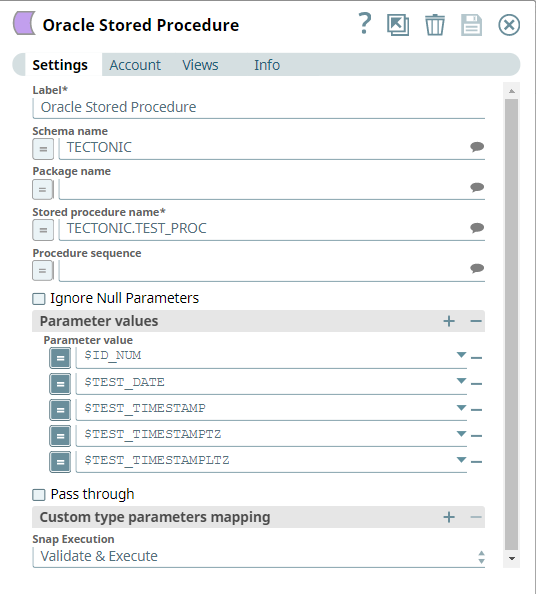
Schema Name
String/Expression/ Suggestion |
Specify the database schema name. The suggestions in the Schema field are populated only when at least a single table exists in the schema. If no tables exist to use that schema, only SYS, SYSTEM, and XDB are populated. You can pass the values as expressions using the pipeline parameters but cannot use values from the upstream Snap. Default value: None Example:
|
Package name
String/Expression/ Suggestion |
The package name where the procedure resides. The property is suggestible and will return all packages of the DB. If a schema is defined, then it will only return the packages of that schema. To invoke stored functions in a package, you need to upgrade the Oracle JDBC driver to 12.1.0.2 or later. User-defined types are supported only with a specific version of the JDBC driver. Refer to the JDBC Driver setting in Oracle Thin Account. Example:
|
Stored Procedure Name
String/Expression/ Suggestion |
Required. Stored procedure to execute. The property is suggestible and will return all procedures of the DB. If a package is defined, then it will only return the procedures of that package. If a schema is defined and no package is defined, then it will return all procedures of that schema. Default value: None Example:
|
Procedure sequence
Integer/Expression |
Required for overloaded procedures. Sequence number that indicates the procedure to be used for overloaded procedures. The property is optional and only to be used when the selected procedure is overloaded. The starting index is always 1. The property is suggestible and will return the available indexes of the overloaded procedure, if any. The procedure sequence instructions apply similarly to stored functions. Example:
|
Ignore Null Parameters
Checkbox |
Select this check box to enable the Snap to ignore the parameters evaluated as null. This applies to parameters with defined default values. Default value: Not selected |
Parameter Values
String/Expression |
Select the input parameter values for the stored procedure. If you define parameter values, you must do so in the same order as they appear in the stored procedure definition. Quotation marks should not be used when setting input parameters unless they are part of the input value itself, since they are treated as escaped plain characters. For example, if the desired input value is TEST_VALUE1, the input parameter should be set as TEST_VALUE1; if you set it as "TEST_VALUE1", it will be recognized as \"TEST_VALUE1\". If you do not provide any parameters in the Snap, you can still view the required input parameters in the Target Schema of the upstream Mapper Snap. The parameters are dynamically populated based on the column keys of the stored procedure; you can map the parameters and pass them as an input to the Stored Procedure Snap. Default value: None Example: There is a stored procedure named createGreeting with two input parameters: p1 and p2 of type VARCHAR2. Then you need to provide two string values. The first value goes to p1 and the second value goes to p2. |
Pass through
Checkbox |
If selected, the input document will be passed through to the output views under the key 'original'. The document will be passed to the Parameter output view, and it will also be passed to the Result Set output view if there is output sent from this view. This property applies only to the Execute Snaps with SELECT statement or the Select Snaps. Default value: Not selected |
| Custom type parameters mapping | Supports mappings for all parameters. Use this fieldset to define custom type mappings for user-defined type parameters. |
Parameter index
Integer/Expression |
The index of the custom type parameter. It is suggestible based on stored procedure name.
|
Parameter type
String/Expression/ Suggestion |
The custom type name the parameter is of. It is suggestible based on database account. |
|
Snap execution Dropdown list
|
Choose one of the three modes in
which the Snap executes. Available options are:
Default value: Validate & execute Example: Execute only |
Additional information
- User-defined types are only supported with a specific version of the JDBC driver. Refer to the JDBC Driver setting in Configure Oracle Accounts.
- There is a limitation in Oracle JDBC driver that prevents the passing of a record type parameters to the stored procedure. Refer the link: Oracle JDBC driver limitations. A workaround could be to write a wrapper stored procedure to avoid passing of record type parameter directly to the original stored procedure.