


HDFS ZipFile Reader
The HDFS ZipFile Reader Snap extracts and reads archive files in HDFS directories and produces a stream of unzipped documents in the output.
Overview
Use the HDFS ZipFile Read Snap to extract and read archive files in HDFS directories and produce a stream of unzipped documents in the output.
For the HDFS protocol, use a SnapLogic on-premises Groundplex. Also, ensure that the instance is within the Hadoop cluster and that SSH authentication is established.
Supported Accounts
Snap views
| Type | Format | Number of Views | Examples of Upstream and Downstream Snaps | Description |
|---|---|---|---|---|
| Input | Document | Min: 0 Max: 1 |
|
Documents containing information that identifies the directory and ZIP files that must be read. |
| Output | Binary | Min: 1 Max: 1 |
|
A binary stream containing unzipped documents from the specified ZIP files. |
| Error | Error handling is a generic way to handle errors without losing data or failing the Snap execution. You can handle the errors that the Snap might encounter while running the Pipeline by choosing one of the following options from the When errors occur list under the Views tab:
Learn more about Error handling in Pipelines. |
|||
Prerequisites
The user executing the Snap must have Read permissions on the concerned Hadoop directory.
Snap settings
| Field/Field set | Description |
|---|---|
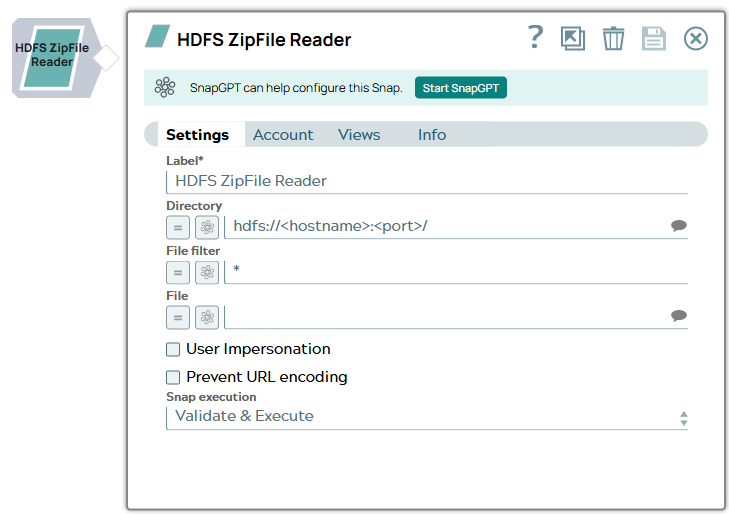
| Label
|
Specify a unique name for the Snap. Modify this to be more appropriate, especially if more than one of the same Snaps is in the pipeline. Default value: HDFS ZipFile Reader Example: HDFS ZipFile Reader |
| Directory
|
The URL for the data source (directory). The Snap supports both HDFS and ABFS(S) protocols. Syntax for a typical HDFS URL: Syntax for a typical ABFS and an ABFSS URL: When you use the ABFS protocol to connect to an endpoint, the account name and endpoint details provided in the URL override the corresponding values in the Account Settings fields. Default value: [None] |
| File Filter
|
The GLOB pattern to be applied to select the files within the ZIP file. Example:
Default value: * |
| File
|
The relative path and name of the file that must be read. Example:
Default value: [None] |
| User Impersonation
|
Select this check box to enable user impersonation. Note: For encryption zones, use user impersonation.
Default value: Not selected |
| Prevent URL Encoding
|
Select this checkbox to prevent the Snap from automatically encoding the URL file path (including the query string if it exists) and use the file path value as-is. Deselect this checkbox to encode the URLs. Common characters such as backslash (\), pound (#), space, percent (%), and angle brackets (< >) are automatically encoded by the Snap. Default value: Not selected |
| Snap Execution
|
Choose one of the three modes in
which the Snap executes. Available options are:
Default value: Execute only Example: Validate & Execute |
Troubleshooting
Writing to S3 files with HDFS version CDH 5.8 or later
When running HDFS version later than CDH 5.8, the Hadoop Snap Pack may fail to write to S3 files. To overcome this, make the following changes in the Cloudera manager:
- Go to HDFS configuration.
- In Cluster-wide Advanced Configuration Snippet (Safety Valve) for core-site.xml, add an entry with the following details:
- Name: fs.s3a.threads.max
- Value: 15
- Click Save.
- Restart all the nodes.
- Under Restart Stale Services, select Re-deploy client configuration.
- Click Restart Now.