


Dropbox Identity Sync
This Snap retrieves account information, team members, and groups from Dropbox for ACL enforcement.
Supported Accounts
- This is a Read-type Snap.
 Works in Ultra Tasks
Prerequisites
None.
Limitations and known issues
None.
Snap views
| Type | Description | Examples of upstream and downstream Snaps |
|---|---|---|
| Input | This Snap has at most one document input view. The input document can optionally trigger the retrieval of identity information. |
|
| Output | This Snap has exactly one document output view. The Snap outputs the retrieved account information, team members, and groups. |
|
| Learn more about Error handling. | ||
Snap settings
Note: Learn about
the common controls in the Snap settings dialog.
| Field/Field set | Description |
|---|---|
|
Label
|
Specify a unique name for the Snap. Modify this to
be more appropriate, especially if there are more than one of the same Snap in the
pipeline.
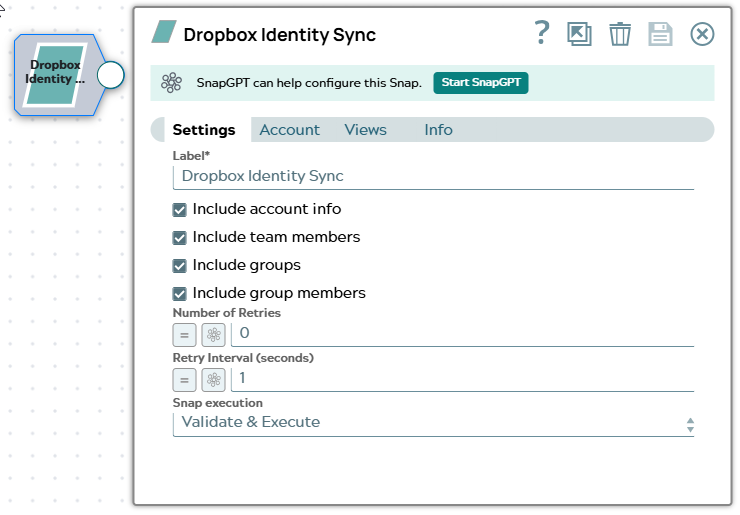
Default value: Dropbox Identity Sync |
| Include account info
|
Select this checkbox to include basic account information in the synchronization, such as account ID, email, and display name.
Default value: Selected |
| Include team members
|
Select this checkbox to include team member information in the synchronization. This retrieves all members of the Dropbox Business team.
Default value: Selected |
| Include groups
|
Select this checkbox to include group information in the synchronization. This retrieves all groups defined in the Dropbox Business team.
Default value: Selected |
| Include group members
|
Select this checkbox to include group membership information in the synchronization. This retrieves the members of each group.
Default value: Selected |
| Snap execution
|
Choose one of the three modes in
which the Snap executes. Available options are:
Default value: Validate & Execute |