


Tc Delete
This Snap delete any Teamcenter element of type item or derived types, such as document, part, design, or ME Process. The element can only be deleted using this Snap if it is not related to other objects or elements.
Supported Accounts
- This is a Write-type Snap.
 Works in Ultra Tasks
Prerequisites
- A valid Teamcenter account with the required permissions.
Limitations
The element can only be deleted using this Snap if it is not related to other objects or elements.
Snap views
| Type | Description | Examples of upstream and downstream Snaps |
|---|---|---|
| Input |
Optional.This Snap has at the most one document input view. The required input of the snap is the Object ID for the element that needs to be deleted from the Teamcenter software. |
|
| Output |
Optional.This Snap has at the most one document output view. The output of the snap is the result with the deleted object. |
|
| Learn more about Error handling. | ||
Examples
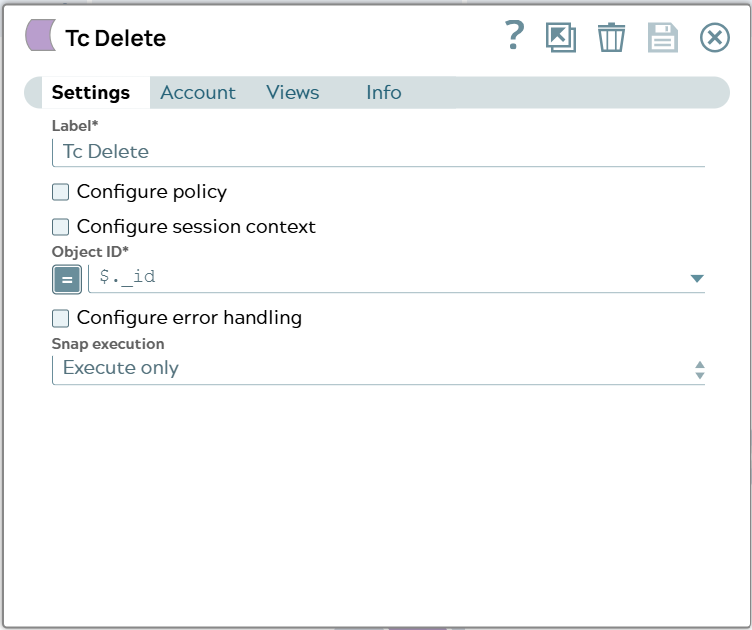
Delete objectSnap settings
| Field/Field set | Description |
|---|---|
Label
String |
Specify a unique name for the Snap. Modify this to
be more appropriate, especially if there are more than one of the same Snap in the
pipeline.
Default value: Tc Delete |
Configure policy
Checkbox |
Select this checkbox to run the Snap with a specific named Teamcenter policy. A policy determines the set of object properties that Teamcenter returns. Learn more: Configure policy. Default status: Deselected |
Configure session context
Checkbox |
Select this checkbox to run the Snap with a group, role, or project other than the one configured in the account. Learn more: Configure session context. Default status: Deselected |
Object ID*
String/Expression |
Select the UID (unique identifier) or the Teamcenter adapter ID of the object. Default value: $._id Example: $._id |
Configure error handling
Checkbox |
Select this checkbox to define how the Snap behaves when Teamcenter returns an error. Use these settings for analysis and debugging. Learn more: Configure error handling. Default status: Deselected |
Snap execution
Dropdown list |
Choose one of the three modes in
which the Snap executes. Available options are:
|