


Google BigQuery Dynamic OAuth2
Configure a Google BigQuery Dynamic OAuth2 account to authenticate with Google BigQuery using dynamic OAuth2 access tokens.
Overview
Use this SnapLogic Account type to connect Snaps to Google BigQuery using Dynamic OAuth2.
Expression-enabled authentication fields, such as Username, Password, and Client Secret, support Secrets Management, a SnapLogic add-on that allows you to store endpoint credentials in a third-party secrets manager, such as AWS Secrets Manager, Azure Key Vault, or HashiCorp Vault. During validation and execution, pipelines obtain the credentials directly from the secrets manager. Learn more: Configure Accounts to use secrets.
Prerequisites
A valid Access token.
Account Settings
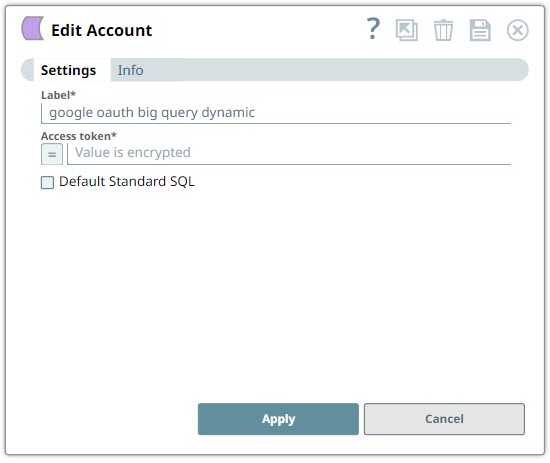
| Field/Field set | Description | ||
|---|---|---|---|
| Label String |
Required. Specify a unique label for the account. Default value: None. Example: google oauth big query dynamic |
||
| Access token String/Expression |
Required. Specify the access token for the application. This token is passed as 'Authorization: bearer <access_token_value> to the Snap if 'Header authenticated' property is enabled. Some endpoints require an uppercase letter for Bearer, then the property value for the token must be provided as 'Bearer <access_token_value>' for the access token property value. The access token is not refreshable, but can be passed as a Pipeline parameter. Default value: None. Example: dfx863?1mh092= |
||
| Default Standard SQL Checkbox |
Select this checkbox if you want to default the dialect in the Query field of the Snaps using this account to Standard SQL. Important: Use the #legacySQL tag in the Query field of the Snap to treat it as a Legacy SQL Query.Default: Deselected |
||
Generating OAuth2 Access Token using Java Script
When you create a Google Service Account property that contains a private key, client email, and so on, perform the following steps to generate the Access token using Java Script install the Google API for Node.js to generate the token as follows:
-
Install Node.Js.
-
Install Google API.
npm install -S googleapis -
Write the script as follows:
import google from 'googleapis' import googleServiceAccountKey from '/path/to/private/google-service-account-private-key.json' // see docs on how to generate a service account const googleJWTClient = new google.auth.JWT( googleServiceAccountKey.client_email, null, googleServiceAccountKey.private_key, ['https://www.googleapis.com/auth/analytics.readonly'], // You may need to specify scopes other than analytics null, ) googleJWTClient.authorize((error, access_token) => { if (error) {returnconsole.error("Couldn't get access token", e) } // ... access_token ready to use to fetch data and return to client // even serve access_token back to client for use in `gapi.analytics.auth.authorize` }) -
Run the above script to generate the Access token.