


Basic Use Case - Managing Data in S3
This basic use case demonstrates how to perform the following operations using the Amazon S3 Snaps:
-
Upload a single JSON file in the S3 object
-
Copy the file
-
List the S3 Object and its attributes
-
Download the file
-
Delete the file

-
Configure key-value pairs containing parameters to pass to the Pipeline during
execution.

-
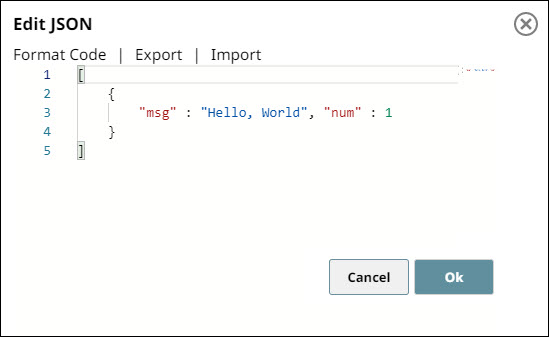
Configure the JSON
Generator Snap with
sample data as follows.

-
Configure the
S3 Upload
Snap to upload the
binary data to S3 objects residing in the S3 bucket.


-
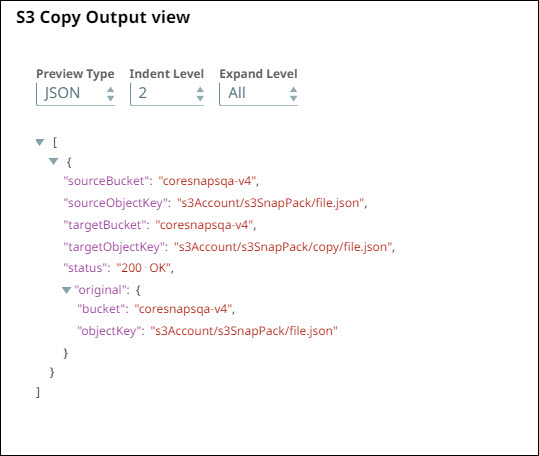
Configure the
S3 Copy
Snap to copy the S3
object from source folder to target folder.

-
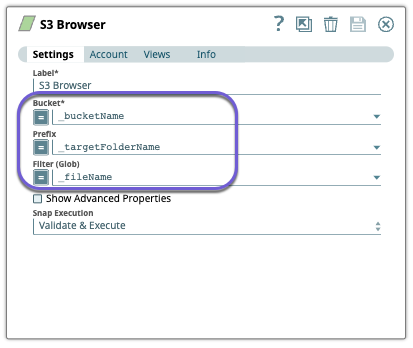
Configure the
S3 Browser
Snap to list the
attributes for S3 objects.

-
Configure the
S3 Download
Snap to download S3
objects.


-
Configure the
S3 Delete
Snap to delete the S3
objects. You can view the status of the deleted object in the output preview.


- Download and import the pipeline into SnapLogic.
- Configure Snap accounts as applicable.
- Provide pipeline parameters as applicable.