


Basic Authentication Account
Overview
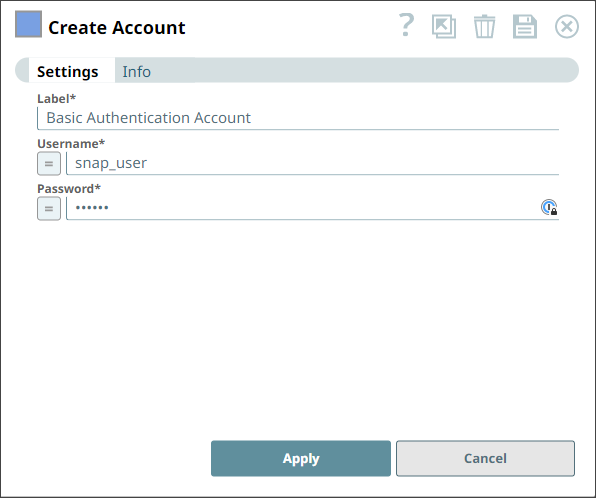
You can use this account type to connect the HTTP Client and GraphQL Client Snaps with data sources that use the Basic Authentication account.
Limitations
HttpClient5 library does not support colons in Usernames when using Basic Authentication, because it follows the updated RFC 7617 specification. This standard does not support colons in usernames for Basic Authentication.We recommend that you use the Secured Headers Account if the username contains colons.
Account settings
- Expression icon (
 ): Allows using
JavaScript syntax to access SnapLogic Expressions to set field values dynamically (if
enabled). If disabled, you can provide a static value. Learn more.
): Allows using
JavaScript syntax to access SnapLogic Expressions to set field values dynamically (if
enabled). If disabled, you can provide a static value. Learn more. - SnapGPT (
 ): Generates SnapLogic Expressions
based on natural language using SnapGPT. Learn
more.
): Generates SnapLogic Expressions
based on natural language using SnapGPT. Learn
more. - Suggestion icon (
 ): Populates a
list of values dynamically based on your Snap configuration. You can select only one
attribute at a time using the icon. Type into the field if it supports a comma-separated
list of values.
): Populates a
list of values dynamically based on your Snap configuration. You can select only one
attribute at a time using the icon. Type into the field if it supports a comma-separated
list of values. - Upload
 : Uploads files. Learn more.
| Field/Field set | Type | Description |
|---|---|---|
| Label
String |
Required. Specify a unique label for the account. Default value: N/A Example: Basic Authentication Account |
|
| Username String/Expression |
Required. Specify the
username for the Basic Authentication account. Note: To access the username for the
HTTP Client and GraphQL Client Snaps, enable expressions for the field and enter
account.username.Default value: N/A Example: Snap_user |
|
| Password String/Expression |
Required. Specify the
password for the Basic Authentication account. Note: To access the password for the
HTTP Client and GraphQL Client Snaps, enable expressions for the field and enter
account.password. Default value: N/A Example: Encrypted |
|
Troubleshooting
| Error | Reason | Resolution |
|---|---|---|
The username cannot contain the ': character. |
HttpClient5 library does not support colons in Usernames when using Basic Authentication. | Provide a username without the colon ':” character and retry. |