


Google VertexAI Generate
Overview
You can use this Snap to generate text responses using the Gemini VertexAI model and model parameters.
- This is a Transform-type Snap.
 Works in Ultra Tasks
Prerequisites
Supported models:
- text-embedding-005
- text-multilingual-embedding-002
- text-embedding-large-exp-03-07
You need to have one of the following accounts configured for your Google VertexAI Snaps:
Limitations
- gemini-1.0-pro and gemini-1.5-pro is not supported for the Top K field.
- models/gemini-1.5-flash is not supported for the JSON mode field.
- Attention: In September 24, Google is deprecating the
googleSearchRetrievalfield with the gemini-1.5-flash and gemini-1.5-pro. Thifunctionality
Snap views
| Type | Description | Examples of upstream and downstream Snaps |
|---|---|---|
| Input | This Snap supports a maximum of one binary or document input view. When the input type is a document, you must provide a field to specify the path to the input prompt. The Snap requires a prompt, which can be generated either by the Google GenAI Prompt Generator or any user-desired prompt intended for submission to the Gemini API. | |
| Output | This Snap has at the most one document output view. The Snap provides the result generated by the Gemini API. | Mapper |
| Learn more about Error handling. | ||
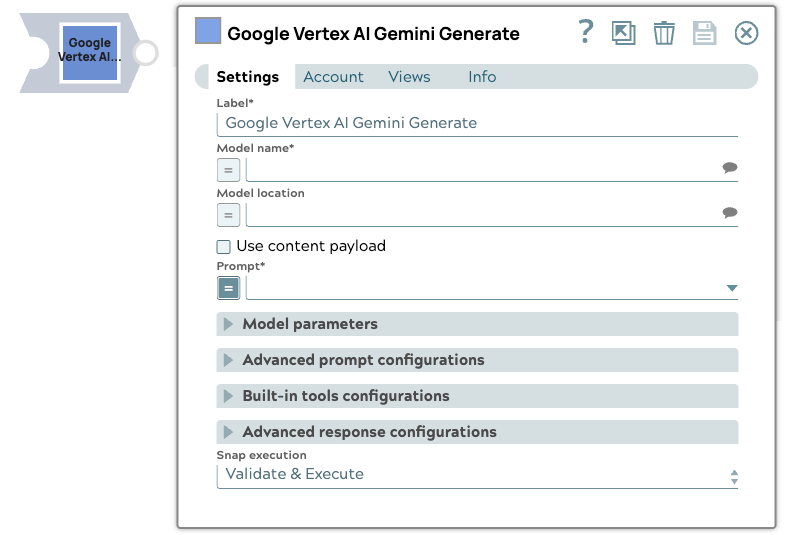
Snap settings
- Expression icon (
 ): Allows using
JavaScript syntax to access SnapLogic Expressions to set field values dynamically (if
enabled). If disabled, you can provide a static value. Learn more.
): Allows using
JavaScript syntax to access SnapLogic Expressions to set field values dynamically (if
enabled). If disabled, you can provide a static value. Learn more. - SnapGPT (
 ): Generates SnapLogic Expressions
based on natural language using SnapGPT. Learn
more.
): Generates SnapLogic Expressions
based on natural language using SnapGPT. Learn
more. - Suggestion icon (
 ): Populates a
list of values dynamically based on your Snap configuration. You can select only one
attribute at a time using the icon. Type into the field if it supports a comma-separated
list of values.
): Populates a
list of values dynamically based on your Snap configuration. You can select only one
attribute at a time using the icon. Type into the field if it supports a comma-separated
list of values. - Upload
 : Uploads files. Learn more.
| Field/Field set | Type | Description |
|---|---|---|
| Label*
|
String |
Specify a unique name for the Snap. Modify this to be more appropriate, especially if more than one of the same Snaps is in the pipeline. Default value: ... Example: ... |
| Model name | String/Expression/ Suggestion |
Required. The identifier for the Gemini text generation models. Supported models:
Important: Some models (suchas gemini-1.5-flash and gemini-1.5-pro) are planned to be deprecated by the vendor.
Default value: N/A Example: |
| Model location | String/Expression/ Suggestion |
The location of the model. Default value: N/A Example: us-central1 |
| Use content payload | Checkbox |
Select this checkbox to generate responses using the contents specified in the Content payload field. Default status: Deselected |
| Prompt | String/Expression |
Required. The prompt to run against the model. Default value: N/A Example: "Hello" |
| Content payload | String/Expression |
Required. Specify the content payload to send to the Gemini text generation endpoint for all contents. Contents coming from the Prompt Generator Snap will be correctly formatted. Default value: N/A Example:Content payload: Tool payload: Allowed function names: |
| Model parameters |
Parameters used to tune the model runtime. |
|
| Top K | Integer/Expression |
The number of high-probability tokens considered for each generation step, controlling the randomness of the output. If left blank, the endpoint uses its default value. Default value: N/A Example: |
| Stop sequences | String/Expression |
Sequence of tokens to stop the completion at. Default value: N/A Example: |
| Temperature | Decimal/Expression |
The sampling temperature to use, a decimal value between 0 and 1. If left blank, the endpoint uses its default value. Default value: N/A Example: 0.2 |
| Maximum tokens | Integer/Expression |
Maximum number of tokens that can be generated in the Gemini text generation foundation model. If left blank, the endpoint uses its default value. Default value: N/A Example: 50 |
| Top P | Decimal/Expression |
The nucleus sampling value, which must be a decimal between 0 and 1. If left blank, the endpoint uses its default value. Default value: N/A Example: 0.2 |
| Advanced prompt configurations |
Configure the advanced prompt settings. |
|
| System prompt | String/Expression |
Specify the persona for the model to adopt in the responses. This initial instruction guides the LLM's responses and actions. Default value: N/A Example:
|
| JSON mode | Checkbox/Expression |
Select this checkbox to include a JSON output from the Gemini API. Default status: Deselected |
| Built-in tools configurations |
Configure built-in tool behavior and inputs. |
|
| Tool type | Dropdown list | The type of tool to invoke from the built-in toolset.
Default value: N/A Example: ... |
| Top K | Integer/Expression | Maximum number of documents to retrieve based on relevance. Displays when vertexRagStore is selected. Default value: N/A Example: 20 |
| RAG corpus | String/Expression/ Suggestion | Corpus used in Vertex RAG store for document retrieval. Displays when vertexRagStore is selected. Default value: N/A Example: 3379951520340000000:p0_rag_test |
| Google retrieval mode | Dropdown list | Select the Google search mode to use.
Default value: N/A Example: MODE_UNSPECIFIED |
| Google search dynamic threshold | Decimal/Expression | The dynamic threshold value for Google search. Default value: N/A Example: 0.3 |
| Ranking configurations | object | Configuration for ranking retrieved results. Default value: N/A Example: |
| RAG corpus location | String/Expression/ Suggestion | The location of the RAG corpus. Default value: N/A Example: us-central1 |
| Filter configurations | object | Configuration for corpus-level document filtering.
Default value: N/A Example:
|
| Advanced response configurations |
Modify the response settings to customize the responses and optimize output processing. |
|
| Structured outputs | Checkbox/Expression |
Ensures the model always returns outputs that match your defined JSON Schema. Default value: N/A Example: |
| Simplify response | Checkbox/Expression |
Select this checkbox to receive a simplified response format that retains only the most commonly used fields and standardizes the output for compatibility with other models. Default status: Deselected |
| Continuation requests | Checkbox/Expression |
Select this checkbox to enable continuation requests. If selected, the Snap will automatically request additional responses if the finish reason is maximum tokens. Default status: Deselected |
| Continuation requests limit | Integer/Expression | Required. The maximum number of continuation requests to be made. Default value: N/A Example: 3 |
| Debug mode | Checkbox/Expression |
Select this checkbox to enable debug mode. This mode provides the raw response in the _sl_response field and is recommended for debugging purposes only. Default status: Deselected |
| Snap execution
|
Dropdown list |
Choose one of the three modes in
which the Snap executes. Available options are:
Default value: Validate & Execute Example: Execute only |
Additional information
The following table lists the Models and their corresponding minimum, maximum, and default values for the Temperature field:
| Model name | Default value | Minimum value | Maximum value |
|---|---|---|---|
| gemini-1.5-pro | 1.0 | 0.0 | 2.0 |
| gemini-1.0-pro-vision | 0.4 | 0.0 | 1.0 |
| gemini-1.0-pro-002 | 1.0 | 0.0 | 2.0 |
| gemini-1.0-pro-001 | 0.9 | 0.0 | 1.0 |
Troubleshooting
Continuation requests limit error.
The Continuation requests limit value is invalid.
Provide a valid value for Continuation requests limit that is between 1-20.