


Notification settings tab
Manage configured notifications.
The Notification settings tab displays configured notifications:
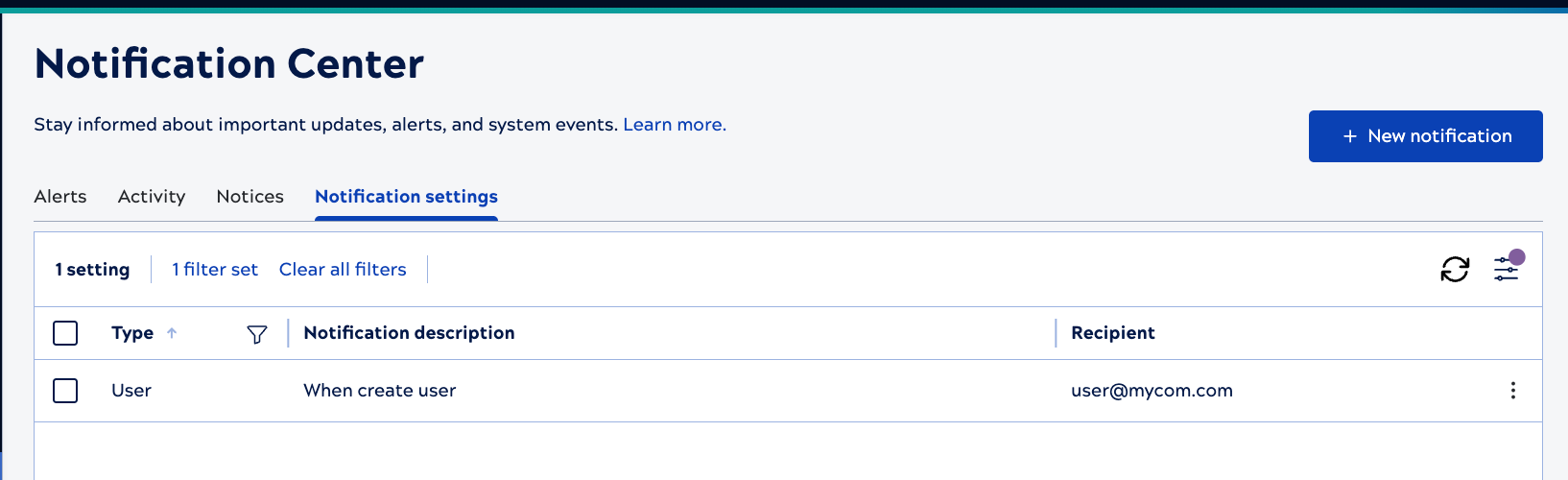
System admins can set up email and Slack notifications for any of the event types listed below. Email notifications can go to multiple recipients. If Slack is configured for the environment, a notification can be sent to multiple channels or individual recipients. Create a notification describes the available notification settings.
Use controls on the table to:
- Click the Type column filter icon,
 , to filter by type. A dark filter icon,
 , indicates that the column has a filter applied.
 - Clear all filters.
- Refresh table data.
- Configure the table, by clicking
 . You can set row spacing to expanded or
compact, hide or show columns, and filter the Type column, or search by
recipient.
. You can set row spacing to expanded or
compact, hide or show columns, and filter the Type column, or search by
recipient. - To stop a notification, click the three-dot menu in the notification row and select Delete.
Table configuration and filters
Click to open the Table
configuration and filters dialog.
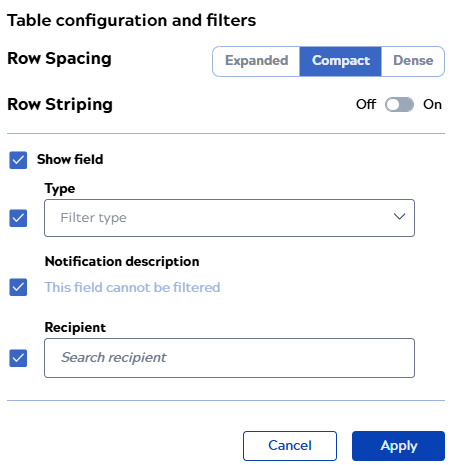
to open the Table
configuration and filters dialog. From the Table configuration and filters dialog, you can:
- Select any of the following row spacing options:
- Compact to show more table rows with the decreased row height.
- Expanded to show fewer table rows with the increased row height.
- Dense to display the same number of table rows on one page as shown in the Compact view but with the reduced icon size and padding.
- Enable row striping.
- Show or hide columns by checking or unchecking the box next to the name.
- Reorder columns by hovering near the name and dragging the handle that displays to the right.
- Filter columns by selecting a value from the dropdown list.
- Click Apply to save the changes.
Event types
| Notification category | Available types |
|---|---|
| Account | Account stale. |
| ACL | User permission added to or removed from an asset's Asset Control List (ACL). |
| API | Concurrent or daily API usage. |
| APIM | Migration from APIM to APIM 3.0 or pending subscription. |
| Asset | Asset created, deleted, updated, moved, renamed, ownership change, or account stale. |
| Broadcast message | Custom scheduled message sent to all environment users (displays in the banner). Learn how to Create a broadcast notice. |
| Dist | Snap Pack change in the asset label, override of the FQID, or subscribe. |
| Group |
Group create, delete, update, or create provisioned. |
| Session | Session start, end, or SSO session. |
| Snaplex | Auto scale config update, congestion, node added, node connection rejected, node crash, enter maintenance mode, leave maintenance mode, node restart, pipeline interrupter, or version update. |
| Snaplex node | CPU utilization, disk usage, or memory usage. Learn how to Create a Snaplex notification and address underlying issues |
| Task | Execution duration percentage over or time limit. Learn how to Create a task notification and address underlying issues. |
| User |
|