


Coupa Update
Overview
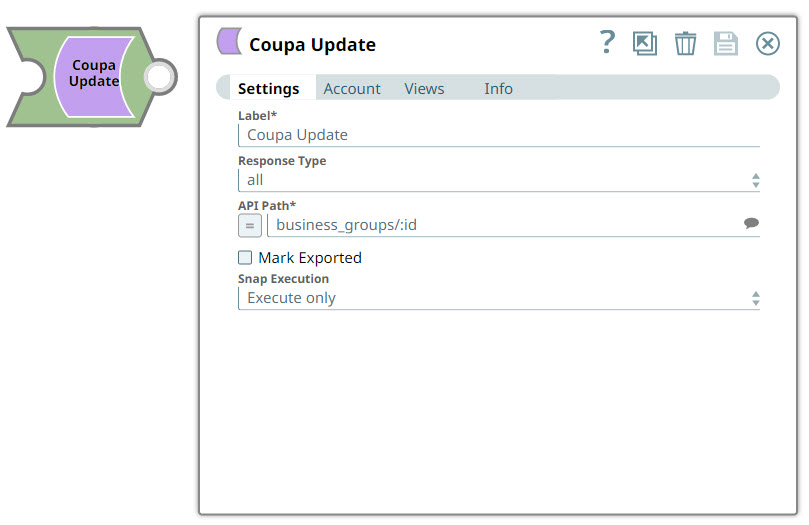
You can use this Snap to update Coupa resource records such as addresses by using the relevant resource APIs. You can only use this Snap to select the resource whose records are to be updated; all record-related data must be passed through an upstream Snap such as the Mapper Snap.
- This is a Write-type Snap.
 Works in Ultra Tasks
Allowable Values
Some resource elements have a specific set of allowable values. An error is displayed if you provide any other value for such elements. Allowable values are mentioned in the Elements section in the resource's API documentation.
For example, the change-type element in the Purchase Order resource accepts only change and revision.
If the change-type element's value is changed from change to revision, it cannot be reverted.
Supported Accounts
Prerequisites
- A valid Coupa Account with appropriate permissions.
- Resource parameters compliant with the resource schema.
Limitations
None.
Snap views
| Type | Description | Examples of upstream and downstream Snaps |
|---|---|---|
| Input |
This Snap has exactly one document input view. The resource details as a JSON document. |
|
| Output |
This Snap has at most one document output view. Details of the updated resource record. Level of detail varies according to the configuration of the Response Type field. |
|
| Learn more about Error handling. | ||
Examples
Snap settings
| Field/Field set | Description |
|---|---|
Label* String |
Specify a unique name for the Snap. Modify this to be more appropriate, especially if more than one of the same Snaps is in the pipeline. Default value: Coupa Update Example: |
Response Type
Dropdown list |
Specify the level of detail required in the Snap's output. You can configure this keeping in mind the available memory and likely processing time that it would take to execute this Snap. Available options are:
See API Return Formats for more details. Default value: all Example: |
API Path
String/Expression/ Suggestion |
Required. The API name associated with the target resource. Select the target resource from the suggestions in the field. Suggestions vary based on the account. Note:
When updating specific resources, select the corresponding ID API and pass the resource ID as an upstream parameter. Example: |
Mark Exported
Checkbox |
Select this checkbox to export the resource record after the update. This is only applicable to transactional resources such as contracts. Note:
Updating a resource record and marking a record as exported must not be done in the same request. If this field is selected, the record updates may be ignored. Default value: Not selected |
|
Snap execution Dropdown list
|
Choose one of the three modes in
which the Snap executes. Available options are:
Default value: Execute only Example: Validate & Execute |