


Update Records with Conditional Expressions
Overview
This example demonstrates how to use the Redshift Update Snap to modify existing records in Redshift tables using conditional expressions. The Snap supports both static update conditions and dynamic parameter substitution from upstream data.
Prerequisites
- Amazon Redshift cluster with appropriate access
- Valid Redshift account configured in SnapLogic
- Target table with existing records to update
- Write permissions on the target table
Pipeline Overview
The pipeline uses the Redshift Update Snap to modify records in a database table by specifying update expressions and WHERE clause conditions. Two common approaches are demonstrated: using upstream data from a Mapper Snap for targeted updates, and using Redshift Execute for bulk update operations.
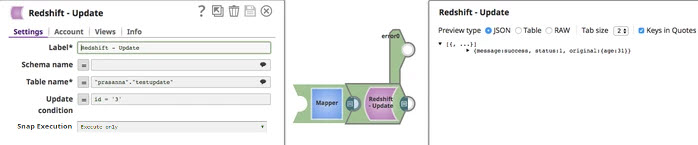
Basic Update with Mapper
Pipeline: Mapper → Redshift Update
This approach updates specific records based on values provided by an upstream Mapper Snap.
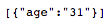
Mapper Configuration:
Provide the update values and filter criteria:

Redshift Update Snap - Settings:
- Schema name: public
- Table name: customer
- Update expression: Specify columns and values to update (e.g., age=$age)
- Where clause: Filter condition (e.g., id=$id)
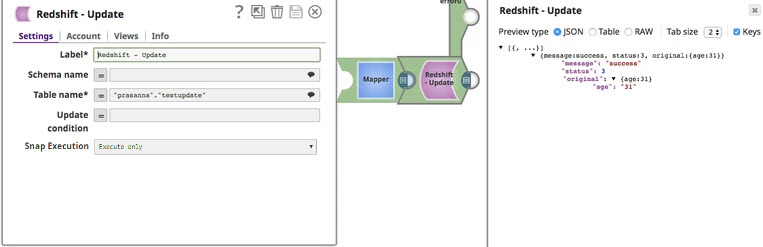
Example SQL Generated:
UPDATE "public"."customer"
SET age = 25
WHERE id = '3'
Bulk Update with Execute
Pipeline: Redshift Execute → Mapper → Redshift Update
This approach retrieves data using Execute, transforms it, and applies bulk updates.
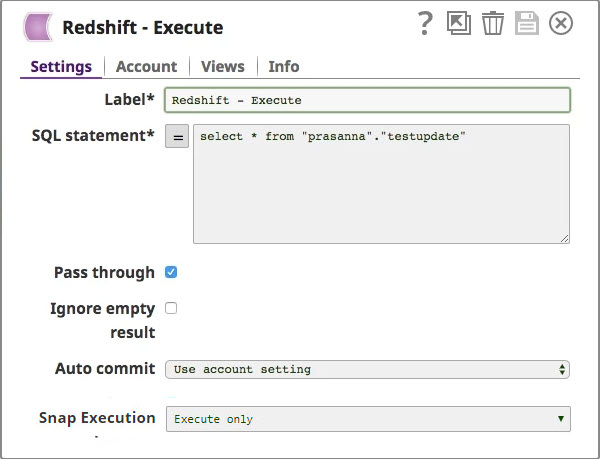
Redshift Execute Configuration:
Query existing data to determine update values:
Mapper Configuration:
Transform the queried data to prepare update values:

Redshift Update Configuration:
Apply the transformed values to update multiple records:

Update Expression Syntax
The Update expression property specifies which columns to modify and their new values:
- Static values:
age = 30 - JSON path substitution:
age = $age - Multiple columns:
age = $age, status = $status - Expressions:
balance = balance + $amount
Use $ prefix for JSON path substitution to reference values from input documents. Each document drives one UPDATE statement.
Where Clause Configuration
The WHERE clause determines which records to update:
- Single condition:
id = $id - Multiple conditions:
id = $id AND status = 'active' - Static filters:
created_date < '2024-01-01' - Range conditions:
age BETWEEN $min_age AND $max_age
Always test WHERE clauses carefully to avoid unintended updates. Use SELECT queries with the same WHERE clause first to verify which records will be affected.
Output Configuration
The Snap outputs information about the update operation:
- Number of rows updated: Count of affected records
- Original input data: Pass-through option available
- Update status: Success or failure information
Enable the error view to route failed updates to error handling logic.
Use Cases
This pattern is useful for:
- Updating records based on conditional logic
- Synchronizing data between systems with transformation
- Implementing data correction workflows
- Applying business rules to existing data
- Batch updates with dynamic filter criteria
- Status or flag updates based on external triggers
- Incremental data updates from upstream sources
Best Practices
- Always include a WHERE clause to avoid updating all records unintentionally
- Test WHERE clauses with SELECT statements before executing updates
- Use indexed columns in WHERE clauses for better performance
- Enable the error view to handle failed update operations
- Consider using transactions for multiple related updates
- Monitor the number of rows updated to detect unexpected results
- Use pipeline parameters for reusable update templates
- Validate input data before executing updates
- Back up data before performing large-scale updates