


MySQL Merge
Overview
You can use this Snap to execute an SQL Merge statement. Each document in the input view is expected to be merged or created with/as a new record in the specified table on the target database.
MySQL - Merge Snap does not have the Merge condition property because MySQL operates merge on its primary key only. Therefore, input data must contain the value of the primary key for the merge operation to work.
When the target table has a primary key, and if a primary key exists for the record, the row is updated with the new values. If the primary key does not exist for the record, a new row is inserted.
When the target table does not have a primary key, the Insert statement is executed, and duplicate records are inserted into the table on every execution.
Merges will be batched up until the account's batch size property or until the structure of the update statement changes. An update statement will change if an incoming document contains different keys than a previous document.
- This is a Write-type Snap.
 Works in Ultra Tasks
Prerequisites
A valid account with INSERT and UPDATE privileges on the target MySQL database table.
Limitations
When MySQL execute Snaps (MySQL Execute and MySQL Multi Execute) are followed by MySQL non-execute Snaps, such as MySQL Insert, MySQL Merge, and so on, the following error is displayed when executed:
Table definition has changed, please retry transaction.
This happens due to a known issue in the MySQL Connector. For more information about this issue, see MySQL Bug #65378.
Snap views
| Type | Description | Examples of upstream and downstream Snaps |
|---|---|---|
| Input | Required.
Min: 1, Max: 1 The Snap can have at the most one input document. |
|
| Output | Optional.
Min: 0, Max: 1 If an output view is available, then the original document that was used to create the statement is displayed in the output with the status of the merge executed. Queries produced by the Snap are in the following format: |
|
| Error | Error handling is a generic way to handle errors without losing data or failing the Snap execution. You can handle the errors that the Snap might encounter while running the Pipeline by choosing one of the following options from the When errors occur list under the Views tab:
|
Snap settings
- Expression icon (
 ): Allows using
pipeline parameters to set field values dynamically (if enabled). SnapLogic Expressions
are not supported. If disabled, you can provide a static value.
): Allows using
pipeline parameters to set field values dynamically (if enabled). SnapLogic Expressions
are not supported. If disabled, you can provide a static value. - SnapGPT (
 ): Generates SnapLogic Expressions
based on natural language using SnapGPT. Learn
more.
): Generates SnapLogic Expressions
based on natural language using SnapGPT. Learn
more. - Suggestion icon (
 ): Populates a
list of values dynamically based on your Snap configuration. You can select only one
attribute at a time using the icon. Type into the field if it supports a comma-separated
list of values.
): Populates a
list of values dynamically based on your Snap configuration. You can select only one
attribute at a time using the icon. Type into the field if it supports a comma-separated
list of values. - Upload
 : Uploads files. Learn more.
| Field/Field set | Description |
|---|---|
Label
String |
Required.Specify a unique name for the Snap. You can modify this to be more specific, especially if you have more than one of the same Snap in your pipeline.
Default value: MySQL - Merge Example: MySQL - Merge |
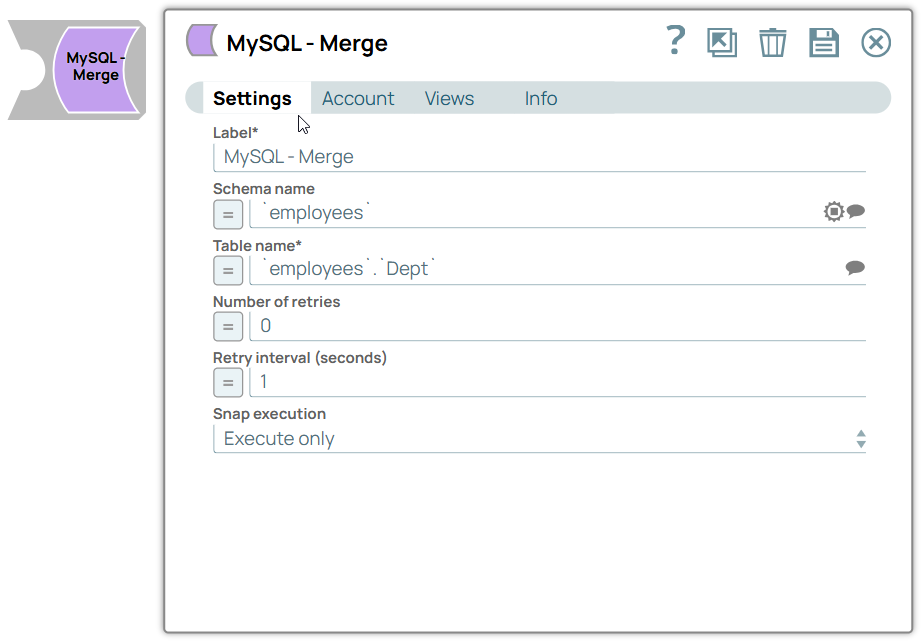
| Schema name
|
The database schema name. In case it is not defined, then the suggestion for the Table Name will retrieve all tables names of all schemas. The property is suggestable and will retrieve available database schemas during suggest values.
Default value: N/A Example: SYS |
| Table name
|
Required.The name of the table to execute the insert on. You can pass the values can using the pipeline parameters but not the upstream parameter.
Default value: N/A Example: people |
| Number of retries
|
Specify the maximum number of attempts to retry.
The request is terminated if the attempts do not result in a response.
When you enable retry and a connection failure occurs that cannot be recovered by retry,
the Snap writes a connection failure error in the error view. In some cases,
the error view records might contain duplicate data that was written to the database.
Ensure to verify all the records in the error file before you restart the merge request.
You can locate the duplicate records in the error view by checking the $reason property
for the sub-string: If the retry value is larger than 0, the Snap first downloads the target file into a temporary local file. If any error occurs during the download, the Snap waits for the time specified in the Retry interval and attempts to download the file again from the beginning. When the download is successful, the Snap streams the data from the temporary file to the downstream Pipeline. All temporary local files are deleted when they are no longer needed. Ensure that the local drive has sufficient free disk space to store the temporary local file. Default value: 0 Example: 3 |
| Retry interval (seconds)
|
Specify the time interval between two successive retry requests. A retry happens only when the previous attempt resulted in an exception.
When you enable retry and a connection failure occurs that cannot be recovered by retry, the Snap writes a connection failure error in the error view. In some cases, the error view records might contain duplicate data that was written to the database. Ensure to verify all the records in the error file before you restart the merge request. You can locate the duplicate records in the error view by checking the $reason property for the sub-string: Default value: 1 Example: 10 |
Snap execution
Dropdown list |
Choose one of the three modes in
which the Snap executes. Available options are:
|