


SQL Server Insert
This Snap inserts new records into database tables. This Snap executes an SQL Insert statement with the specified values. Key-value pairs are used to insert columns and their respective values into the table columns. Missing columns from the document results in inserting null values into them.
Supported Accounts
- This is a Write-type Snap.
Snap Type
The SQL Server Insert Snap is a WRITE-type Snap that inserts new records into a SQL database table.
Prerequisites
- A valid database account with the required permissions.
Support for Ultra Pipelines
Works in Ultra Pipelines if batching is disabled.
Behavior change
As part of the JOOQ upgrade done in main25112, the SQL Server-Insert Snap displayed an error Caused by: java.lang.NumberFormatException: Character n is neither a decimal digit number, decimal point, nor "e" notation exponential mark when an empty string was inserted into an integer-type column. Now, The Snap inserts a null value in this scenario.
Supported Versions
This Snap supports SQL Server 2008 or newer.
Snap views
| Type | Description | Examples of upstream and downstream Snaps |
|---|---|---|
| Input |
This Snap has one or two document input views.
The input document should contain the data to be inserted into the table. The second input view can be added to use the metadata of the source table as a document so that the table is created in SQL Server with a similar schema as the source table. The metadata is not used if the table already exists. |
|
| Output |
Optional. This Snap has at most one output view.
The Snap outputs one document for every record written, therefore any document processing Snap can be used downstream. If an output view is available, then the original document that was used to create the statement is written to the output with the status of the insert executed. Note: Database Write Snaps output all records of a batch (as configured in your account settings) to the error view if the write fails during processing.
|
|
| Learn more about Error handling. | ||
Snap settings
| Field/Field set | Description |
|---|---|
|
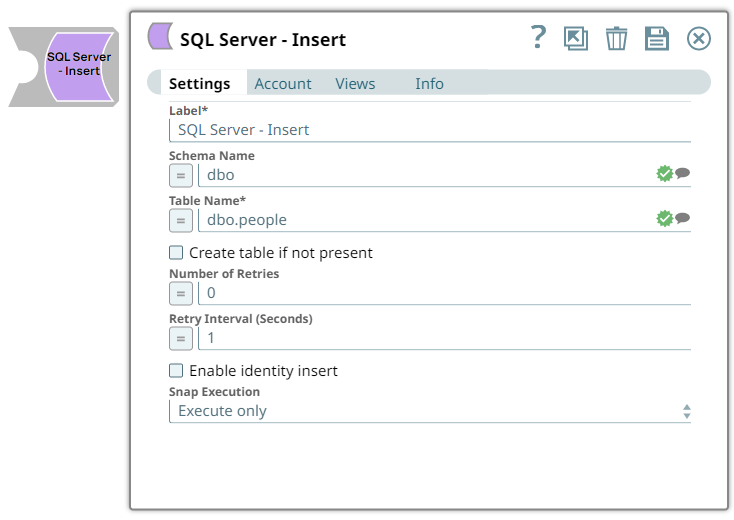
Label String
|
Specify a unique name for the Snap. Modify this to
be more appropriate, especially if there are more than one of the same Snap in the
pipeline.
Default value: SQL Server - Insert |
Schema Name
String/Expression/ Suggestion |
Optional. Specify the database schema name. In case it is not defined, then the suggestion for the Table Name will retrieve all tables names of all schemas. The property is suggestible and will retrieve available database schemas during suggest values. Note:
The values can be passed using the Pipeline parameters but not the upstream parameter. You cannot use Pipeline parameters within your SQL statement. If you need to use parameters, insert a Mapper (Data) Snap before the SQL Snap and call them there. The Snap can then use the substituted values through the input view. Default value: N/A Example: dbo |
Table Name
String/Expression/ Suggestion |
Required. Specify the name of the table into which data will be inserted. The table name is suggestible and requires an account setting. Note: The values can be passed using the pipeline parameters but not the upstream parameter.
Default value: N/A Example: Customers |
Create table if not present
Checkbox |
Optional. Select this checkbox to create the table specified in the Table name property if it does not exist. If the table does not exist and this property is not selected, the Snap displays an error. Note: If the table does not exist and the Create table if not present checkbox is selected, a new table is created with the columns and data types required to hold the values in the first input document. If you would like the table to be created with the same schema as a source table, you can connect the second output view of a Select Snap to the second input view of this Snap.
Default status: Deselected |
Number of retries
Integer/Expression |
Specify the maximum number of attempts to be made to receive a response. The request is terminated if the attempts do not result in a response. Default value: 0 Example: 3 |
Retry interval (seconds)
Integer/Expression |
Specify the time interval between two successive retry requests. A retry happens only when the previous attempt resulted in an exception. Default value: 1 Example: 10 |
Enable identity insert
Checkbox |
Optional. Select the checkbox to insert values from the input document into the target table identity column. Ensure that the target table contains an identity column. If you do not select the check box, then do not enter any value for the identity column in the input document. Default status: Deselected |
|
Snap execution Dropdown list
|
Choose one of the three modes in
which the Snap executes. Available options are:
Default value: Execute only |