


SuccessFactors Upsert
Overview
The SuccessFactors Upsert Snap updates or inserts data objects from the SuccessFactors Data Center.
The Snap automatically inserts the data in case the records are not available. For more information about SuccessFactors APIs, refer to SuccessFactors Documentation.
- This is a Write-type Snap.
 Works in Ultra Tasks
Supported Accounts
Prerequisites
- A valid SuccessFactors host server.
- A valid account with the roles required to perform the Upsert operation on the selected entity.
Snap views
| Type | Description | Examples of upstream and downstream Snaps |
|---|---|---|
| Input |
This Snap has exactly one document input view. A document containing the data that must be created or updated, and has to be written into the SuccessFactors Data Center for the selected entity. |
|
| Output |
This Snap has at most one document output view. A document containing the status data for each record in the batch input to confirm whether the data creation or update was successful. |
|
| Learn more about Error handling. | ||
Snap settings
| Field/Field set | Description |
|---|---|
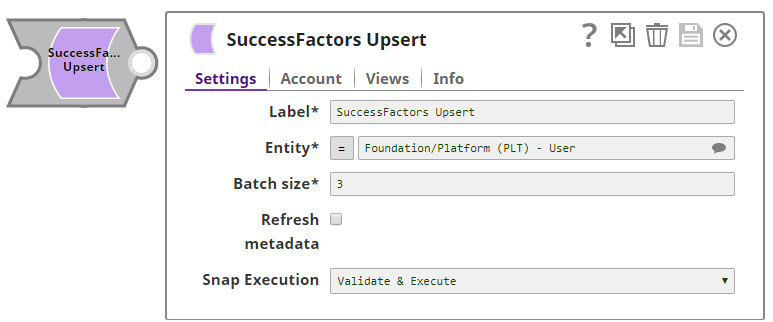
| Label
|
Specify a unique name for the Snap. Modify this to be more appropriate, especially if more than one of the same Snaps is in the pipeline. Default value: SuccessFactors Upsert |
| Entity
|
Required. Lets you define an entity of the API. You can either choose an entity from the suggestion drop-down or type an entity manually. The values in the suggestion drop-down are displayed dynamically from different users' accounts. The entity is shown as Default value: N/A Example: Foundation/Platform (PLT) – User or User |
| Batch size
|
Required. This property value is allowed to be from 1 through 10,000. Each input document forms one SuccessFactors record to be upserted. The Snap stores record in memory until the number of records reaches the batch size and sends the request to SuccessFactors in a single batch. Increasing the batch size increases the amount of memory used during the data load. Decreasing the batch size increases the number of API calls against SuccessFactors. Default value: 200 Example: 200, 1000 |
| Refresh metadata
|
If selected, the Snap refreshes the cache and shows the refreshed metadata results including any entities/parameters that were added or deleted. This is useful in cases where changes are made to the dataset outside of SnapLogic, such as when a dataset has been created or deleted, or when there are changes in the metadata of SuccessFactors. Note: After the first run and after the metadata has been refreshed, please deselect this checkbox.
Default value: Deselected |
| Snap execution
| Choose one of the three modes in
which the Snap executes. Available options are:
|
For more information about the OData based API, see OData Version 4.0 Documentation.
Troubleshooting
| Error | Cause | Resolution |
|---|---|---|
| The input entity does not exist. | An invalid entity has been entered. | Click the suggestion drop-down in the Entity field and select the entity. |