


LDAP Account
Overview
You can configure your accounts in SnapLogic using the Designer or Manager. You can use this account to connect to LDAP directory servers. The account settings are described below.
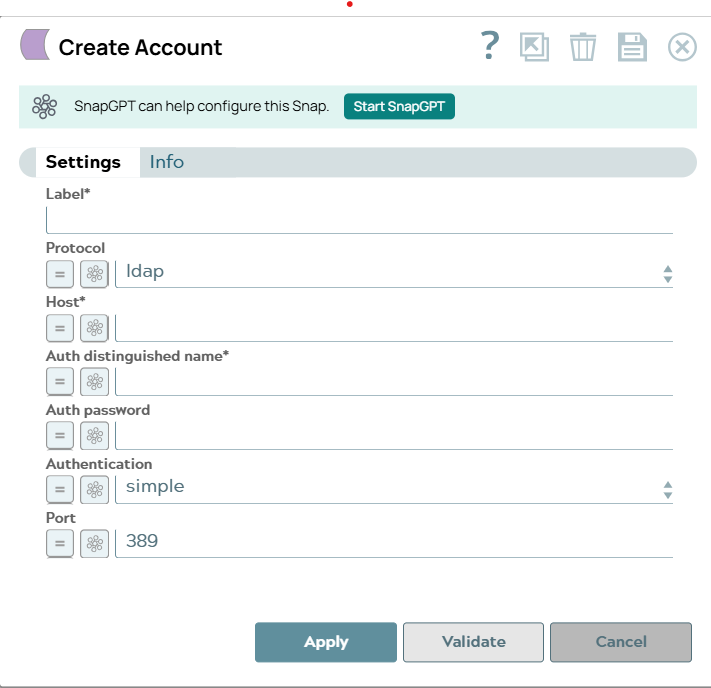
Account settings
Legend:
- Expression icon (
 ): Allows using
JavaScript syntax to access SnapLogic Expressions to set field values dynamically (if
enabled). If disabled, you can provide a static value. Learn more.
): Allows using
JavaScript syntax to access SnapLogic Expressions to set field values dynamically (if
enabled). If disabled, you can provide a static value. Learn more. - SnapGPT (
 ): Generates SnapLogic Expressions
based on natural language using SnapGPT. Learn
more.
): Generates SnapLogic Expressions
based on natural language using SnapGPT. Learn
more. - Suggestion icon (
 ): Populates a
list of values dynamically based on your Snap configuration. You can select only one
attribute at a time using the icon. Type into the field if it supports a comma-separated
list of values.
): Populates a
list of values dynamically based on your Snap configuration. You can select only one
attribute at a time using the icon. Type into the field if it supports a comma-separated
list of values. - Upload
 : Uploads files. Learn more.
| Field/Field set | Description |
|---|---|
Label*
String |
Required. Specify a unique label for the account.
Default value: N/A Example: LDAP Account |
Protocol
Dropdown list |
The Internet Protocol to connect to the LDAP server. Options available include:
Warning: For performing certain operations like creating or updating an
entry with unicode password, it is recommended to use ldaps protocol.
Whenever the LDAP Snaps display an error indicating insufficient privileges
(unwilling to perform), use the LDAPS protocol.
Default value: ldap Example: ldaps |
Host*
String/Expression |
Required. The IP address or host name of the LDAP server.
Default value: N/A Example: ldap.example.com |
Auth distinguished name*
String/Expression |
Required. The DN (distinguished name) of the user.
Default value: N/A Example: cn=admin,dc=example,dc=com |
Auth password
String/Expression |
The password of the user.
Default value: N/A Example: mypassword |
Authentication
Dropdown list |
The authentication mechanism to be used. Options available include:
Default value: simple Example: none |
Port
Integer/Expression |
The port number to connect to the LDAP server. Default value to attempt: 389
for LDAP, 636 for LDAPS.
Default value: 389 Example: 636 |