


Dropbox Access Token Account
Overview
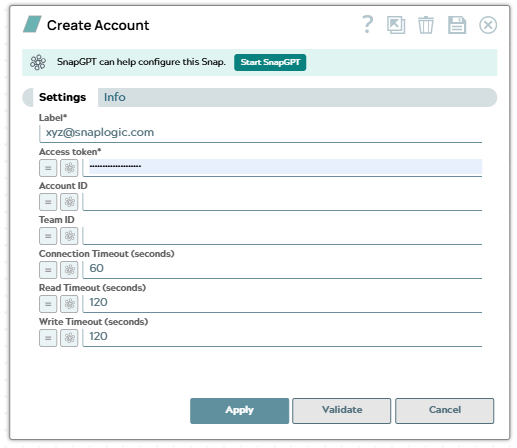
Use this account type to connect Dropbox Snaps with Dropbox data sources using a long-lived access token. This is a simple account that uses an access token generated from the Dropbox App Console. You can generate an access token in the Dropbox App Console under the Generated access token section.
This account type is easier to set up than OAuth2 for testing and development.
Prerequisites
- A Dropbox account
- A valid Dropbox access token generated from the Dropbox App Console
Account settings
- Expression icon (
 ): Allows using
JavaScript syntax to access SnapLogic Expressions to set field values dynamically (if
enabled). If disabled, you can provide a static value. Learn more.
): Allows using
JavaScript syntax to access SnapLogic Expressions to set field values dynamically (if
enabled). If disabled, you can provide a static value. Learn more. - SnapGPT (
 ): Generates SnapLogic Expressions
based on natural language using SnapGPT. Learn
more.
): Generates SnapLogic Expressions
based on natural language using SnapGPT. Learn
more. - Suggestion icon (
 ): Populates a
list of values dynamically based on your Snap configuration. You can select only one
attribute at a time using the icon. Type into the field if it supports a comma-separated
list of values.
): Populates a
list of values dynamically based on your Snap configuration. You can select only one
attribute at a time using the icon. Type into the field if it supports a comma-separated
list of values. - Upload
 : Uploads files. Learn more.
| Field/Field set | Description | ||
|---|---|---|---|
| Label*
|
Specify a unique label for the account. Default value: N/A Example: Dropbox Access Token Account |
||
| Access token*
|
Dropbox access token. Generate this in your Dropbox App Console under Generated access token. For long-lived tokens, ensure your app has the offline access type. Default value: N/A Example: Encrypted |
||
| Account ID
|
Specify the API v2 account ID if this OAuth 2 flow is user-linked. This is returned in the OAuth token response. When set, operations are scoped to this user. Default value: N/A Example: dbid:AABCDefGhIjKlMnOpQrStUvWxYz1234567 |
||
| Team ID
|
API v2 team ID if this OAuth 2 flow is team-linked. This is returned in the OAuth token response. When set, you must also specify an Account ID to indicate which team member's files to access. Default value: N/A Example: dbtid:AACdEfGhIjKlMnOpQrStUvWxYz12345 |
||
| Connection Timeout (seconds)
|
Specify the maximum time in seconds to wait for a connection to be established. Default value: 60 Example: 30 |
||
| Read Timeout (seconds)
|
Specify the maximum time in seconds to wait for data to be read from an established connection. Default value: 120 Example: 180 |
||
| Write Timeout (seconds)
|
Specify the maximum time in seconds to wait for data to be written to an established connection. Default value: 120 Example: 180 |
||
Troubleshooting
| Error | Reason | Resolution |
|---|---|---|
| Failed to validate account. | Invalid or expired access token | Verify that the access token is valid and has not expired. Generate a new token from the Dropbox App Console if necessary. |
| Insufficient permissions. | The access token does not have the required permissions | Ensure the access token has the necessary scopes/permissions for the operations you want to perform. |