


Fetch pipeline by snode ID
GET https://{controlplane_path}/api/1/rest/public/pipeline/fetch/{snode_id}Overview
This API fetches a single pipeline by its snode_id and returns the complete pipeline JSON.
Use this API when you need to retrieve a single pipeline quickly. For exporting one or more pipelines as a ZIP archive, refer to Export individual assets.
Prerequisites
- Read access to the pipeline.
Request
GET https://{controlplane_path}/api/1/rest/public/pipeline/fetch/{snode_id}
Path parameters
| Key | Description |
|---|---|
controlplane_path |
Required. The SnapLogic control plane host:
elastic.snaplogic.com (US) or
emea.snaplogic.com (EU). |
snode_id |
The unique snode ID of the pipeline. You can also pass an
instance_id or instance_fqid by setting
the id_type query parameter accordingly.
Example:
|
version_number |
Optional. The asset version number of the pipeline to fetch. If omitted, the latest version is returned. |
Query parameters
None.
Request header
Basic authentication
To use basic authentication, specify Basic for authorization in the request
header, add your credentials (email and password for your SnapLogic user or service account), and
specify application/json for content type. For example:
Authorization: Basic {base64_encoded <email>:<password>}
Content-Type: application/json
Example of basic authentication using Postman:
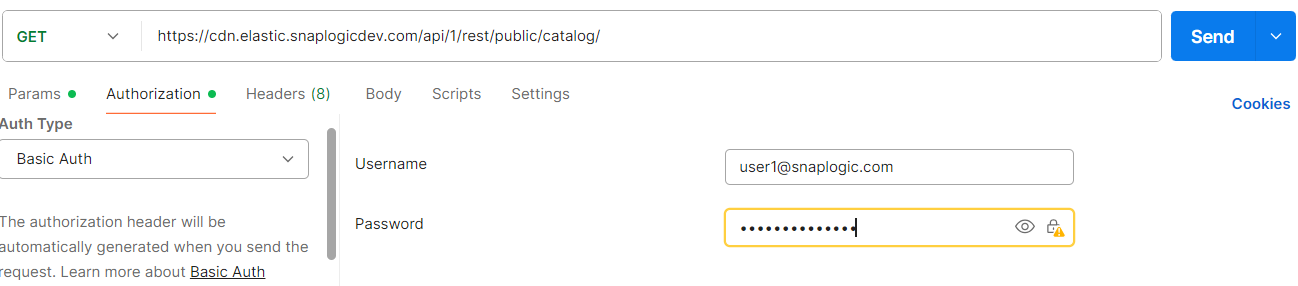
Learn more about the basic authentication header in REST API requests.
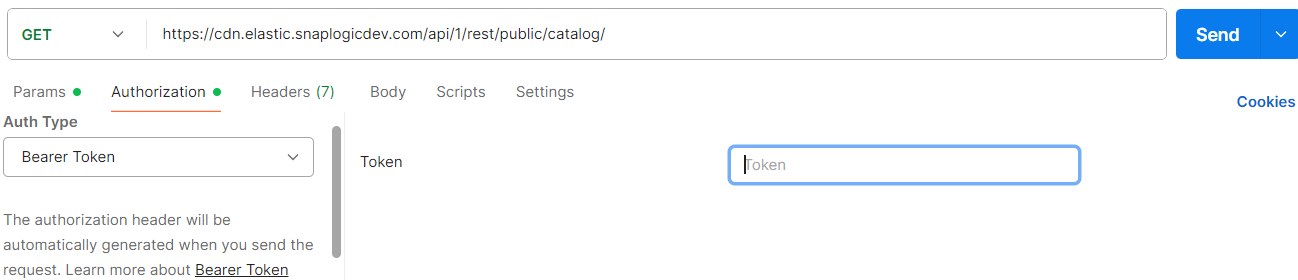
JWT authentication
When using JWT authentication, the API request includes specific headers. In the request header,
specify Bearer Token for authorization, add the token, and specify
application/json for content type. These headers are automatically added when
you configure bearer token authentication in your API client. The authorization header contains
the word Bearer followed by a space and your JWT.
Authorization: Bearer Token {token}
Content-Type: application/json
Example of JWT authentication using Postman:
Response
A successful response returns 200 OK with the complete pipeline JSON under response_map.
{
    "response_map": {
        "snode_id": "65b124ad2c22dd5a9d774dff",
        "name": "MyPipeline",
        "path": "/MyOrg/MyProjectSpace/MyProject/MyPipeline",
        "path_id": "/MyOrg/MyProjectSpace/MyProject",
        "property_map": {},
        "snap_map": {},
        "link_map": {},
        "render_map": {},
        "create_user_id": "[email protected]",
        "update_user_id": "[email protected]",
        "create_time": "2025-01-01T00:00:00.000000+00:00",
        "update_time": "2025-01-01T00:00:00.000000+00:00"
    },
    "http_status_code": 200
}
property_map, snap_map,
link_map, and render_map objects contain nested
pipeline data and are shown here as empty objects for brevity.| Key | Type | Description |
|---|---|---|
snode_id |
string | The unique snode ID of the pipeline. |
name |
string | The name of the pipeline. |
path |
string | The full path to the pipeline, including the pipeline name. |
path_id |
string | The path to the project that contains the pipeline. |
property_map |
object | The pipeline properties, including input, output, error view, and settings configurations. |
snap_map |
object | The Snap configurations in the pipeline. |
link_map |
object | The link configurations between Snaps in the pipeline. |
render_map |
object | The rendering properties of the pipeline canvas, including pan and zoom settings. |
create_user_id |
string | The email address of the user who created the pipeline. |
update_user_id |
string | The email address of the user who last updated the pipeline. |
create_time |
string | The timestamp when the pipeline was created, in ISO 8601 format. |
update_time |
string | The timestamp when the pipeline was last updated, in ISO 8601 format. |
Example
Fetch a pipeline by its snode_id:
GET https://elastic.snaplogic.com/api/1/rest/public/pipeline/fetch/65b124ad2c22dd5a9d774dff
Fetch a specific version of a pipeline by its snode_id:
GET https://elastic.snaplogic.com/api/1/rest/public/pipeline/fetch/65b124ad2c22dd5a9d774dff/2