


Power BI Post Import
Overview
The Power BI Post Import Snap creates new records in the selected workspace from pbix, Excel, and Rdl files or OneDrive for Business.
- This is a Write-type Snap.
 Works in Ultra Tasks
Limitations
- Only supports import of PBIX files less than 1 GB.
- Does not support importing PBIX files from OneDrive.
Snap views
| Type | Description | Examples of upstream and downstream Snaps |
|---|---|---|
| Input |
This Snap has exactly one binary input view. Expected input: A binary stream containing details of the file or data to import. |
|
| Output |
This Snap has at most one document output view. Expected output: A document containing the success/failure confirmation. |
|
| Learn more about Error handling. | ||
Snap settings
| Field/Field set | Description |
|---|---|
|
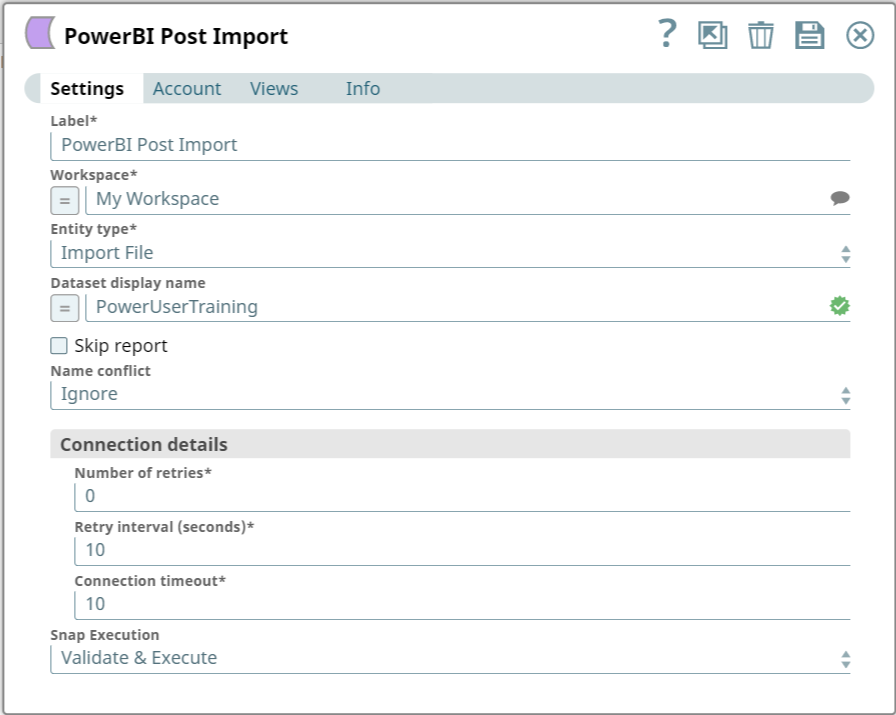
Label String
|
Specify a unique name for the Snap. Modify this to
be more appropriate, especially if there are more than one of the same Snap in the
pipeline.
Default value: Power BI Post Import Example: Import Employee Files |
|
Workspace String
|
Required. Enter the workspace in which to import the data/file. Alternatively, click the Suggest icon to fetch a list of workspaces associated with the Power BI account and select the workspace.
Default value: My Workspace Example: Employee Records |
|
Entity type Dropdown list
|
Required. Select the entity type to import.
Available options are:
Default value: Import File Example: Import from OneDrive |
|
Dataset display name String
|
Specify the dataset's name to use after importing data from the file. The name must also include the file's extension.
Note: Not supported when importing from OneDrive.
Default value: N/A Example: PowerUserTraining |
|
Skip report Checkbox
|
Select to skip report import. Only supported for PBIX files.
Default value: Deselected |
|
Name conflict Dropdown list
|
Specify how to handle creating a dataset when a dataset of the same name exists already.
Available options are:
Note: Only Abort and Overwrite are supported for RDL files.
Default value: Ignore Example: Abort |
| Connection details | Use this field set to configure the network connection parameters.
This field set contains the following fields:
|
|
Connection timeout Integer
|
Required. Specify the connection timeout duration in seconds.
Default value: 0 Example: 30 |
|
Number of retries Integer
|
Required. Specify the maximum number of re-connections if the connection fails or is timed-out.
Default value: 10 Example: 4 |
|
Retry interval (seconds) Integer
|
Required. Specify the interval in seconds between reconnections.
Default value: 10 Example: 30 |
|
Snap execution Dropdown list
|
Choose one of the three modes in
which the Snap executes. Available options are:
Default value: Execute only |
Troubleshooting
| Error | Cause | Resolution |
|---|---|---|
| HTTP Response Exception:400 | Invalid OAuth endpoint/token URL. | Verify the values of the OAuth2 endpoint or token URLs in the account settings. |
| HTTP Response Exception:401 | Invalid refresh token or access token. | Verify the values of the refresh or access tokens in the account settings. |