


Exit
Overview
You can use this Snap to force a Pipeline to stop with a failed status if it receives more records than the user-defined threshold.
- This is a Read-type Snap.
 Works in Ultra Tasks
Behavior of the Exit Snap in Ultra Pipelines
When an input document is passed to the Exit snap in an Ultra pipeline, the Snap acknowledges the message (removes it from the request queue) and fails the Pipeline (depending on the Threshold limit).
Snap views
| Type | Description | Examples of upstream and downstream Snaps |
|---|---|---|
| Input | Accepts document data that flows into the Exit Snap for threshold monitoring
and pipeline control. When the number of input documents exceeds the configured threshold limit, the Snap forces the pipeline to stop with a failed status. |
N/A |
| Output |
The output view passes through input documents that are within the configured threshold limit before the Snap triggers a pipeline failure. This optional view (Min: 0, Max: 1) allows downstream processing of documents that successfully pass the threshold check. |
N/A |
| Learn more about Error handling. | ||
Snap settings
- Expression icon (
 ): Allows using
pipeline parameters to set field values dynamically (if enabled). SnapLogic Expressions
are not supported. If disabled, you can provide a static value.
): Allows using
pipeline parameters to set field values dynamically (if enabled). SnapLogic Expressions
are not supported. If disabled, you can provide a static value. - SnapGPT (
 ): Generates SnapLogic Expressions
based on natural language using SnapGPT. Learn
more.
): Generates SnapLogic Expressions
based on natural language using SnapGPT. Learn
more. - Suggestion icon (
 ): Populates a
list of values dynamically based on your Snap configuration. You can select only one
attribute at a time using the icon. Type into the field if it supports a comma-separated
list of values.
): Populates a
list of values dynamically based on your Snap configuration. You can select only one
attribute at a time using the icon. Type into the field if it supports a comma-separated
list of values. - Upload
 : Uploads files. Learn more.
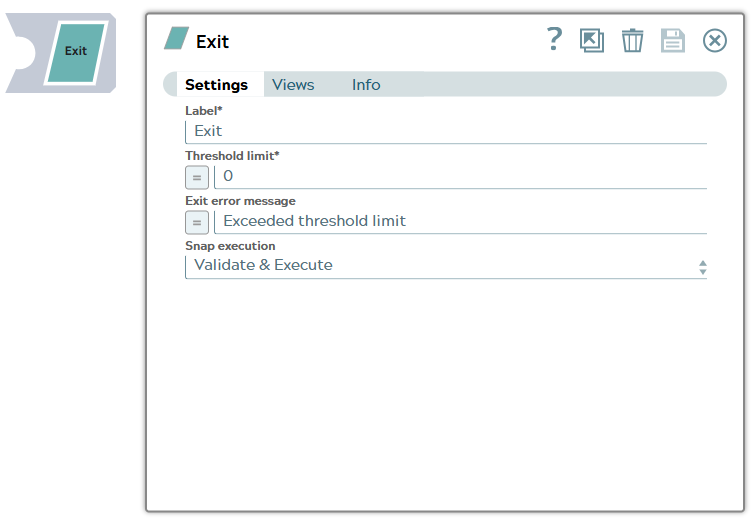
| Field/Field set | Type | Description |
|---|---|---|
Label
|
String | Required. Specify a unique name for the Snap. Modify this to be more appropriate, especially if more than one of the same Snaps is in the pipeline. Default value: Exit Example: Exit Transaction |
| Threshold limit | Integer/Expression | Required. Specify the maximum number of input
records to be received by the Snap. Warning: This field is expression
enabled; however, it cannot take values from the upstream Snaps. The Snap allows
only direct values or Pipeline parameters. Default value: 0 Example: 2483647 |
| Exit error message | String/Expression | Specify the message to be displayed when the error occurs. Warning: This field is expression enabled; in case the field is blank, the default value
is displayed. Default value: Exceeded threshold limit |
| Snap execution
|
Dropdown list |
Choose one of the three modes in
which the Snap executes. Available options are:
Example: Execute only Default value: Validate & Execute |