


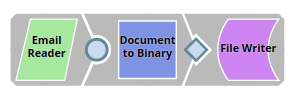
The Snap's configuration is the same as in reading emails from individual mailboxes, however the Account settings are to be configured a little differently:
-
Email ID - email ID suffixed with "/shared-mailbox". For example, [email protected] /shared-mailbox
-
Mail properties fields:
-
Mail property name: mail.imaps.auth.plain.disable
-
Mail property value: true
-
The screenshot below is a sample of the Account settings for such a configuration:

Validate the account and click Apply. If the mail properties are not configured the
validation fails with an exception.
The Email Reader Snap is configured the same way as in individual mailboxes,
in the Mail folder property, the folders from the shared mailbox are suggested as
seen in the screenshot below: |
A sample preview of the output data showing one of the emails in the shared
mailbox. |
- Download and import the pipeline into SnapLogic.
- Configure Snap accounts as applicable.
- Provide pipeline parameters as applicable.