


LDAP Add Entry
Overview
The LDAP Add Entry Snap adds a new LDAP entry onto the LDAP server.
Supported Accounts
- This is a Write-type Snap.
 Works in Ultra Tasks
Snap views
| Type | Description | Examples of upstream and downstream Snaps |
|---|---|---|
| Input |
This Snap has at most one document input view. The Distinguished name of the entry and a set of attributes. An attribute consists of a name and value. |
|
| Output |
This Snap has at most one document output view. The entry (if it did not exist before) will be added to the server. |
|
| Learn more about Error handling. | ||
Snap settings
| Field/Field set | Description |
|---|---|
Label*
String |
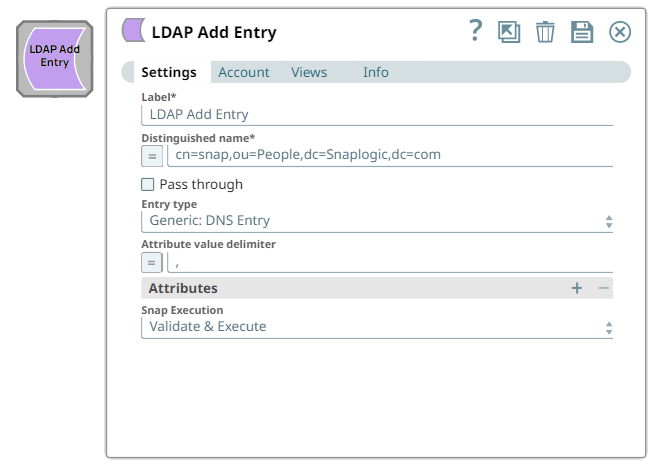
Specify a unique name for the Snap. Modify this to be more appropriate, especially if more than one of the same Snaps is in the pipeline. Default value: LDAP Add Entry Example: Add entries |
Distinguished name*
String/Expression |
Specify the distinguished name (DN) of the entry to which a new attribute is added.
Note: DN uniquely identifies a certain entry and its position in the directory information tree (DIT) hierarchy. The DN of an LDAP entry is similar to the path of a file on a file system.
Default value: N/A Example: cn=snap,ou=People,dc=Snaplogic,dc=com |
Pass through
Checkbox |
Select this checkbox to include the entire input data in the Snap's output. The Snap includes this data within the $original field in the output.
Default value: Deselected |
Entry type
Dropdown list |
Specify the type of entry. The options available include:
Note: An LDAP entry is a collection of information about an entity. Each entry consists of three components: Distinguished Name (DN), collection of attributes, and a collection of object classes.
Default value: Other Example: Courier Mail: Account |
Attribute value delimiter
String/Expression |
Specify the character or string to use as a delimiter to split the value of an attribute into multiple values.
Default value: N/A Example: , (Comma), ; (Semi-colon), : (Colon), / (Slash) |
| Attributes | Use this field set to define the attributes for the entry.
Note:
|
Attribute name*
String/Expression/ Suggestion |
Specify the name of the attribute to be attached with this entry.
Default value: N/A Example: department |
Attribute value*
String/Expression |
Specify the value to be assigned to the attribute.
Default value: N/A Example: engineering |
Snap execution
Dropdown list |
Choose one of the three modes in
which the Snap executes. Available options are:
Default value: Execute only Example: Validate and Execute |