


TPT Delete
Overview
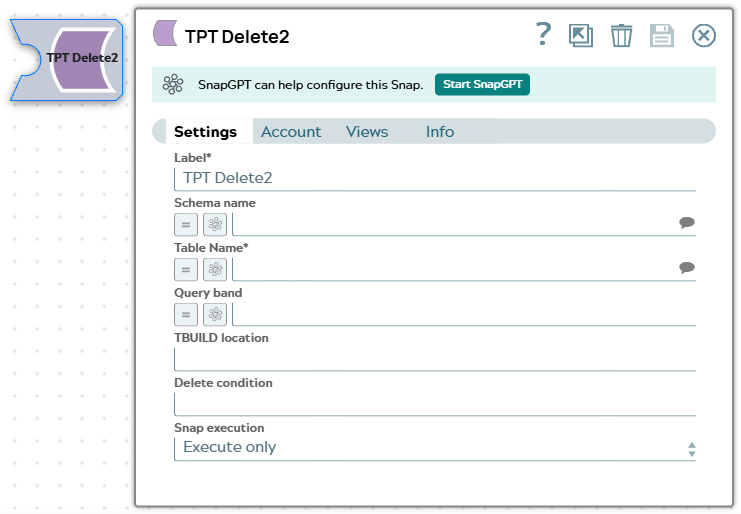
The TPT Delete Snap deletes records from a Teradata table using the TPT (Teradata Parallel Transporter) tbuild utility based on specified delete conditions.
This Snap allows logical operators like GE (Greater than or equals), GT (Greater than), LT (Less than), LE (Less than or equals), IS NULL, IS NOT NULL, and comparison operators such as <, >, <=, >=.
- The TPT Snaps are built to handle bulk input documents. The TPT Delete Snap is designed to execute only if there are input documents. The Snap does not execute when there is no input document.
- The equalTo '=' operator is not allowed to use with a PI (Primary Index) column. However, if the table has more than one PI columns, you can use them as partial PI columns.
- This is a Write-type Snap.
 Does not support Ultra Tasks
Prerequisites
TPT Snaps (TPT Insert, TPT Update, TPT Delete, TPT Upsert and TPT Load) use the 'tbuild' utility for the respective operations.
In order to use these Snaps in the pipelines, the respective TPT utilities should be installed/available on the Snapplexes.
Basic steps for installing the TPT utilities:
Procedure to install the Teradata tools and utilities:
- Download the Teradata Tools and Utilities base such as TTU 16.20.25.00 Linux - Base for Linux environment.
- If the OS is 64 bit, install 32 bit support packages on the environment and also any further dependencies.
- Install the Teradata Tools and Utilities (that includes tbuild, fastload, mload etc.).
- The default installation also configures the PATH in the OS.
Flow: If the tbuild or fastload is already available on the OS path then the corresponding TPT Snap can invoke the required utility, however, if these binaries are not available on the OS path, then we need to provide the absolute path of the respective binary in the Snap.
Snap views
| Type | Description | Examples of upstream and downstream Snaps |
|---|---|---|
| Input |
This Snap has at most one document input view. Expected upstream Snaps: Any Snap that provides a document output view, such as Structure or a JSON Generator Snap. Expected input: A stream of documents to be loaded into the table. Each input document contains values for one record in the table. |
|
| Output |
This Snap has at most one output view. Expected downstream Snaps: Any Snap with a document input view. Expected output: A single document containing the console output, return status from tbuild and the script which the Snap submitted to tbuild. |
|
| Learn more about Error handling. | ||
Snap settings
- Expression icon (
 ): Allows using
pipeline parameters to set field values dynamically (if enabled). SnapLogic Expressions
are not supported. If disabled, you can provide a static value.
): Allows using
pipeline parameters to set field values dynamically (if enabled). SnapLogic Expressions
are not supported. If disabled, you can provide a static value. - SnapGPT (
 ): Generates SnapLogic Expressions
based on natural language using SnapGPT. Learn
more.
): Generates SnapLogic Expressions
based on natural language using SnapGPT. Learn
more. - Suggestion icon (
 ): Populates a
list of values dynamically based on your Snap configuration. You can select only one
attribute at a time using the icon. Type into the field if it supports a comma-separated
list of values.
): Populates a
list of values dynamically based on your Snap configuration. You can select only one
attribute at a time using the icon. Type into the field if it supports a comma-separated
list of values. - Upload
 : Uploads files. Learn more.
| Field/Field set | Description |
|---|---|
Label
String |
Specify a unique name for the Snap. Modify this to be more appropriate, especially if more than one of the same Snaps is in the pipeline. Default value: TPT Delete |
Schema name
String/Expression/ Suggestion |
The database schema name. If not defined, the suggestion for the table name will retrieve all the table names of all the schemas. The property is suggestible and will retrieve available database schemas during suggest values. Note: The values can be passed using the pipeline parameters but not the upstream parameter.
Default value: N/A Example: SYS |
Table name
String/Expression/ Suggestion |
Required. Name of the table to delete records from. Note: The values can be passed using the pipeline parameters but not the upstream parameter.
Default value: N/A Example: people |
TBUILD Location
String/Expression |
Location of the tbuild application. Note: The location will be on the Snapplex.
Default value: N/A Example: /usr/bin/tbuild |
Delete Condition
String/Expression |
Delete statement to be executed to delete the table data which matches given delete condition. If no condition is specified in the Delete Condition field then entire table data will be deleted from the specified database. Please note that, due to Teradata's requirement, an equality operator '=' is not allowed with PI (Primary Index). For example, if 'empno' is a PI, "empno=:empno" will cause an error "RDBMS error 3537: A MultiLoad DELETE Statement is Invalid." Default value: N/A Example: empno < 1000 or empno LT :empno |
Query band
String/Expression |
Specify the name-value pairs to use in the session's generated query band statement. The query band is passed to the Teradata database as a list of name-value pairs separated by semi-colons. The Snap sets the query band at the session level. Therefore, the metadata queries that the Snap runs also carry this information. Default value: N/A Example: ProjectName=dstage1;user=test; |
Snap execution
Dropdown list |
Choose one of the three modes in
which the Snap executes. Available options are:
|
Temporary files
During execution, data processing on Snaplex nodes occurs principally in-memory as streaming and is unencrypted. When processing larger datasets that exceed the available compute memory, the Snap writes unencrypted pipeline data to local storage to optimize the performance. These temporary files are deleted when the pipeline execution completes. You can configure the temporary data's location in the Global properties table of the Snaplex node properties, which can also help avoid pipeline errors because of the unavailability of space. Learn more about Temporary Folder in Configuration Options.