


Oracle - Execute
Overview
The Oracle - Execute Snap executes an Oracle statement or query.
This Snap works only with single queries.
This Snap:
- is for simple DML (SELECT, INSERT, UPDATE, DELETE) type statements. For the comprehensive scripting functionality offered by various databases, use stored procedure functionality offered by their chosen database using the Stored Procedure Snap.
- might drop your database, hence be cautious.
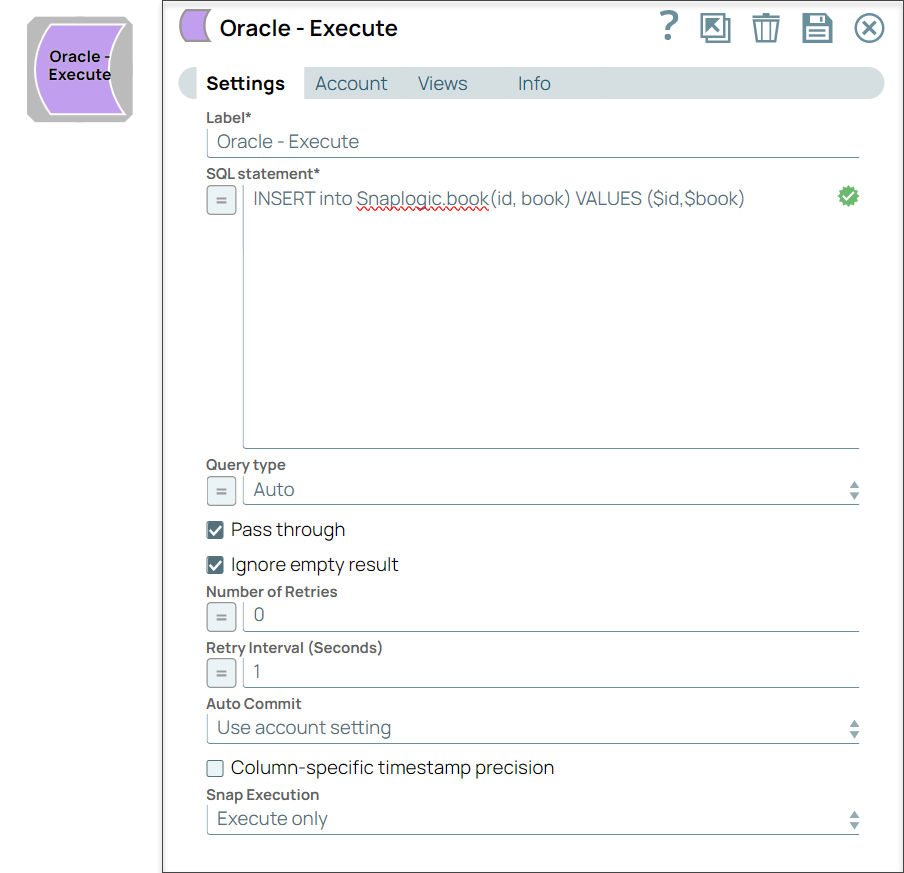
If you execute a SELECT query, the query's results are merged into the incoming document and the values of any existing keys will be overwritten. On the other hand, if there are no results from the query, the original document is written.
Any valid JSON paths that you define in the WHERE clause for queries/statements are substituted with values from an incoming document. Documents will be written to the error view if the document is missing a value to be substituted into the query/statement.
- This is a Write-type Snap.
 Works in Ultra Tasks
The Oracle JDBC Driver is upgraded from OJDBC6 JAR (v11.2.0.4) to OJDBC10 JAR (v19.20.0.0) in the latest distribution in October 2023 and deployed to the stable distribution in the November 2023 release (after the Snaplex upgrade). The latest JDBC driver upgrade is backward-compatible. Learn more: Oracle JDBC driver and JOOQ upgrades.
You can consume this driver upgrade with the 434patches23000 Snap Pack
version.
This JDBC driver upgrade has resulted in specific behavior changes that include errors, status codes, and success and failure messages. Learn more about the behavior changes to ensure your migration to the upgraded driver is seamless.
Behavior changes
Breaking change
With the 439patches29008 Snap Pack version if any of your existing Oracle
pipelines use the encoded ROWID (by manually handling the Base64 encoded
data), your pipelines might break. To prevent your pipelines from failing, you must update
your Snap Pack version to the latest version.
Behavior Change in 4.27
In 4.26, when the stored procedures were called using the Database Execute Snaps, the queries were treated as write queries instead of read queries. So the output displayed message and status keys after executing the stored procedure. In 4.27, all the Database Execute Snaps run stored procedures correctly, that is, the queries are treated as read queries. The output now displays message key, and OUT params of the procedure (if any). The status key is not displayed.
If the stored procedure has no OUT parameters then only the message key is displayed with value success.
If you have any existing Pipelines that are mapped with status key or previous description then those Pipelines will fail. So, you might need to revisit your Pipeline design.
Earlier, the ROWID columns were displayed in binary (Base64 encoded data)
form in the output. With the 439patches29008, the Oracle - Execute and Oracle - Select Snaps display the ROWID
columns in string form in the output (which can be used for other operations
downstream).
As part of main23721 (because of the JOOQ upgrade) previously, when you
used a stored procedure in the Oracle - Execute Snap, the
Snap displayed a Message:Success in the output. Now, the Snap displays
$UPDATE_COUNT=-1.
As part of 436patches25696, when you use a stored procedure in the Oracle
- Execute Snap, the Snap displays Message: Success and
$UPDATE_COUNT=-1, 0, or 1 (based on the Snap Pack behavior) in the
output.
Prerequisites
None.
Limitations
- Due to the limitation in Oracle JDBC driver, the SQL statement cannot have semicolons at the end except that it is a BEGIN-END block.
- This Snap cannot invoke procedures, hence we recommend that you use Oracle - Stored Procedure Snap for invoking procedures.
Known issues
- When the SQL statement property is an expression, the Pipeline parameters are shown in the Suggest, but not the input schema.
- With the
439patches29008Snap Pack version if any of your existing Oracle pipelines use the encodedROWID(by manually handling the Base64 encoded data), your pipelines might break. To prevent your pipelines from failing, you must update your Snap Pack version to the latest version.
Snap views
| Type | Description | Examples of upstream and downstream Snaps |
|---|---|---|
| Input |
This Snap has at most one document input view. If the input view is defined, then the where clause can substitute incoming values for a given expression. |
|
| Output |
This Snap has at most one document output view. If an output view is available and an update/insert/merge/delete statement was executed, then the original document that was used to create the statement will be output with the status of the statement executed. Database Write Snaps output all records of a batch (as configured in your account settings) to the error view if the write fails during batch processing. |
|
| Learn more about Error handling. | ||
Snap settings
- Expression icon (
 ): Allows using
pipeline parameters to set field values dynamically (if enabled). SnapLogic Expressions
are not supported. If disabled, you can provide a static value.
): Allows using
pipeline parameters to set field values dynamically (if enabled). SnapLogic Expressions
are not supported. If disabled, you can provide a static value. - SnapGPT (
 ): Generates SnapLogic Expressions
based on natural language using SnapGPT. Learn
more.
): Generates SnapLogic Expressions
based on natural language using SnapGPT. Learn
more. - Suggestion icon (
 ): Populates a
list of values dynamically based on your Snap configuration. You can select only one
attribute at a time using the icon. Type into the field if it supports a comma-separated
list of values.
): Populates a
list of values dynamically based on your Snap configuration. You can select only one
attribute at a time using the icon. Type into the field if it supports a comma-separated
list of values. - Upload
 : Uploads files. Learn more.
| Field/Field set | Description |
|---|---|
Label String |
Required. Specify a unique name for the Snap. Modify this to be more appropriate, especially if more than one of the same Snaps is in the pipeline. Default value: Oracle Execute Example: Oracle Execute |
SQL statement*
String |
Required. Specify the SQL statement to execute on the server. Executing SQL statements in SnapLogic You must understand the following scenarios to successfully execute your SQL statements: Scenario 1: Executing SQL statements without expressions If you do not enable the expression toggle of the SQL statement field:
Examples:
Additionally, the JSON path is allowed only in the WHERE clause. If the SQL statement starts with SELECT (case-insensitive), the Snap regards it as a select-type query and executes once per input document. If not, it regards it as write-type query and executes in batch mode. If your Oracle table has columns whose names contain a '$' (or any other special
character) in it, enclose the column name within quotes, such as: Scenario 2: Executing SQL queries using expressions If you enable the expression toggle of the SQL statement field:
Table name and column names must not be provided as bind parameters. Only values can be provided as bind parameters. Examples:
Note:
We recommend you to use the Oracle - Stored Procedure Snap for invoking procedures as the Oracle Execute Snap has the following limitation while invoking procedures:
Oracle JDBC documentation recommends using Single quotes in values must be escaped Any relational database (RDBMS) treats single quotes ( For example:
Default value: N/A |
Query type
Dropdown list |
Select the type of query for your SQL statement (Read or Write). When Auto is selected, the Snap tries to determine the query type automatically. If the execution result of the query is not as expected, you can change the query type to Read or Write. Default value: Auto Example: Read |
Pass through
Checkbox |
Select this checkbox to pass the input document to the output view under the key
' Default value: Selected |
Ignore empty result
Checkbox |
Select this checkbox to not write any document to the output view when a SELECT operation does not produce any result. If you deselect this checkbox and select Pass through, the input document will be passed through to the output view. Default value: Deselected |
Auto commit
Dropdown list |
Choose one of the options from the list to override the state of the Auto commit on the account. The available options are:
Default value: Use account setting Note: 'Auto commit' may be enabled for certain use cases if PostgreSQL jdbc driver
is used in either Redshift, PostgreSQL or generic JDBC Snap. But the JDBC driver
may cause out of memory issues when Select statements are executed. In those
cases, "Auto commit" in Snap property should be set to 'False' and the Fetch size
in the "Account setting" can be increased for optimal performance.
Note:
Behavior of DML Queries in Database Execute Snap when auto-commit is false DDL queries used in the Database Execute Snap will be committed by the Database itself, regardless of the Auto-commit setting. When Auto commit is set to false for the DML queries, commit will be called only at the end of the pipeline lifecycle. Instead of building multiple Snaps with inter dependent DML queries, we recommend you to use the Oracle - Stored Procedure Snap. The Auto commit needs to be true in a scenario where the downstream Snap does depend on the data processed on an Upstream Database Execute Snap containing a DML query. When the Auto commit is set to the Use account setting on the Snap, the account level commit needs to be enabled. |
Number of retries
Integer |
Specify the maximum number of retry attempts the Snap must make in case of network failure. When you set the Number of retries to more than 0, the Snap generates duplicate records when the connection is not established. To prevent duplicate records, we recommend that you follow one of the following:
Default value: 0 Example: 3 |
Retry interval (seconds)
Integer |
Specify the time interval between two successive retry requests. A retry happens only when the previous attempt resulted in an exception. Default value: 1 Example: 10 |
Column-specific timestamp precision
Checkbox |
Select this checkbox to display the timestamp with millisecond/microsecond/nanosecond precision in string type. By default, the checkbox is deselected, which maintains the backward compatibility (supports only millisecond of date time type). Default value: Deselected |
|
Snap execution Dropdown list
|
Choose one of the three modes in
which the Snap executes. Available options are:
Default value: Execute only Example: Validate & execute |