


MongoDB Insert
This Snap executes a MongoDB insert command to insert input documents into the database.
Overview
This Snap executes a MongoDB insert command. Input documents will be inserted into the database. DateTime objects will be converted to UTC time zone by MongoDB, so the original timezone will be lost when inserting the object.
Supported Accounts
- This is a Write-type Snap.
 Works in Ultra Tasks when the Batch size is set to 1.
Prerequisites
None.
Limitations
- If you have a number in Decimal128 data type, the Snap inserts the number as a 64-bit floating-point value instead of a 128-bit floating-point value. As a result of this limitation, you may lose precision for values whose representation requires a 128-bit floating-point value.
Known issues
None.
Snap views
| Type | Description | Examples of upstream and downstream Snaps |
|---|---|---|
| Input | This Snap has exactly one document input view. The input document will be inserted into the database. | |
| Output | Optional. This Snap has at most one document output view. | |
| Learn more about Error handling. | ||
Snap settings
| Field/Field set | Description |
|---|---|
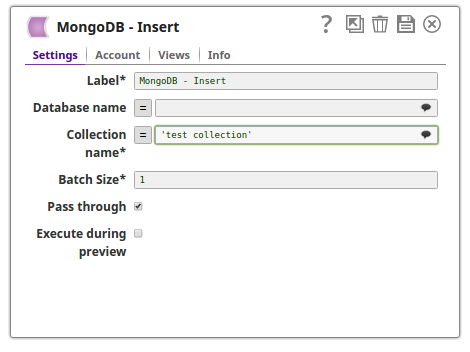
Label String |
Required.Specify a unique name for the Snap. Modify this to
be more appropriate, especially if there are more than one of the same Snap in the
pipeline.
Default value: MongoDB - Insert |
Database name String/Suggestion |
The database that the collection is defined in. If not specified, then the MongoDB account database will be used. Default value: N/A Example: assets |
Collection name String/Suggestion |
Required. MongoDB collection name to execute insert on. Default value: N/A Example: users |
Batch Size Integer |
Required. Number of documents to be inserted at a time. Default value: 1 Example: 10 |
Pass through Checkbox |
If selected, the input document will be passed through to the output views under the key 'original'. The document will be passed to the Parameter output view, and it will also be passed to the Result Set output view if there is output sent from this view. Default status: Selected |
Number of retries Integer/Expression |
Specify the maximum number of attempts to be made to receive a response. The request is terminated if the attempts do not result in a response. Note:
Default value: 0 Example: 4 |
Retry interval (seconds) Integer/Expression |
Specify the time interval between two retry requests. Default value: 1 Example: 5 |
|
Snap execution Dropdown list
|
Choose one of the three modes in
which the Snap executes. Available options are:
Default value: Execute only Example: Validate & Execute |