


Tc Meta Get LOV Values
Use this Snap to get the configured values of the List of Values (LOV) from Teamcenter. LOV is a specific type of attribute that provides a predefined list of acceptable values for a particular attribute in the system. When users are entering or editing data for an object, they can choose values from the List of Values, ensuring consistency and accuracy in the data.
Supported Accounts
- This is a Read-type Snap.
 Works in Ultra Tasks
Prerequisites
- A valid Teamcenter account with the required permissions.
Snap views
| Type | Description | Examples of upstream and downstream Snaps |
|---|---|---|
| View |
Description |
Examples of Upstream and Downstream Snaps |
| Input |
Optional.This Snap has at the most one document input view. The required input of the snap is the object type, LOV name and the property name of the LOV. It is necessary to set either lov name or object type and property name. |
|
| Output |
This Snap has exactly one document output view. The output of the snap are the values of the Teamcenter list of values. |
|
| Learn more about Error handling. | ||
Examples
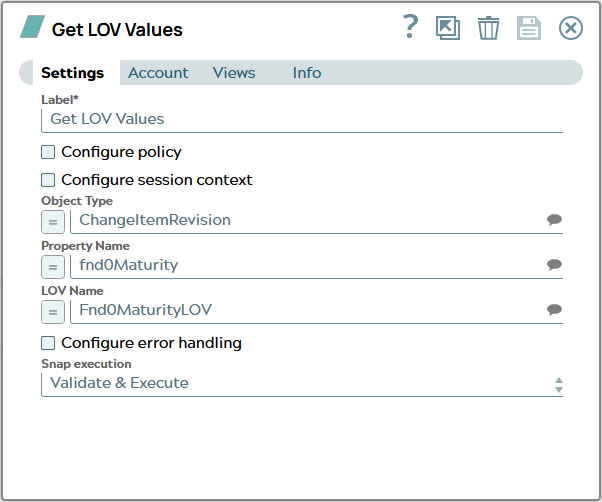
Tc Meta Get LOV Values: Get LOV values for Fnd0MaturityLOVSnap settings
| Field/Field set | Description |
|---|---|
Label
String |
Specify a unique name for the Snap. Modify this to
be more appropriate, especially if there are more than one of the same Snap in the
pipeline.
Default value: Tc Meta Get LOV Values |
Configure policy
Checkbox |
Select this checkbox to run the Snap with a specific named Teamcenter policy. A policy determines the set of object properties that Teamcenter returns. Learn more: Configure policy. Default status: Deselected |
Configure session context
Checkbox |
Select this checkbox to run the Snap with a group, role, or project other than the one configured in the account. Learn more: Configure session context. Default status: Deselected |
Object Type
String/Expression/ Suggestion |
Specify the type of the Teamcenter object LOV values shall be fetched for in Teamcenter. In JSON document the content for path can look like this: Name of the JSON property has to be the technical name of a valid type in Teamcenter datamodel. Default value: N/A Example: ChangeItemRevision |
Property Name
String/Expression/ Suggestion |
Specify the name of the property of the previously entered Object type LOV values shall be fetched for. Default value: N/A Example: fnd0Maturity |
LOV Name
String/Expression/ Suggestion |
Alternativly specify the name of the Teamcenter LOV object. Default value: N/A Example: Fnd0MaturityLOV |
Configure error handling
Checkbox |
Select this checkbox to define how the Snap behaves when Teamcenter returns an error. Use these settings for analysis and debugging. Learn more: Configure error handling. Default status: Deselected |
Snap execution
Dropdown list |
Choose one of the three modes in
which the Snap executes. Available options are:
|