


PostgreSQL Bulk Upsert
Overview
This Snap enables you to perform bulk insert or update operations (using the MERGE command) into the existing tables or any input data stream. The upsert operation updates existing rows if the specified value exists in the target table and inserts a new row if the specified value does not exist in the target table.
The PostgreSQL Bulk Upsert Snap processes the entire input as a single atomic
operation. It loads all input data into a temporary table using the PostgreSQL
COPY command, then upserts into the target table using the
MERGE command. Because MERGE is atomic, if any
record fails (for example, because of a foreign key constraint violation), the entire
operation fails and no records are upserted. This Snap does not support
batching.
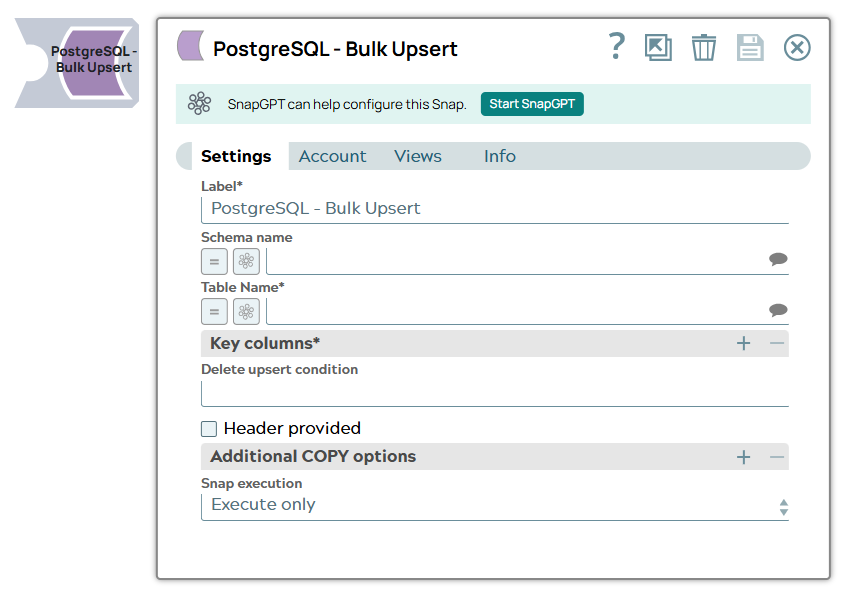
- This is a Write-type Snap.
 Works in Ultra Tasks
Prerequisites
A valid account with the required permissions.
Support and Limitations
- The Bulk Upsert Snap uses the PostgreSQL
MERGEcommand, which executes all documents as a single atomic operation with no batching support. If any record fails, the entire batch is aborted and no records are upserted, not even the valid ones.
Snap views
| Type | Description | Examples of upstream and downstream Snaps |
|---|---|---|
| Input | Requires the Upsert format and additional detail, if required, to insert new or update existing rows in bulk. | |
| Output | The output is in document view format. The output view lists the number of rows that were updated, modified, or inserted in the target table. | |
| Learn more about Error handling. | ||
Snap settings
| Field/Field set | Type | Description |
|---|---|---|
| Label
|
Required. Specify a unique name for the Snap. Modify this to be more appropriate, especially if more than one of the same Snaps is in the pipeline. Default value: PostgreSQL Bulk Upsert Example: PostgreSQL Bulk Upsert |
|
| Schema name
|
The database schema name. Selecting
a schema filters the Table name list to show only tables within that
schema. Default value: N/A Example: emp_bulk_upsert_schema |
|
| Table name
|
Required. The
table on which to execute the insert operation. Default value: N/A Example: emp_mdm_master |
|
| Key columns | Required. Specify the conditions to check for
existing entries in the target table. Default value: N/A |
|
| Column
|
Required.
Specify one or more columns from the target table to check for
existing entries. Default value: N/A |
|
| Delete upsert condition
|
Specify the delete condition to
update, delete, or insert records. When the delete upsert condition
is not blank and the condition is met, the records are deleted. Default value: N/A Example: emp_name="Charlie" |
|
| Header provided
|
Select this checkbox if the header
is included in the input schema. Note: HEADER, FORMAT,
and ENCODING should not be provided as part of Additional COPY
options. Default status: Deselected |
|
| Additional COPY options | Use this field to
specify additional PostgreSQL COPY command options.
Note: Error control through the
ON_ERROR option is available from PostgreSQL
17 and later. If you are using PostgreSQL 15 or 16, error control
during the copy phase is not available. From PostgreSQL 17, you
can add ON_ERROR ignore in this field to skip
records that fail during the copy phase. The REJECT_LIMIT
10 is configurable from PostgreSQL
18.Important: Errors during the merge phase
cannot be controlled. The Snap fails if any invalid record exists
in the batch because the MERGE command is
atomic.Default value: N/A |
|
| COPY options
|
Specify the COPY option. Default value: N/A Example: DELIMITER '|', ESCAPE '`' |
|
| Snap Execution
|
Choose one of the three modes in which the Snap executes. Available options are:
Default value: Execute only Example: Validate & Execute |
|
Troubleshooting
| Error | Reason | Resolution |
|---|---|---|
| The Snap displays an error if you use an older version (below 15) of PostgreSQL. | An older version of PostgreSQL might exist. The MERGE command is available only from PostgreSQL version 15.
Note: The MERGE command in PostgreSQL 15 version does not have a returning clause, which helps to output the number of records inserted/updated separately.
|
Use PostgreSQL DB version 15 to execute the MERGE command. |
| Key column name is required. | No key column(s) specified for checking for existing entries. | Please enter one or more key column names. |
| Key column name is not present in target table. | Incorrect key column(s) specified for checking for existing entries. | Please select one or more key column names from the suggestion box. |
| All columns in target table are key columns. | The merge will fail as all columns in the target table are key columns. | Please select one or more (but not all) key column names from the suggestion box. |
| Batch processing scenario in PostgreSQL Bulk Upsert: the Route error data to error view option is enabled and the Snap routes the error to the error view as expected, but it does not upsert any processed record. The entire Snap fails without processing any documents. | The Bulk Upsert operation executes as a single
When the Route error data to error view option is enabled and any record fails, the entire batch is aborted and no records are upserted, not even the valid ones. |
Verify that the input data matches the destination schema. To achieve record-level error handling, use a parent-child pipeline design:
Configure the batch size for the Update and Insert Snaps in the parent pipeline. This parent-child pipeline design enables you to process valid records and isolate invalid records without failing the entire operation. Download the sample pipelines: Parent pipeline to carry out the bulk upsert operation and Child pipeline to carry out the bulk upsert operation. |
Temporary files
During execution, data processing on Snaplex nodes occurs principally in-memory as streaming and is unencrypted. When processing larger datasets that exceed the available compute memory, the Snap writes unencrypted pipeline data to local storage to optimize the performance. These temporary files are deleted when the pipeline execution completes. You can configure the temporary data's location in the Global properties table of the Snaplex node properties, which can also help avoid pipeline errors because of the unavailability of space. Learn more about Temporary Folder in Configuration Options.