


SnapLogic MCP Server tools
The SnapLogic MCP Server is an AI integration layer that makes SnapLogic Platform operations available as tools for AI agents and LLMs. It implements the Model Context Protocol (MCP) over a Streamable HTTP transport, so any MCP-compatible client (such as Claude Code, SnapGPT, or a custom integration) can discover and invoke SnapLogic capabilities directly from an AI session, without custom scripting or middleware. The SnapLogic MCP Server is the hosted service that provides the tools; an MCP client is the application or AI agent that connects to it to discover and call those tools.
Use the MCP Server to connect AI agents to SnapLogic for account and asset discovery, pipeline operations, project and pipeline export, Snaplex management, SLDB file management, and Python code generation. To set up your client, refer to Connect an MCP client.
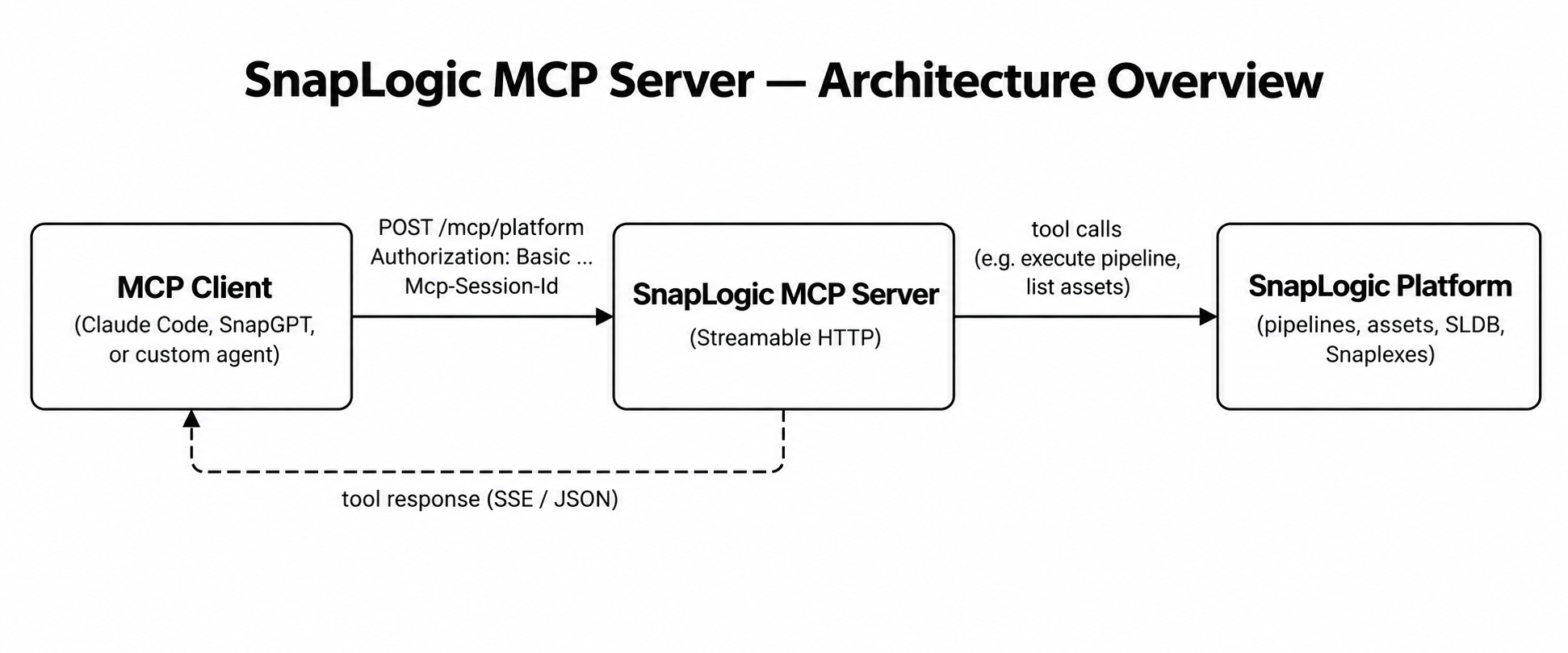
The MCP Server exposes three access paths, each returning a fixed set of tools. Choose the path that matches your use case:
| Path | Tools | Use for |
|---|---|---|
/platform_mcp/mcp |
46 (37 platform + 9 PyGen) | Full agent: operate pipelines and generate code in one session. |
/platform_mcp/mcp/platform |
37 platform | Control-plane operations: account and asset discovery, project and space management, pipelines, project/pipeline export, Snaplexes, SLDB files, runtime monitoring, health diagnostics, scheduled tasks, and user and group management. |
/platform_mcp/mcp/pygen |
9 PyGen | Text-to-pipeline generation helpers (Snap knowledge queries). |
/mcp/pygen returns 404 or /mcp shows only
37 tools, PyGen is not configured for that environment.Base URLs
Use the SnapLogic API host for your region. Your SnapLogic credentials work only for the region where your environment is hosted and cannot be used for a different region's endpoint.
| Region | Base URL |
|---|---|
| Production US | https://elastic.snaplogic.com |
| Production EU | https://emea.snaplogic.com |
Append any of the paths above to your region's base URL to form the full endpoint, for example:
https://elastic.snaplogic.com/api/1/rest/public/platform_mcp/mcp/platformAuthentication
The SnapLogic MCP Server supports the following authentication methods:
- HTTP Basic authentication
-
Pass your SnapLogic username (email) and password as a Base64-encoded Basic credential:
Authorization: Basic BASE64(username:password)For example, to encode
[email protected]:mypasswordinto Base64, use the following commands:macOS / Linux:
echo -n '[email protected]:mypassword' | base64Windows (PowerShell):
[Convert]::ToBase64String([Text.Encoding]::UTF8.GetBytes("[email protected]:mypassword"))Both commands output:
dXNlckBleGFtcGxlLmNvbTpteXBhc3N3b3JkUse the Base64-encoded value in the Authorization header:
Authorization: Basic dXNlckBleGFtcGxlLmNvbTpteXBhc3N3b3Jk - OAuth 2.0 authentication
-
Authenticate through a browser window using your SnapLogic credentials. A capable MCP client auto-discovers the SnapLogic authorization server and handles the OAuth flow. Refer to Connect an MCP client for the full OAuth flow description and token refresh behavior.
Session lifecycle
All MCP interactions follow the MCP Streamable HTTP handshake regardless of which toolset you connect to:
- Initialize. Send a
POSTrequest with"method": "initialize". The server returns200 OKand sets theMcp-Session-Idresponse header. Copy this value; it is required on every subsequent request. - Confirm. Send a second
POSTwith"method": "notifications/initialized"and include the session ID. This is a JSON-RPC notification (noidfield). The handshake is complete after this step. - Interact. Call
tools/listto see available tools, thentools/callto invoke them. Include the session ID on every request. Optionally open aGETconnection to receive server-initiated SSE messages. - Terminate. Send a
DELETErequest with the session ID to release server-side resources. Session state (preferences and caches) is per-connection and is not persisted after the session ends.
Known issues
- The Streamable HTTP transport does not support file path parameters
(
slp_file_path,local_file_path). Pass all pipeline and file content inline usingslp_contentorfile_content. - Session state does not persist across sessions. Preferences and caches set
by
save_user_preferencesapply to the current connection only. - The MCP Server ignores the
X-SL-Host-Urlheader and pins routing to the calling host. To target a different environment, change the base URL.
Common parameters
- Environment (
org) orgis schema-required on all org-scoped tools. Omitting it entirely returns a schema validation error. Callers may pass an empty string ("") to use the session default set viasave_user_preferences.- Project path (
project_path) - The folder path within the
org, for examplesharedorMyTeam/my-project. Do not include the org name as a prefix. - Snaplex /
runtime_path_id - The path to the Snaplex for the pipeline validation and execution. Format:
<org_id>/rt/<location>/<environment>. Discover available values withlist_snaplexes. - SLP content (
slp_content) - The JSON definition of a SnapLogic pipeline, passed as an inline string.
Supports
json(raw) orbase64encoding via theslp_encodingparameter. Local file paths are not supported over the HTTP transport. - SLDB
- (SnapLogic DataBase Service) SnapLogic's internal storage implementation. A component of the SnapLogic control plane.
Troubleshooting
| Symptom | Likely cause | Resolution |
|---|---|---|
tools/list returns 0 tools (no error) |
Missing or invalid Authorization header (HTTP Basic),
OAuth discovery not enabled, or wrong-region credentials. |
For HTTP Basic: check that the Authorization: Basic
header is present and the Base64-encoded credentials are correct. For OAuth
2.0: confirm that mcp.oauth.discovery_enabled is enabled for
your environment. US credentials must be used against
elastic.snaplogic.com; EU credentials against
emea.snaplogic.com. |
| 503 / "SnapLogic MCP server is not configured" | The MCP Server feature is not provisioned for this environment. | Contact your SnapLogic CSM to subscribe to the MCP Server feature. |
400 / "no session" on tools/list |
Missing Mcp-Session-Id, or
notifications/initialized was skipped. |
Re-run the full handshake: initialize → capture
session ID → send notifications/initialized → then call
tools. |
| Tool returns "Organization is required" | Platform tool needs an environment to operate against and no default is set. | Pass org in the tool arguments, or call
save_user_preferences once at the start of the
session. |
| 400 / 404 on a sub-path | Path is not a valid MCP endpoint. | Use exactly /mcp, /mcp/platform,
or /mcp/pygen. All other sub-paths are
blocked. |
/mcp/pygen returns 404, or /mcp
shows only Platform tools (no PyGen tools) |
PyGen is not configured for the environment. | The PyGen toolset is not available in all environments. Contact your administrator. |
Response body contains data: {...} lines |
SSE framing: this is expected behavior, not an error. | Parse the JSON object after each data: prefix. Each
tool response is a JSON object with fields success
(boolean), response (result payload), and optionally
metadata. |