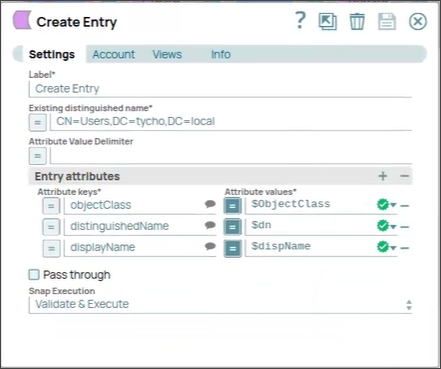
Active Directory Create Entry
Overview
The Active Directory Create Entry Snap creates an entry in Active Directory.
An entry (user Account) can be created in any Organizational Unit (OU), Domain Controller (DC), and so on by providing the complete distinguished name, which is what LDAP uses to uniquely identify an LDAP object.
The attributes of the table are generated based on the existing entry in Active Directory.
The table consists of all the fields that need to be generated when the entry is created.
Many of the attributes may be mandatory when creating an entry depending on the
configuration of the AD instance. For example, objectClass and
distinguished name are required.
To generate the suggested attributes in the table, the distinguished name of the existing entry in Active Directory is required.
- This is a Write-type Snap.
 Works in Ultra Tasks
Supported Accounts
Prerequisites
None.
Snap views
| Type | Description | Examples of upstream and downstream Snaps |
|---|---|---|
| Input |
This Snap has exactly one document input view. Expected input: Existing distinguished name, Entry attributes (Attribute keys, Attribute values). |
|
| Output |
This Snap has exactly one document output view. Expected output: The output data as status of entry. |
|
| Learn more about Error handling. | ||
Snap settings
| Field/Field set | Description |
|---|---|
Label String |
Specify a unique name for the Snap. Modify this to be more appropriate, especially if more than one of the same Snaps is in the pipeline. Default value: Active Directory Create Entry |
Existing distinguished name String/Expression |
Required. The distinguished name of the existing entry. To generate the suggested attributes in the table, the distinguished name of the existing entry in Active Directory is required. The LDAP API references an LDAP object by its distinguished name (DN). A DN is a
sequence of relative distinguished names (RDN) connected by commas. An RDN is an
attribute with an associated value in the form
This field is applicable only to existing users. If a user does not exist, you can create the distinguished name manually from the Active Directory server to create a new user using Active Directory Create Entry Snap. Or, by default, the server creates system users when creating the domain space, which you can use as a reference for Existing distinguished name. Example: A distinguished name for an LDAP entry can be
represented as: Default value: None You can also use special characters in the distinguished name. See using special characters in Distinguished Name. |
Attribute Value Delimiter String |
Character or string to be used as delimiter to separate multiple values provided to the Attribute Value field. Example:
Default value: None |
Entry attributes Fieldset |
Required. The table of suggested attribute key-value pairs to create the entry. Consists of two fields: Attribute Key and Attribute Value. |
Attribute Keys String/Expression |
Required. Attribute keys to create the entry. Note: Some of the attribute keys and their values may be required to create the
entry. For example:
objectClass,
DistinguishedName.Default value: None |
Attribute Values String/Expression |
Required. Value of the attribute. Note: Some of the attribute values corresponding to their keys are required to
create the entry. For example: value of the key
objectClass as
top, user, organizationalPerson and the value of the key
DistinguishedName as CN=SomeUser, CN=Users, DC=child,
DC=parent, DC=Domain, DC=com.Note: Space is considered to be a string in the attribute when using multi-value
attribute.
Default value: None |
Pass through Checkbox |
Select to include the entire input data in the Snap's output. The Snap includes
this data within the Default value: Not selected |
Snap execution Dropdown list |
Choose one of the three modes in
which the Snap executes. Available options are:
|
Using Special Characters in Distinguished Name
You can include special characters in the Distinguished name and Existing distinguished name fields. As of Patch activedirectory8789, the fields do not require the following special characters to be prefixed with an escape character:
- Forward slash (/)
- Backward slash (\)
- Plus (+)
- Double-quote (")
- Less than symbol (<)
- Greater than symbol (>)
- Semi-colon (;)