


Veeva Vault OAuth2 Account
Overview
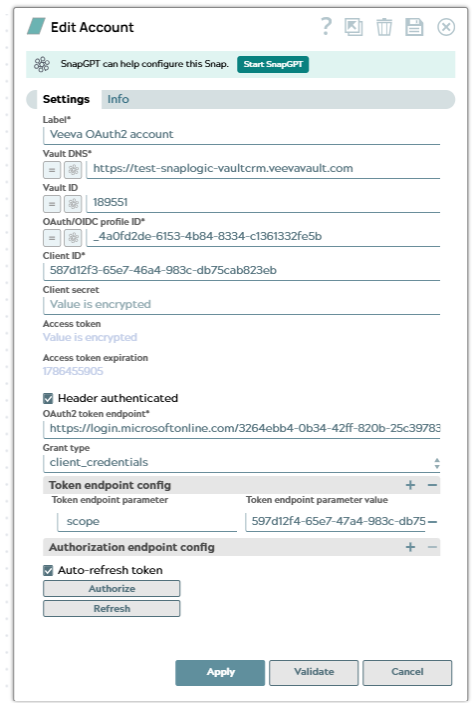
Use this account type to connect Veeva Vault Snaps with Veeva Vault instances using OAuth 2.0 authentication. This account type supports OAuth 2.0 authorization flows for secure, token-based authentication to Veeva Vault.
Prerequisites
- An OAuth 2.0 client ID and client secret from Veeva Vault
- API access enabled in your Veeva Vault instance
- The Veeva Vault domain URL for your instance
- OAuth 2.0 application configured in Veeva Vault Admin
Account settings
| Field/Field set | Description |
|---|---|
| Label*
|
Specify a unique label for the account. Default value: N/A Example: Veeva Vault OAuth2 Production |
Vault DNS*
String/Expression |
The DNS of your Veeva Vault instance.
Default value: N/A Example: https://test-snaplogic-vaultcrm.veevavault.com |
Vault ID
String |
The ID of the Vault to connect to. Specify this field when your Veeva Vault domain contains more than one Vault.
Default value: N/A Example: 189551 |
OAuth/OIDC profile ID*
String/Expression |
The ID of the OAuth 2.0 or OpenID Connect profile configured in Veeva Vault Admin.
Default value: N/A Example: _4a0fd2de-6153-4b84-8334-c1361332fe5b |
Client ID*
String |
The client ID of the application registered with your authorization server.
Default value: N/A Example: 587d12f3-65e7-46a4-983c-db75cab823eb |
Client secret
String |
The client secret of the application registered with your authorization server.
Default value: N/A |
Access token
String |
(Read-only) The access token retrieved from the authorization server. This field is populated when you click Authorize and is obfuscated after you save the account.
Default value: N/A |
Access token expiration
Integer |
(Read-only) The expiration time of the access token, in epoch seconds.
Default value: N/A |
Header authenticated
Checkbox |
Select this checkbox if your authorization server expects the client ID and client secret in the request header instead of the request body.
Default value: Selected |
OAuth2 token endpoint*
String |
The token endpoint URL of your authorization server.
Default value: N/A Example: https://login.microsoftonline.com/3264ebb4-0b34-42ff-820b-25c39783.../oauth2/v2.0/token |
Grant type
Dropdown list |
The OAuth 2.0 grant type to use when requesting the access token.
Default value: client_credentials |
| Token endpoint config | Use this field set to define custom parameters to send to the token endpoint. This field set contains the following fields: |
Token endpoint parameter
String |
The name of the parameter to send to the token endpoint.
Default value: N/A Example: scope |
Token endpoint parameter value
String |
The value of the parameter to send to the token endpoint.
Default value: N/A |
| Authorization endpoint config | Use this field set to define custom parameters to send to the authorization endpoint. This field set contains the following fields: |
Authorization endpoint parameter
String |
The name of the parameter to send to the authorization endpoint.
Default value: N/A |
Authorization endpoint parameter value
String |
The value of the parameter to send to the authorization endpoint.
Default value: N/A |
Auto-refresh token
Checkbox |
Select this checkbox to let the account refresh the access token automatically before it expires. If you deselect it, click Refresh to renew the token manually.
Default value: Selected |
| Authorize | Click to authorize the account against your authorization server and retrieve the access token. |
| Refresh | Click to renew the access token without reauthorizing the account. |
Troubleshooting
| Error | Reason | Resolution |
|---|---|---|
Failed to validate account |
Invalid OAuth 2.0 credentials or incorrect configuration. | Verify that the Client ID, Client secret, OAuth/OIDC profile ID, and Vault DNS are correct. |
Invalid token endpoint |
The OAuth2 token endpoint is incorrect or unreachable. | Verify the OAuth2 token endpoint. If you are using a custom token endpoint, ensure that it is accessible. |
OAuth 2.0 token expired |
The access token has expired. | The account automatically refreshes tokens. If the issue persists, verify the OAuth 2.0 application configuration in Veeva Vault. |
API access denied |
The OAuth 2.0 application does not have required permissions. | Ensure that the OAuth 2.0 application in Veeva Vault has the necessary API permissions enabled. |