


Open Table Iceberg - Insert
Overview
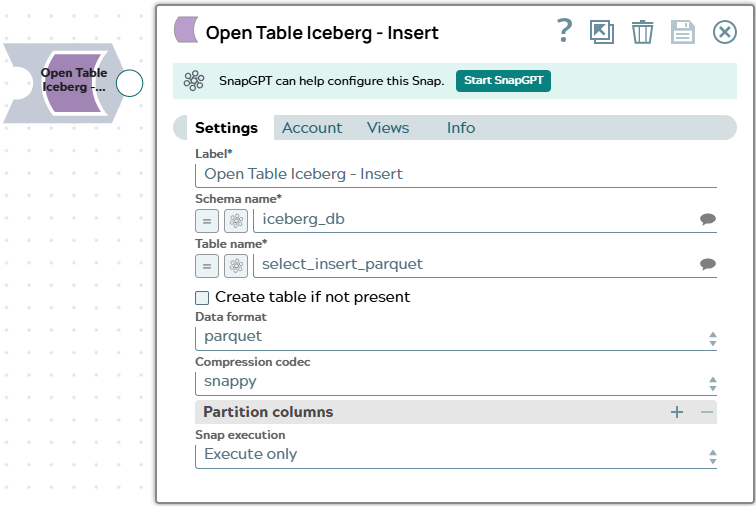
The Open Table Iceberg - Insert Snap inserts data from upstream documents into an Iceberg table. You can configure the storage format, compression codec, and partition columns. If the target table does not exist, the Snap can create it automatically by inferring the schema from the input documents or from schema metadata supplied via a second input view.
The Snap emits a status document per inserted row to the output view and routes errors to the error view without halting pipeline execution.
- This is a Write-type Snap.
 Works in Ultra Tasks
Known issues
- Open Table Iceberg Snaps may abort with zero output and no actionable error when executed on a JRE 21 Snaplex; the same pipelines execute successfully on a JRE 11 Snaplex.
Prerequisites
- A configured Open Table Iceberg Account with write access to the target catalog, schema, and S3 bucket.
- The target schema (namespace) must exist in the Iceberg catalog. The table may or may not exist depending on whether Create Table If Not Present is selected.
Supported Accounts
Snap views
| Type | Description | Examples of upstream and downstream Snaps |
|---|---|---|
| Input |
The primary input view (first) receives the data documents to insert. Each document corresponds to one row in the target table. An optional second input view receives schema definition documents. These can be
column descriptor documents from the second output view of the
Open Table Iceberg - Select Snap
( |
|
| Output |
Emits one status document per inserted row:
|
|
| Learn more about Error handling. | ||
Snap settings
| Field/Field set | Description |
|---|---|
Label* String |
Specify a unique name for the Snap. Modify this to be more appropriate, especially if more than one of the same Snaps is in the pipeline. Default value: Open Table Iceberg - Insert Example: Iceberg Write Orders |
Schema Name*
String/Expression/ Suggestion |
Specify the schema (namespace) that contains the target table. Click the Suggest
icon Default value: None Example: |
Table Name*
String/Expression/ Suggestion |
Specify the name of the Iceberg table to insert data into. Click the Suggest
icon Default value: None Example: |
Create Table If Not Present
Checkbox |
Select this checkbox to create the target table automatically if it does not exist. The Snap infers the table schema from the input documents or from the schema definition documents supplied via the second input view. Default value: Deselected Example: Selected |
Data Format
Dropdown list |
Select the file format used to store data in the Iceberg table. Options:
Default value: parquet Example: orc |
Compression Codec (Parquet)
Dropdown list |
Appears when Data Format is set to parquet. Select the compression algorithm for Parquet files. Options: none, snappy, gzip, zstd, lz4. Default value: snappy Example: gzip |
Compression Codec (Avro)
Dropdown list |
Appears when Data Format is set to avro. Select the compression algorithm for Avro files. Options: none, snappy, gzip, zstd. Default value: snappy Example: zstd |
Compression Codec (ORC)
Dropdown list |
Appears when Data Format is set to orc. Select the compression algorithm for ORC files. Options: none, snappy, zstd, lz4. Default value: snappy Example: zstd |
Partition Columns — Use this field set to define
the partition strategy for the target table. Click  to add a partition column. Each row specifies one partition column and its transform.
Applies only when Create Table If Not Present is selected
and the table is being created.
to add a partition column. Each row specifies one partition column and its transform.
Applies only when Create Table If Not Present is selected
and the table is being created. |
|
Column Name
String/Expression |
Specify the name of the column to partition by. Default value: None Example: |
Transform
Dropdown list |
Select the Iceberg partition transform to apply to the column:
The year, month, day, and hour transforms require a DATE or TIMESTAMP column. Default value: identity Example: year |
|
Snap execution Dropdown list
|
Choose one of the three modes in
which the Snap executes. Available options are:
Default value: Execute only Example: Validate & Execute |
 to select from
available namespaces in the catalog.
to select from
available namespaces in the catalog.Troubleshooting
| Error | Reason | Resolution |
|---|---|---|
| Failed to create table | The table does not exist and schema inference failed, or the Snap does not have write permissions on the schema. | Ensure that Create Table If Not Present is selected and that either the input documents contain data or a schema document is supplied via the second input view. Confirm that the account has CREATE TABLE permissions. |
| Failed to insert data | A data type mismatch occurred between the input document values and the target table column types. | Verify that the input document field types match the target column types. Consider using the second input view to supply an explicit schema from the Open Table Iceberg - Select Snap. |
| Unsupported partition transform | A year, month, day, or hour transform was applied to a column that is not of DATE or TIMESTAMP type. | Use the identity or bucket transform for non-date columns, or change the column type to DATE or TIMESTAMP. |