


Snaplex Node Properties
Field reference for the Node properties tab of the Add Snaplex page
This tab is available for both Groundplexes and Cloudplexes. You create a Groundplex and set its Node properties fields yourself; SnapLogic provisions a Cloudplex instead, but Environment admins can still adjust the settings that control pipeline execution capacity and restart behavior through this same page. Settings that configure the underlying node infrastructure — memory, network interface, and host details — apply to Groundplexes only.
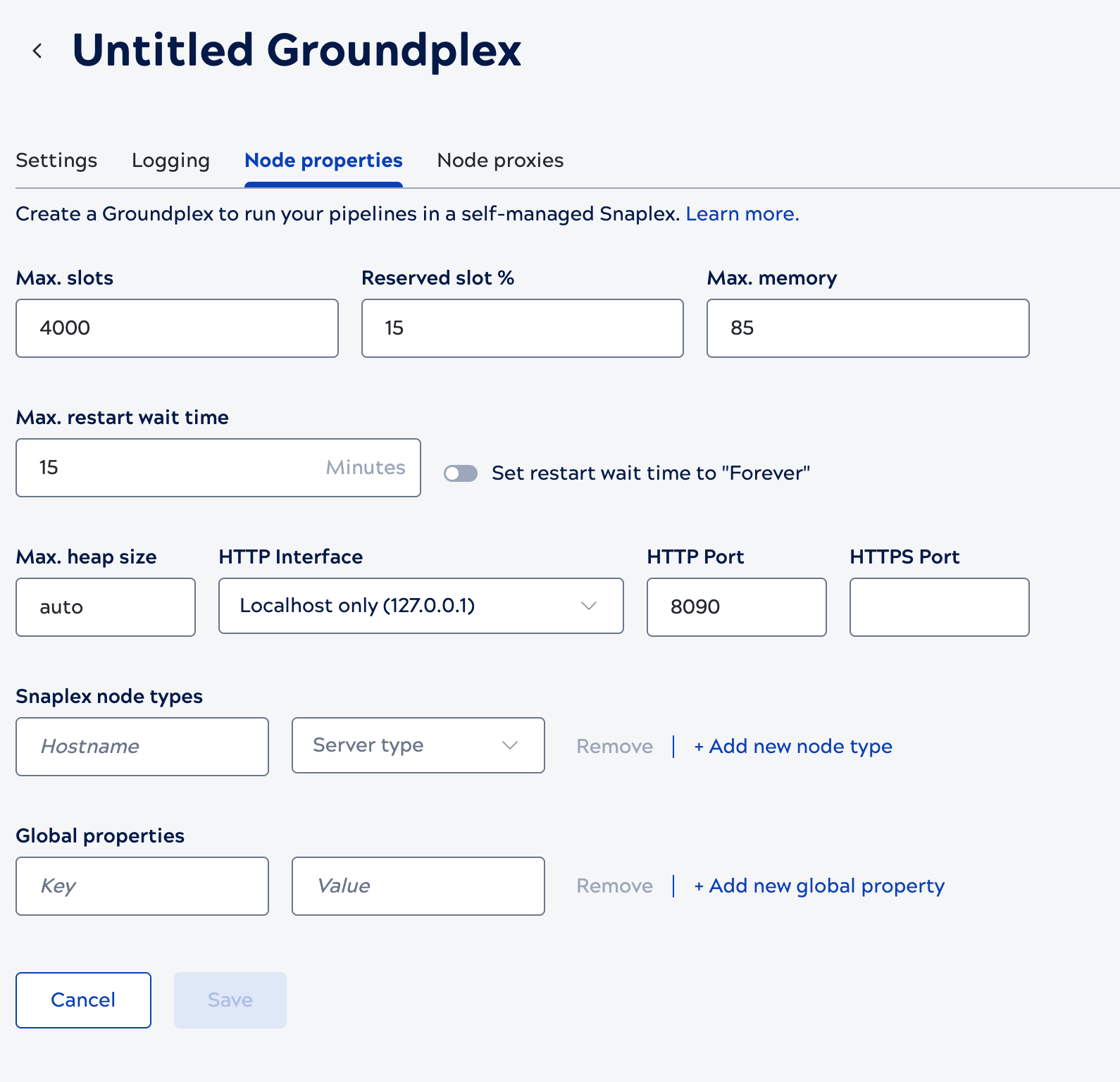
| Field/Field set | Description |
|---|---|
| Max. slots |
Each Snap in a pipeline is estimated to consume one execution slot — the actual threads used can be higher, since Snaps like Pipeline Execute, bulk loaders, and Snaps performing input/output can use more than one thread each. A node only accepts a pipeline execution if its free slots are greater than or equal to the estimated slot count; otherwise the node rejects the execution and the scheduler tries another node in the Snaplex. If no node in the Snaplex has enough free slots, Scheduled Task and Ultra Task executions are placed in a Queued state until a node has capacity, while Triggered Task executions retry for one minute before returning a failure to the requesting client. Tip: You can set roughly 2000 slots per 8 GB of RAM on each node as a sizing
guideline — the default of 4000 is appropriate for nodes with 16 GB of RAM. Changes to
this setting do not require a restart.
Default value: 4000 Refer to the Execution capacity section of Node properties for more detail. |
| Reserved slot % |
The percentage of a node's Max. slots reserved for pipelines or validations executed interactively through Designer — typically during development and testing. If no slots are reserved, interactive executions can be blocked by long-running pipelines. Pipelines started via Tasks or the Pipeline Execute Snap do not have access to reserved slots. Tip: You can set this value higher to reserve more slots for interactive
sessions, or lower — if interactive pipeline building isn't a priority — to allocate more
capacity to automated executions.
Changes to this setting take effect immediately without a node restart. Default value: 15 |
| Max. memory |
The percentage of a node's maximum JVM heap size that can be in use before the node is excluded from receiving new pipeline executions. Changes to this setting take effect immediately without a node restart. Default value: 85 |
| Max. restart wait time |
When a Snaplex node transitions into a cooldown state — for example, during a version update, a configuration change, a user-initiated restart, or when you place a node in maintenance mode — the node stops accepting new pipeline requests and waits up to this amount of time for its currently running pipelines to finish. If pipelines are still running when the limit is reached, they are automatically stopped so the node can complete its transition. Tip: Polling and Ultra Pipelines don't need extra time: they're automatically
signaled to stop polling for new data and can shut down cleanly without waiting for the
timeout.
Enabling the Set restart wait time to Forever toggle disables the numeric field; the node then never automatically terminates a running pipeline during a transition — you're responsible for manually stopping pipelines so the transition can proceed. We recommend keeping this value under 60 minutes, since the control plane only waits up to an hour for nodes to update during mandatory upgrades before it stops sending them new pipeline requests. Default value: 15 minutes Refer to How Restart Maximum Wait Time works for complete details, including cooldown, maintenance mode, and version-change behavior. |
| Max. heap size |
The maximum JVM heap size for the node. The default, auto, has the Platform calculate the heap size automatically based on available system memory, leaving sufficient memory for operating system usage. To set a custom value instead of auto, follow the number with a unit suffix with no space — for example, 5g for 5 GiB. Default value: auto Refer to Memory management for heap sizing guidance, compressed class space, and swap memory configuration. Groundplex only. |
| HTTP Interface |
Controls which network interface the node accepts HTTP connections on:
If neither preset fits — for example, the node needs to advertise a specific IP address
or DNS hostname other nodes use to reach it — set the Default value: Localhost only (127.0.0.1) Refer to the Network section of Node properties, and to Groundplex requirements: Network for firewall and port planning. Groundplex only. |
| HTTP Port |
The port on which the Snaplex node listens for HTTP connections. Important: We recommend running Groundplex nodes on dedicated hosts. If
another application on the host is already using this port, the JCC node cannot
complete its startup cycle.
Default value: 8090 for a JCC node and 8091 for a FeedMaster node. Refer to HTTP port configuration for host port requirements, and JCC node port customization for how to change it. Groundplex only. |
| HTTPS Port |
The port on which the Snaplex node listens for HTTPS connections. If left blank, the node falls back to its own internal default: port 8081 for a JCC node, 8084 for a FeedMaster node. Default value: None. Refer to JCC node port customization for how to change it. Groundplex only. |
| Snaplex node types (Hostname/server type) |
Maps hostnames to node roles (JCC or FeedMaster). By default, every node in a Groundplex runs as a JCC; use this field only if you want a specific machine to run as a FeedMaster instead. Add additional entries with + Add new node type. This field is available only to Environments that have subscribed to Ultra Tasks, since FeedMaster is the node type that manages Ultra Task request distribution. Default value: None. Refer to the Node configuration section of Node properties. Groundplex only. |
| Global properties (Key/Value pairs) |
Key/value pairs for internal JVM and JCC configuration options. Do not edit these values without guidance from your CSM. Add additional entries with + Add new global property. For example, if the FeedMaster doesn't receive an acknowledgment that a document
was processed by a low-latency Ultra Task, it redelivers the document up to five
times by default; you can customize this redelivery limit for a specific Snaplex
by setting the Default value: None. Refer to Snaplex configuration for Snaps for more global property use cases. Groundplex only. |