


Twilio Create
Overview
Use this Snap to create data objects in Twilio.
- This is a Write-type Snap.
 Works in Ultra Tasks
Prerequisites
- Valid Twilio Account SID
- Auth Token corresponding to the Account SID
Snap views
| Type | Description | Examples of upstream and downstream Snaps |
|---|---|---|
| Input |
Document Min: 1, Max: 1 A document containing details of the entity or data object to create a Twilio entity. |
|
| Output |
Document Min: 0, Max: 1 A document containing details indicating whether the create operation is successful. |
|
| Learn more about Error handling. | ||
Snap settings
| Field/Field set | Description |
|---|---|
|
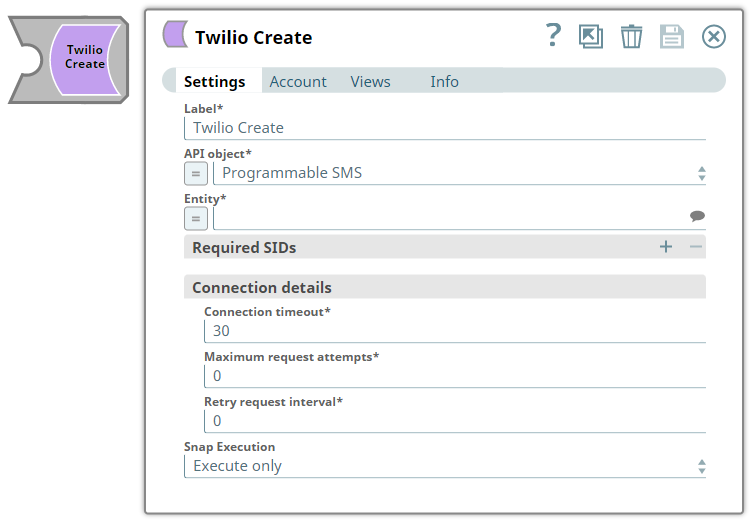
Label String
|
Specify a unique name for the Snap. Modify this to
be more appropriate, especially if there are more than one of the same Snap in the
pipeline.
Default value: Twilio Create |
|
API object String/Expression
|
Required. Select the API that you want to access in Twilio instance.
Default value: Programmable SMS |
|
Entity String/Expression/ Suggestion
|
Required. Select an entity that belongs to the corresponding API object chosen above.
Default value: Messages |
| Required SIDs | Use this fieldset to specify any additional SIDs required by the selected entity. Click the + icon to add a row and provide the SID name and its value for each required parameter. |
|
SID name String/Expression
|
Specify the name of the required SID parameter for the selected entity. Default value: N/A Example: AccountSid |
|
SID value String/Expression
|
Specify the value for the corresponding SID name. Default value: N/A Example: |
| Connection details | Use this fieldset to specify the connection details for the Snap. |
|
Connection timeout Integer/Expression
|
Required. Specify the connection timeout duration in seconds. Default value: 30 Example: 60 |
|
Maximum request attempts Integer/Expression
|
Required. Specify the maximum number of attempts to be made to receive a response. The request is terminated if the attempts do not result in a response. Default value: 0 Example: 3 |
|
Retry request interval Integer/Expression
|
Required. Specify the time interval in seconds between successive retry attempts. A retry occurs only when the previous attempt resulted in an exception. Default value: 0 Example: 5 |
|
Snap execution Dropdown list
|
Choose one of the three modes in
which the Snap executes. Available options are:
Default value: Execute only |
Troubleshooting
| Error | Reason | Resolution |
|---|---|---|
| The input entity does not exist. | An invalid entity has been entered. | Select a valid entity from the suggestion drop-down list. |
| One or more Required SIDs are missing. | The Required SIDs are mandatory for this Endpoint. | Check your settings under the Required SIDs table and provide values accordingly. |
| You have an empty value in the SID name/value field for the Required SID. | The SID name/value field must not be empty for Required SIDs. | Enter a valid SID name/value for Required SID. |