


Salesforce JWT OAuth2 Account
Overview
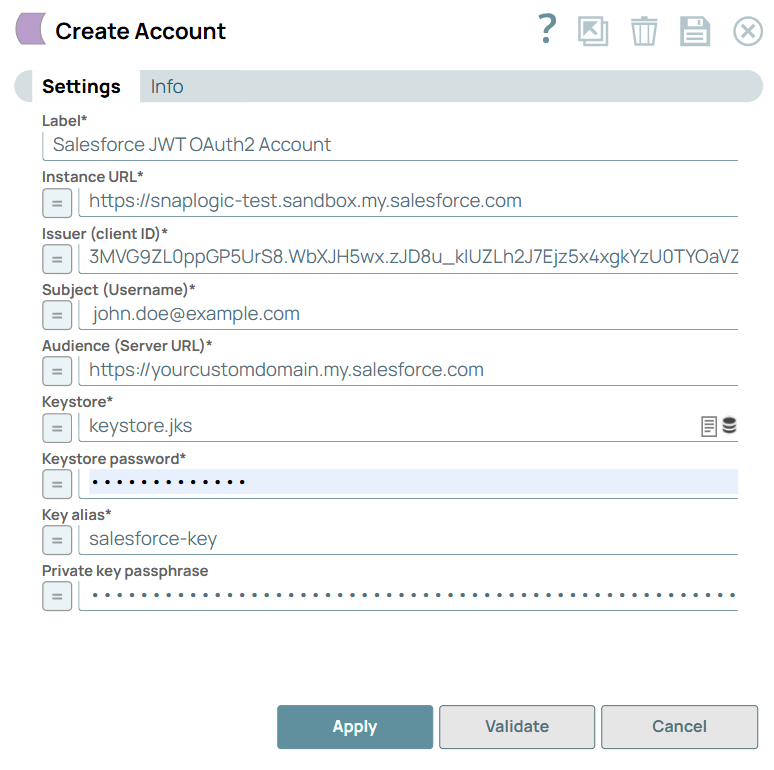
You can configure your accounts in SnapLogic using the Designer or Manager. You can use the Salesforce JWT OAuth2 (JSON Web Token) account to authenticate and integrate Salesforce Snaps with other data sources. This account enables a secure and efficient server-to-server authentication. It eliminates the need for interactive logins, thereby streamlining enterprise integrations.
Prerequisites
- Generate a Private key and certificate. Learn more.
- Valid Issuer (Client ID), Subject (Username), and Audience (Server URL).
Account settings
- Expression icon (
 ): Allows using
JavaScript syntax to access SnapLogic Expressions to set field values dynamically (if
enabled). If disabled, you can provide a static value. Learn more.
): Allows using
JavaScript syntax to access SnapLogic Expressions to set field values dynamically (if
enabled). If disabled, you can provide a static value. Learn more. - SnapGPT (
 ): Generates SnapLogic Expressions
based on natural language using SnapGPT. Learn
more.
): Generates SnapLogic Expressions
based on natural language using SnapGPT. Learn
more. - Suggestion icon (
 ): Populates a
list of values dynamically based on your Snap configuration. You can select only one
attribute at a time using the icon. Type into the field if it supports a comma-separated
list of values.
): Populates a
list of values dynamically based on your Snap configuration. You can select only one
attribute at a time using the icon. Type into the field if it supports a comma-separated
list of values. - Upload
 : Uploads files. Learn more.
| Field/Field set | Description |
|---|---|
Label
String |
Required. Specify a unique label for the account.
Default value: N/A Example: JWT OAuth2 Account |
Instance URL
String/Expression |
Required. Specify the instance URL to access Salesforce.
Default value: N/A Example: https://na123.salesforce.com |
Issuer (client ID)
String/Expression |
Required. Specify the client ID (consumer key) of the connected app that is used to access the Salesforce account. This value is generated when you create a connected app in Salesforce. Learn more about creating a connected app in Salesforce at Application Configuration in Salesforce Portal for OAuth2 Account to use in Salesforce.
Default value: N/A Example: 3MVG9ZL0ppGP5UrS8.WbXJH5wx.zJD8u_kIUZLh2J7Ejz5x4xgkYzU0TYOaVZlUyL0YTjjs8Jd9Mw7wZ9ZDhC |
Subject (Username)
String/Expression |
Required. Specify the username for the Salesforce account.
Default value: N/A Example: [email protected] |
Audience (Server URL)
String/Expression |
Required. Specify the Salesforce endpoint URL for the Salesforce account. Use https://login.salesforce.com for production accounts, https://test.salesforce.com for sandbox accounts, or your custom domain URL when implementing a custom portal.
Default value: N/A Example: https://login.salesforce.com |
Keystore
String/Expression |
Required. Upload the keystore file, which can be in SLDB or any other unauthenticated endpoint such as https://.
Default value: N/A Example: keystore.jks |
Keystore password
String/Expression |
Required. Specify the password for the keystore file.
Default value: N/A Example: StrongJWT_Key$2025 |
Key alias
String/Expression |
Required. Specify the alias of the private key to be used from the keystore.
Default value: N/A Example: salesforce-key |
Private key passphrase
String/Expression |
Specify the passphrase for the private key to be used. Leave this field blank if the passphrase is the same as the keystore password.
Default value: N/A Example: mySecret123 |