


AWS S3 Dynamic Account
Overview
You can use this account type to connect Parquet Reader and Parquet Writer Snaps with data sources that use the AWS S3.
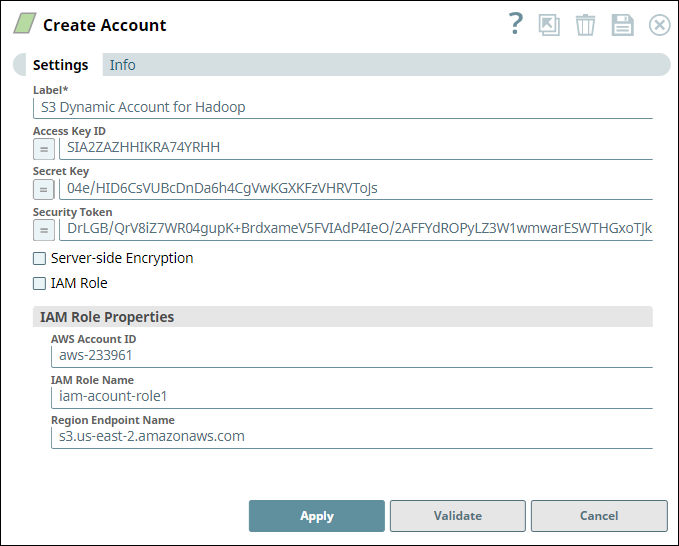
Prerequisites
- Full access to S3 bucket.
- S3 ListAllMyBuckets permission.
Account settings
| Field/Field set | Description | ||
|---|---|---|---|
| Label
|
Specify a unique label for the account. Default Value: [None] Example: AWS S3 Dynamic Account |
||
| Access-Key ID*
|
Required when IAM role is deselected. Specify the access key ID for AWS authentication. Default value: N/A Example: ASIA2ZAZHHIKRA74YRHH |
||
| Secret Key*
|
Required when IAM role is deselected. Specify the Secret key for AWS authentication. Default value: N/A Example: w04e/HID6VUBcDnDa6h4CgVwKGXzVHRVJs |
||
| Security Token
|
Specify the security token to make requests for using AWS resources. Default value: N/A Example:FwoGYXdzEGUaDFInugbfGX8xlGA4ZwNWCiV3uSQBjIre4G7AXvfuGO2Fq41wDp7cLCuGAZvKGc4TcSknLVYpI2amWKf9z21+7oszQ==
|
||
| Server-side Encryption
|
Required for writing to S3. Select this checkbox to enable server-side encryption. Learn more: Protecting Data Using Server-Side Encryption with Amazon S3-Managed Encryption Keys. Default Value: Deselected Example: Selected |
||
| IAM Role
|
Select this checkbox to use the IAM role stored in the EC2 instance to access the S3 bucket. Default Value: Deselected Example: Selected |
||
| IAM Role Properties |
Use this field set to define the properties associated with the IAM Role. Note:
Use this field set only if you do not provide the Access Key ID and Secret Key, and select the IAM Role checkbox.
|
||
AWS Account ID
|
Specify the account ID of the AWS S3 account that you want to use. Default value: N/A Example: aws-233961 |
||
IAM Role Name
|
Specify the name of the IAM role that can access the AWS S3 account specified above. Default value: N/A Example: iam-role1 |
||
Region Endpoint Name
|
Specify the endpoint name of the region to which the target AWS S3 bucket belongs. The protocol that is supported is S3. Default value: N/A Example: s3.us-east-2.amazonaws.com |
||