


Coupa OAuth2 Account
Overview
Use this account to establish a connection between SnapLogic and your Coupa instance using OAuth2 authentication. This account type supports client credentials grant type for system-to-system integrations.
Account settings
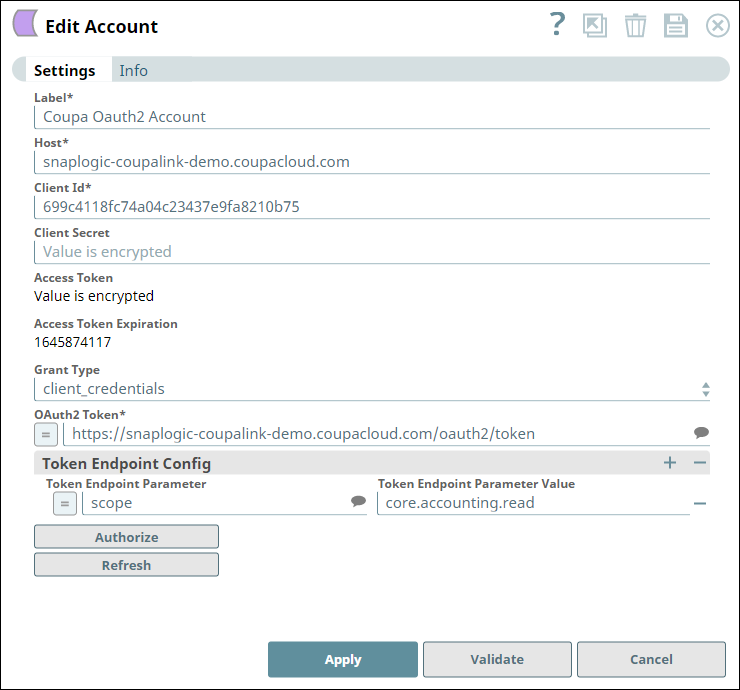
| Field/Field set | Description |
|---|---|
Label*
String |
Specify a unique label for the account. Default value: N/A Example: Coupa OAuth2 Account |
Host
String/Expression |
Required. Specify the domain name of the Coupa instance. Default value: N/A Example: mycompany.coupahost.com |
Client ID
String/Expression |
Required. Specify the client ID to use for authorization. Learn more about obtaining the Client ID in Application Configuration in Coupa Portal. Default value: N/A Example: a1b2c3d4e5f6g7h8 |
Client secret
String/Expression |
Optional. Specify the client secret for authorization of the OAuth2 account. Learn more about obtaining the Client Secret in Application Configuration in Coupa Portal. Default value: N/A Example: Encrypted |
Access token
String/Expression |
Auto-generated upon account authorization. The access token associated with the Coupa application is used to make API requests on behalf of the user associated with the client ID. Important: Access tokens have 24-hour validity; you must get a new access token after it expires.
Default value: N/A Example: Encrypted |
Access token expiration
String/Expression |
Optional. Specify the time (in seconds) until which the access token must be valid. Default value: N/A Example: 86400 |
Grant type
Dropdown list |
By default, SnapLogic supports only Client Credentials Grant Type. This grant type is typically used for system-to-system integrations—the token is automatically accepted and generated. Default value: client_credentials |
OAuth2 token
String/Expression |
Required. Specify the OAuth2 token endpoint URL to get the access token. Default value: N/A Example: https://mycompany.coupahost.com/oauth2/token |
| Token endpoint config | Use this fieldset to configure additional token endpoint parameters as necessary for the account. |
Token endpoint parameter
String/Expression |
Optional. Specify the name for the token endpoint parameter. Default value: N/A Example: scope |
Token endpoint parameter value
String/Expression |
Optional. Specify the value for the parameter. Default value: N/A Example: core.accounting.read |