


MCP Server Router
Routes incoming MCP Server requests, enabling both tool discovery and tool invocation within a single pipeline.
Overview
Use this Snap to route input documents based on the request method
(sl_method) within an MCP Server Pipeline. The MCP Server Router directs
tools/list requests to the first output view and
tools/call requests to the second output view. For tool call requests, the
Snap also enriches the request object with the corresponding tool metadata before sending it
downstream.
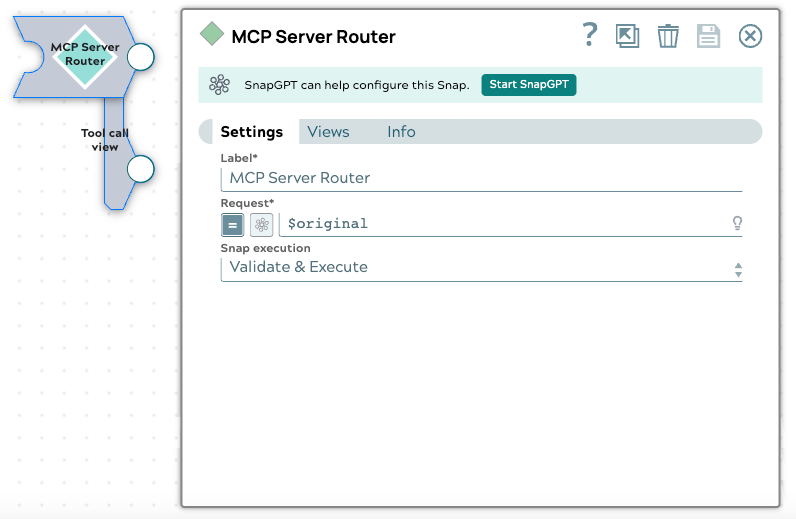
- This is a Transform-type Snap.
Prerequisites
- An MCP Server Pipeline containing one or more Function Generator Snaps connected to the Router's input.
To build a pipeline using this Snap, see MCP Server Pipeline Builder or create it manually. To configure the MCP Server asset that hosts the pipeline, see About MCP Server Setup. To build an agent pipeline that connects to an MCP server as a client, see AgentCreator Architecture and Pipeline Design.
Snap views
| Type | Description | Examples of upstream and downstream Snaps |
|---|---|---|
| Input | This Snap supports exactly one document input view. |
|
| Output |
This Snap supports exactly two document output views.
|
|
| Learn more about Error handling. | ||
Snap settings
- Expression icon (
 ): Allows using
JavaScript syntax to access SnapLogic Expressions to set field values dynamically (if
enabled). If disabled, you can provide a static value. Learn more.
): Allows using
JavaScript syntax to access SnapLogic Expressions to set field values dynamically (if
enabled). If disabled, you can provide a static value. Learn more. - SnapGPT (
 ): Generates SnapLogic Expressions
based on natural language using SnapGPT. Learn
more.
): Generates SnapLogic Expressions
based on natural language using SnapGPT. Learn
more. - Suggestion icon (
 ): Populates a
list of values dynamically based on your Snap configuration. You can select only one
attribute at a time using the icon. Type into the field if it supports a comma-separated
list of values.
): Populates a
list of values dynamically based on your Snap configuration. You can select only one
attribute at a time using the icon. Type into the field if it supports a comma-separated
list of values. - Upload
 : Uploads files. Learn more.
| Field/Field set | Type | Description |
|---|---|---|
Label
|
String |
Required. Specify a unique name for the Snap. Modify this to be more appropriate, especially if more than one of the same Snaps is in the pipeline. Default value: MCP Server Router Example: Firecrawl MCP Server Router |
| Request | String/Expression |
The request object generated from the MCP Server Adapter to the MCP Server
Pipeline. It must include the Default value: Example: |
| Snap execution
|
Dropdown list |
Choose one of the three modes in
which the Snap executes. Available options are:
Default value: Validate & Execute Example: Execute only |