This example demonstrates how to execute a stored procedure that updates employee data in the EMP table. The stored procedure supports the overload feature, allowing you to provide only the parameters you want to update.
Download this pipeline
-
Create a table called dbo.EMP by executing the following code:
CREATE TABLE [dbo].[EMP](
  [EMPNO] [int] NOT NULL,
  [ENAME] [varchar](10) COLLATE SQL_Latin1_General_CP1_CI_AS NULL,
  [DEPTNO] [int] NOT NULL,
  CONSTRAINT [EMP_EMPNO_PK] PRIMARY KEY CLUSTERED (
    [EMPNO] ASC
  )WITH (IGNORE_DUP_KEY = OFF) ON [PRIMARY]
) ON [PRIMARY]
-
Insert several rows into the table:
INSERT INTO [dbo].[EMP] VALUES (1111,'EDWARDS',10);
INSERT INTO [dbo].[EMP] VALUES (2222,'ALLEN',10);
INSERT INTO [dbo].[EMP] VALUES (3333,'WATTS',20);
INSERT INTO [dbo].[EMP] VALUES (4444,'KIRAN',20);
INSERT INTO [dbo].[EMP] VALUES (5555,'CASTER',20);
INSERT INTO [dbo].[EMP] VALUES (6666,'VIJI',30);
INSERT INTO [dbo].[EMP] VALUES (7777,'DATTA',30);
-
Create a stored procedure EMP_PROC with three input parameters:
CREATE proc [dbo].[EMP_PROC]
  @empno int=null,
  @ename varchar(10)=null,
  @deptno int=null
AS
IF EXISTS(SELECT 1 from [EMP] where EMPNO = @empno)
BEGIN
  UPDATE [EMP]
  SET [EMPNO] = COALESCE(@empno,EMPNO),
      [ENAME] = COALESCE(@ename,ENAME),
      [DEPTNO] = COALESCE(@deptno,DEPTNO)
  WHERE EMPNO = @empno
END
-
Configure the JSON Generator Snap to pass input data to the SQL Server Stored Procedure Snap. In this example, the input data contains employee number, name, and department number:
{
  "EMPNO" : 1111,
  "ENAME" : "Ted",
  "DEPTNO" : 20
}
-
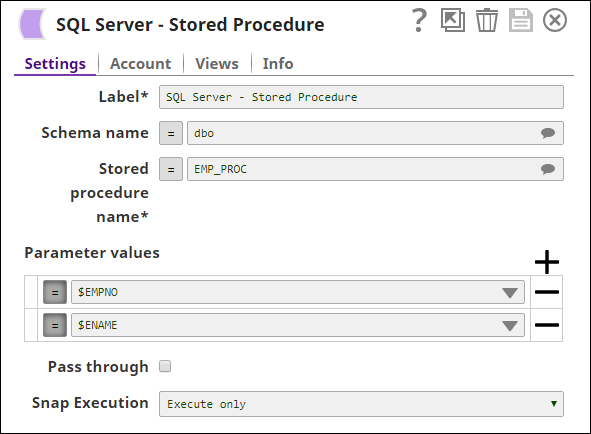
Configure the SQL Server Stored Procedure Snap to execute the EMP_PROC stored procedure. The Snap passes the input parameters to update the employee record.
Note: Only two input parameter values are provided while there are three input parameters in the procedure. This is possible because the procedure is written to support the overload feature. Executing the pipeline updates the ENAME value in the first row from "EDWARDS" to "Ted".
To successfully reuse pipelines:
- Download and import the pipeline into SnapLogic.
- Configure Snap accounts as applicable.
- Provide pipeline parameters as applicable.